What do these figures show? It’s simple. The SaaS industry landscape is becoming more competitive by the day.
To stay on top of your game as a SaaS business, you must identify the companies you’re competing with from an SEO standpoint. That way, you’ll know the content strategies to focus on, the keywords to target, and the type of backlinks to acquire. In this post, you’ll learn three effective ways to do this quickly.
Why care about your SEO competitors as a SaaS brand?
If you don’t know your SEO competitors, you’re leaving so much on the table, while they occupy the top spots on the SERPs.
1. You can identify the top keywords they’re targeting and how they’re acquiring backlinks to help your own strategies.
By identifying the companies competing against your SaaS brand, you’ll know the top keywords they’re targeting. That way, you can focus on those keywords that can generate qualified traffic and drive user signups for your SaaS. This streamlines your keyword research process.
Knowing your top SEO competitors is also a great way to perform a link gap analysis. That way, you can know the type of backlinks they’re acquiring and where they’re getting them from. This helps you to identify relevant websites that are more likely to link to you.
2. You can figure out the competitive edge you have over them
If you don’t know who your top competitors are, you won’t be able to find the SEO opportunities to focus on to drive growth for your business.
Take, for instance, if they focus more on high-volume, top-of-the-funnel keywords. If you then go after middle- and bottom-funnel keywords, it could give you a competitive edge.
3. You can understand their biggest drivers of growth and conversion.
Most SaaS companies optimize their blog posts, landing pages, and product pages for conversions. This is because they measure growth by the number of signups and paying customers that they have.
By identifying your SEO competitors, you can know the kind of CTAs and buttons that work well in your niche. That way, you’ll have a better understanding of the conversion strategies that can drive growth for your SaaS business.
Three ways to identify the SEO competitors of your SaaS brand
Here are three tactics you can try today to identify your SaaS brand’s top SEO competitors.
1. Use SEO tools
SEO tools have access to large amounts of data for different websites and niches — and they’ve analyzed and categorized this information for your own use.
For example, SEMrush has the Market Explorer tool, which helps you to find potential competitors for your business. Ahrefs also has a competing domains report in the Site Explorer tool. This helps you to identify the websites competing with your SaaS, based on the kind of keywords you’re ranking for.
You can also use the Moz Pro True Competitor tool to identify the top SEO competitors for your SaaS brand. Here’s how it works: Let’s say you want to identify the top SEO competitors of Moz. With this tool, you can find that information within a few seconds.
The first thing you need to do is enter the following details in the tool:
Preferred market: The specific location you’re targeting
Domain type: The type of domain
Domain name: Your website URL
Once you enter this information and hit the “Find Competitors” button, you’ll get a list of top 25 competitors:
As you can see, websites competing with Moz on the SERPs aren’t limited to software brands alone. They include others such as:
Google
Search Engine Journal
Hubspot
Search Engine Land
Wordstream
Backlinko.
This tool also has the Overlap and Rivalry metrics, to filter your top competitors.
The Overlap metric filters your top competitors based on the shared keywords you both rank for on the first page of Google. The Rivalry metric uses factors like CTR, DA score, the volume of shared keywords, etc. to identify the most relevant competitors for your SaaS.
After identifying your top SEO competitors, you can perform an in-depth analysis of at most 2 of them, to know the keywords they’re targeting.
2. Survey or interview your new and existing customers
If someone signs up for your SaaS product, chances are that they’ve demoed or tried out other options before deciding to go with yours. It’s also possible that they’ve just churned from one of your competitors to become a customer.
This shows that they have an idea of who your direct and indirect competitors are. To get this information, all you need to do is reach out and interview them one after the other. This could be by talking to them via a quick call, sending a short survey for them to fill out, or asking them during the onboarding process.
Here are some questions you can ask customers to identify your top competitors:
What tools were you using to [solve X problem] before trying out our product?
If you’ve never used any tool before, how were you able to solve this problem before now?
What made you interested in trying out our product?
When did you realize that a tool like ours is what you need right now?
How much research did you do to decide on our product? What are some other, similar tools you discovered during the research process?
3. Perform a Google search targeting your SaaS use cases and features
Performing a Google search for the use cases, features, and problems your software solves is a great way to identify your top SEO competitors. This is effective because most companies ranking high on Google are investing in SEO.
Use the “related:website” advanced search feature
This search operator shows you other websites related to the one you search for on Google.
Let’s say you want to find websites like salesforce.com. You can search for “related:salesforce.com” on Google. The results on page one are some of SalesForce’s top SERP competitors:
Search for the use cases of your software
If your software helps SaaS companies onboard and activate new users, one of your core use cases is “user onboarding”.
If you search “user onboarding software” on Google, you’ll unlock competitors who are either bidding for or ranking organically for the keyword.
Some of the websites targeting this use case on Google include:
Appcues
Userpilot
Apty
Userflow
Aside from that, there are SaaS brands paying to rank on the first page of Google for this keyword.
Search for your SaaS features
One of the core features of the Moz tool is the “rank tracking” feature. To identify the websites that have a similar feature, you can input that keyword on the Google search bar.
Here’s the result it returns:
As you can see, aside from Moz, other competing websites for this feature include:
Link-Assistant
Ahrefs
Rank Tracker
Spyfu
SEMrush
Search for your SaaS jobs-to-be-done (JTBD)
Let’s say you run an online video editing software, one of the problems that your audience most likely have is “how to add an image to video”.
By performing a Google search for this query, you’ll see a result that looks like this:
This shows that some of the top SEO competitors in the online video editing space include:
Kapwing
Veed
Online Video Cutter
Flixier
Movavi
Conclusion
If you don’t know the SaaS companies you’re competing with, they’ll leave you behind and dominate your niche.
In this post, you’ve learned three effective ways to identify your top SEO competitors as a SaaS brand:
You can use an SEO software such as the Moz True Competitor tool to find your competitors and know the keywords they’re targeting.
You can reach out to new and existing customers, to find out the solutions they’re comparing you with.
You can search Google for your SaaS product’s features and use cases. This shows you the companies likely competing with your brand on the SERPs.
Ever tried any of these tactics before? Kindly share which of them worked really well for your SaaS brand in the Q&A.
Our top Whiteboard Friday episode of the year was originally published all the way back at the beginning of January! So much has happened in the marketing industry since then, but Cyrus’s 21 SEO tips for the year are still definitely smart, and these go way beyond the SEO basics. He’s also included a bunch of helpful resources for your reference in the transcription below!
How many of these were you able to implement throughout the past 12 months? Let us know on Twitter @Moz, and we’ll see you in 2022 with brand new episodes!
Click on the whiteboard image above to open a high resolution version in a new tab!
Video Transcription
Howdy, Moz fans. Welcome to another edition of Whiteboard Friday. I’m Cyrus Shepard. Today, so glad that you can join us. We are talking about 21 smart Google SEO tips for 2021.
We’re getting ready for a new year, a new year of SEO strategies. These are 21 practical tips that you can implement that should, hopefully, move the needle on your organic traffic.
These are some of the best tips that I’ve collected over the past year. Many of them that I’m going to use myself in my own SEO strategies.
Now we have four categories: increasing clicks, content/on-page SEO tips, technical SEO, and a little bit of link building.
There are 21 of these. These are going to go fast. We’re trying to do 10 to 12 minutes, so we don’t get to spend a lot of time on each one. But don’t fret. We’re going to link to appropriate resources in the transcript below so that we can keep along and explore a little bit more. All right. Ready to dive in?
Increasing clicks
Let’s start with clicks, specifically earning more clicks from Google without actually ranking higher, because that’s one of the great things about SEO. You don’t actually have to rank higher to get more traffic if you can get more clicks from the rankings that you already have. So let’s talk about some specific strategies for getting more clicks without increasing rankings.
1. Favicon optimization
First, favicon optimization.
Now I’m surprised more people haven’t talked about this in 2020. Google displays favicons in mobile search results, and they can influence your click-through rate if they’re high contrast, if they’re visible or not visible. Having a good favicon can make a few percentage points difference, very minor, but it does make a difference if you can get it right. Aaron Wall, SEO Book, wrote one of the very few posts about that.
2. Breadcrumb optimization
While we’re optimizing our favicons, let’s take a look at breadcrumb optimization. Google displays breadcrumbs in both desktop and mobile search results. They can be keyword-rich breadcrumbs, which can influence your click-through rate. Now Google gets their breadcrumbs from a lot of places. That can be your URL, your schema markup, your actual breadcrumbs on the page.
What you want to do is make sure Google is displaying the breadcrumbs that you want them to display, using those keywords that you choose. The best way to do that, make sure that you have breadcrumbs actually on your page with links, that you’re using schema markup. Ideally, it would match your URL structure, but that isn’t always necessary. So a great breadcrumb optimization audit.
3. Meta descriptions
Let’s optimize those meta descriptions. This is so old-school SEO. But a recent study shows that 30% of websites don’t even use meta descriptions. Now that’s understandable because another study shows that 70% of the time, Google will rewrite the meta description, usually because it’s not using the keywords that the user is searching for. But if we write a well-crafted meta description, it can compel users to click, and that means using keyword-rich descriptions that people are actually searching for, so when Google does use your meta description, it’s encouraging those clicks and acting as marketing copy for your website.
4. Numbers in titles
Along with meta descriptions, titles. Just shared a study recently showing that dates added to titles increased rankings for a particular brand. Numbers are generally one thing that I always test in title tags that usually produce pretty consistent results. Specifically, dates in title tags are often a winner, January 2021.
Don’t be spammy about it. Don’t include it if it doesn’t make sense and don’t fake it. But if you can include a number, it will often increase your click-through rate for any given query.
5. <Title> boilerplate
How about doing a boilerplate audit for your title tag? Tip number five. What’s boilerplate? Boilerplate are the parts of your title tag that repeat every single time.
For example, here at Moz, we put “Moz,” our brand name at the end of every title tag. We used to put “Whiteboard Friday” at the end of every Whiteboard Friday until we tested it and found out that we actually got more clicks and higher rankings when we removed it. So boilerplate, you want your titles to be unique, provide unique value. So I would encourage you to experiment with your boilerplate and see if removing it actually increases your rankings.
Tip number six: schema, specifically FAQ and how-to schema. Google gave us a huge gift when they introduced these in search results. FAQ schema gives you a lot of SERP real estate. You can’t always win it, and you can’t always win the how-to schema, but when you do, that can definitely increase or influence people to click on your result, expand those FAQ schemas out.
It’s not appropriate for every page. You want to make sure that you actually have those FAQs on your pages. But it is one way, in appropriate situations, that you can increase clicks without increasing your actual Google ranking. All right.
Content can go stale after a few years. So we launch content. You have a blog, you launch it, and you share it on social media. Most people forget about it after that. So go back, look at your top content over the last two to five years or even 10 years, if you want to go back that far, and see what you can relaunch by updating it, keeping it on the same URL. In some cases, you can see gains of 500% to 1,000% just by relaunching some of your old content with some updates.
So do a relaunch audit in 2021.
8. Increase internal linking
Number eight: increasing internal linking. Now a lot of top SEO agencies, when they need to quickly increase rankings for clients, there are generally two things that they know are the easiest levers to pull. First, title tags and meta descriptions, what’s getting more clicks, but second is increasing the internal linking.
You know that you can increase internal links on your site, and there are probably some opportunities there that you just haven’t explored. So let’s talk about a couple easy ways to do that without having too much work.
9. Update old content with new links
Number nine is updating your old content with new links. This is a step that we see people skip time and time again. When you publish a new blog post, publish a new piece of content, make sure you’re going back and updating your old content with those new links.
So you’re looking at the top keyword that you want to rank for, and going in Google Search Console or checking tools like Keyword Explorer to see what other pages on your site rank for that keyword, and then adding links to the new content to those pages. I find when I do this, time and time again, it lowers the bounce rate. So you’re not only updating your old page with fresh content and fresh links and adding relevance. You’re adding links to your new content. So make sure, when you publish new content, you’re updating your old content with those new links.
10. Remove unnecessary links
Number 10, remove unnecessary links from your content. Now this is a form of PageRank sculpting. PageRank sculpting is a dirty word in SEO, but actually it works to a certain extent. It’s not nofollow link page sculpting.
It is removing unnecessary links. Do you really need a link to your team page on every page of your website? Do you need a link to your contact form on every page of your website? In many cases, you don’t. Sometimes you do. But if you remove the unnecessary links, you can pass more link equity through the links that actually count, and those links are a major Google ranking signal.
11. Mobile link parity audit
Number 11, need you to do a mobile link parity audit. What is that? What is a mobile link parity audit? That is ensuring that the links on your mobile site are the same as the links on your desktop site. Why is that important? Well, the last couple of years Google has moved to a mobile first index, meaning what they see on your mobile site, that’s your website.
That’s what counts. So a lot of sites, they have a desktop site, and then they reduce it to their mobile site and they’re missing links. They get rid of header navigation, footer links, and things like that. A recent study showed that the average desktop page has 61 links and the average mobile page has 54 links. That means on the web as a whole there are seven fewer links on mobile pages than desktop pages, meaning a lot of link equity is being lost.
So do a study on your own website. Make sure you have mobile link parity between your desktop and your mobile site so you’re not losing that equity.
12. Invest in long-form content
Number 12: need you to invest in long-form content. Now I am not saying that content length is a ranking factor. It is not. Short-form content can rank perfectly well. The reason I want you to invest in long-form content is because consistently, time and time again, when we study this, long-form content earns more links and shares.
It also generally tends to rank higher in Google search results. Nothing against short-form content. Love short-form content. But long-form content generally gives you more bang for your buck in terms of SEO ranking potential.
13. Use more headers
When you’re doing that long-form content, make sure you do number 13: use more headers. I’m talking about H2 and H3 tags.
Break up your content with good, keyword-rich header tags. Why? Well, we have research from A.J. Ghergich that shows that the more header tags you have, generally you rank for more featured snippets. Sites with 12-13, which seems like a lot of header tags, rank for the most featured snippets of anything that they looked at in their most recent study.
So make sure you’re breaking up your content with header tags. It adds a little contextual relevance. It’s a great way to add some ranking potential to your content.
14. Leverage topic clusters
Number 14, leverage topic clusters. Don’t just launch one piece of content. Make sure you write about multiple pieces of content around the same subject and link those together. When you do that and you link them intelligently, you can increase engagement because people are reading the different articles.
You can add the right contextual inner links. I have a great case study that I want to show you in the transcript below, where someone did this and produced amazing results. So look into topic clusters for 2021.
15. Bring content out of tabs
Finally, bring your content out of tabs. If you have content that is in accordions or drop-downs or you have to click to reveal the content, study after study after study shows that content that’s brought out of tabs and brought into the main body, so people don’t have to click to see, generally performs better than content that’s hidden in tabs.
Now to be clear, I don’t believe that Google discriminates content in tabs. They seem to be able to index and rank it just fine. But I think people generally engage with content when it’s out of tabs, and maybe some of those signals help those pages to rank a little better.
Technical SEO
All right. Just a very few technical SEO tips. We’re going fast.
16. Core Web Vitals
Number 16: this is the year to invest in Core Web Vitals. These are some of the page experience signals that Google is bringing to the forefront in 2021. It’s going to be an actual ranking factor very soon. We’re talking about cumulative shift layout, hard word to say. Generally, we’re talking about site speed and delivering great page experience. Now some of these things are very technical, and Google has some tools, like Lighthouse, to try to help you to figure them out.
One tip I like to share, if you are on WordPress, I highly recommend using Cloudflare, in particular their APO for WordPress. It’s a great way to speed up your WordPress website and help you score better for some of these Core Web Vitals. It’s very low cost, it’s easy to implement, and it’s a great way to speed up your WordPress website.
17. Limit sitemaps to 10,000
Number 17: sitemaps. Sitemaps, you’re allowed to have 50,000 URLs per sitemap. This is always a question in every SEO quiz. How many URLs per sitemap are you allowed? Instead, if you have a large site and you have indexing issues, tip number 17, limit your sitemaps to 10,000 URLs. You don’t have to use all 50,000.
We have some evidence that using smaller sitemaps, compressing those into a limited URL set can actually improve your crawlability of those. It’s kind of like Google might prioritize those in some way. The data seems to support it. You also get a little bit better data out of Google Search Console. You can see what’s being indexed and what’s not.
18. Leverage dynamic sitemaps
Also, leverage dynamic sitemaps. Our friend Oliver Mason shows — that I’ll link to in the transcript below — that a dynamic sitemap is a sitemap that changes based upon what you want Google to crawl. So if you have a large corpus of URLs that you want Google to crawl, put the high priority ones in their own special sitemap.
Maybe you limit it to one thousand URLs. As Google crawls and discovers those, remove them and put in additional high priority URLs that you want Google to discover. Keep the sitemap small and tight, and let Google know that those are the ones that you want them to pay attention to.
Link building
Let’s quickly talk about link building tips for 2021, because everybody loves link building.
No, kidding. Everybody hates link building. Link building is so hard. There are some professionals and there are some great people in the industry who do love it, who are great at it. Personally, I’m not that great at link building, but I still am able to build a lot of links.
19. Passive link acquisition
One way that I’m able to do that is number 19: passive link acquisition. What passive link acquisition means is creating content that passively earns links as people discover it in the SERPs.
It means I don’t have to outreach to people. It means that when they find it, when journalists find it, when bloggers find it, they naturally want to link to it. You do that by creating the types of content that journalists and bloggers and web creators are looking for. These are generally data, guides, definitions, how to, such as this video. When you create that kind of content, it generally earns a lot of links as people find it. Passive link building is one of the most sustainable ways to earn links over time.
20. Page-level link intersect
Number 20, page-level link intersect. When you do have to do outreach, you want to do outreach to the pages most likely to link to you. Now we’ve known for a long time one of the top SEO tips for link building is find websites that link to your competitors but not to you.
I like to make that a little more specific and find web pages that link to at least two of my competitors but not to me. That means that they are generally a resource page, if they’re linking to multiple competitors but not to me, and more likely to link to me if I ask them. We have a great tool here at Moz, Link Explorer, that does page-level link intersect. I think it’s the best tool for this specific task in the SEO industry, not because I’m biased, because I actually use it.
21. Be the last click
Tip number 21 for 2021, be the last click. What do I mean by that? I mean satisfy your users. Once you earn the first click, you want to get that first click that people click, but you also want to be the last click. That means they found what they are looking for. User satisfaction is ranking signal number one. Your goal with all of this is to satisfy the user, to give them what they search for.
That’s the magic of SEO. They’re searching for something, and you’re delivering it to them at the exact moment they search for it. When you can be the last click, you’re almost guaranteed to rise in rankings and get the traffic that you deserve.
All right, those are 21 tips. That’s your roadmap for 2021. Hope you enjoyed it. Please share this video and share your tips for 2021 in the comments below.
Meet the One Rand Man, an average 30-something-year-old living in Cape Town, South Africa. As an architect, he’s living his best life, eating out at swanky restaurants, buying rounds of tequila shots for the whole table, and splurging on clothing of the highest quality. He rarely tracks his finances.
But one day, he wakes up and realizes the more he makes, the more he spends on his extravagant lifestyle. He gets curious, so he orders his entire monthly salary to be paid in one rand coins. Yes, you heard that right. The One Rand Man is now on a quest to understand just how much he’s spending in hopes that he’ll spend less by using coins to purchase everything.
Sanlam Life Insurance took on his social experiment as a marketing tactic to teach people how to better manage their money and make smarter financial decisions. And this story blew up — we’re talking thousands of hits on Youtube and plenty of positive publicity. This B2C business used the One Rand Man’s story to educate consumers on the power of making educated financial decisions. And where do you think those consumers turned to when they needed financial assistance? Of course, Sanlam.
What about B2B businesses, though? Does the same concept still apply? The truth is that many of you might believe incorporating this marketing tactic is time consuming or irrelevant to your business audience, but the truth is it works — with flying colors.
For those in the B2B world, you’ve probably heard of B2B referred to as “Boring 2 Boring.” Well, it’s time to end that and spice things up a bit. So, let’s explore marketing storytelling techniques you can use to take your B2B marketing strategy to the next level.
Why is storytelling important in B2B marketing?
You’ve probably turned to the usual suspects in your marketing efforts — urgency, fear, and shock. By doing so, you’ve hit your ideal customers’ pain points with discounts and shiny offers, however, the power of a story can take those one-time customers and make them brand evangelists.
Story-based marketing pulls at heartstrings and cultivates trust. Instead of thinking about your customer as a sale, and them thinking about you as just a product or service, you’re creating long-lasting relationships that break through the barriers of consumerism.
This is especially helpful for B2B businesses, where products and services can often be challenging for consumers to understand. Storytelling humanizes your brand and simplifies complex B2B topics by offering an alternative perspective.
Seven benefits of storytelling you should know
There are numerous benefits to utilizing storytelling as a marketing tactic, in particular, decreased customer acquisition costs and shorter sales cycles. When done right, story-infused messaging elevates and scales your business quicker than you believed possible.
1. Humanizes the brand and conveys personality
Dove portrays a sincere and authentic personality that’s inclusive for all no matter their skin tone, body shape, or complexion type. In a world where fashion brands and cosmetic powerhouses tell women how they should look, their story-infused messaging is a refreshing narrative changer.
How to bring this into B2B
Humans relate to other humans. So, think about how you can highlight the stories behind your team to create a connection with your target audience. As a B2B SaaS business, Dubsado does a really dashing job of highlighting their team’s backstory with super spunky copy. By simply incorporating the story behind your employees, you’re standing out from the sea of other businesses in your industry.
2. Creates emotional connections with the audience
To mention another example from Dove, this campaign showcases a little girl’s future being heavily influenced by all the beauty ads, and urges parents to start a conversation with their children about the industry before the ads do.
By explaining how these ads potentially influence the minds of young girls, Dove creates an emotional connection with parents. They don’t just buy Dove for the product benefits, they purchase from a brand that stands for an inclusive and positive message.
How to bring this into B2B
Let’s look at a video created by Zendesk called, “Sh*t Support Agents Say”. Zendesk is a B2B SaaS company that makes businesses better by appealing to both their teams and customers. In this video, they pull on the relatable emotions of a specific group of people within a business: customer support agents.
Think about a specific group of people within a business industry you’re targeting. How can you create a story-driven video that pulls on an emotion? How could you craft content around current events or values that matter to you and your target audience? By taking a stance, and weaving it into your brand messaging, you’ll create lasting impact and urge your audience to truly care.
3. Motivates customers
The image below is a snippet from the Dollar Shave Club website. This brand is well known for making it easy and fun for new customers to engage with their products and services.
Website visitors can quickly identify the right products and understand how they can become a member through the “Easiest Quiz Ever”, about their daily grooming routine and product needs.
This way, customers feel motivated as well as excited to see how Dollar Shave Club’s products could elevate their daily routine.
How to bring this into B2B
Let’s put this idea of motivating people to work for your B2B business. Motivating others doesn’t mean you need to stop what you’re doing and create a new quiz. Look at Zeb Evans, CEO and founder of ClickUp (a project management software). Each week he posts videos on Linkedin that motivate his target audience to join in on the conversation pertaining to work culture, localization, and even some of his biggest lessons scaling his team.
You can simply motivate your target audience to first engage with your brand by sharing behind the scenes moments and lessons you’re learning along the way. This inspires others and makes you more approachable, too.
4. Works as a basis for customer retention
Canva does an excellent job of creating content their B2B and B2C audiences love. They understand that in order to retain their customers, their offering should not be just about design principles and templates. Their carefully curated blog touches upon various topics, such as case studies (how a redesign boosted a non-profit organization’s impact), efficient organization skills (teaching school teachers how to organize their digital notes), and how-to design guides.
Canva is not just a leading brand for amateur designers, but is also a go-to destination for its users to learn more about several aspects of their daily life at work.
How to bring this into B2B
Map out the types of people that work at the businesses you’re targeting. You have graphic designers, content marketers, business founders, and various other titles. Think about them and create blog content to appeal to their specific areas.
Maybe you do a series geared towards how content marketers could create more productivity in their daily lives by using your product or service. When you pose a solution to their individual stresses, they’ll be more likely to stick around if they feel seen and heard.
5. Also a great way to get new customers
To piggyback off the last point, because Canva’s blogs are super helpful, they’ll very likely get shared and act as free promotion on various channels.
Let’s take a peek at how Eddie Shleyner, the founder of Very Good Copy, incorporates this into his business. Each week he provides fresh micro articles with story-infused, quick writing tips. At the end he encourages — and makes it easy for — his audience to share with others.
How to bring this into B2B
Creating rich, educational, and snappy content for specific individuals within your target audience, and then making it easy for them to share with a friend, is a sure fire way to get lots of referrals.
6. Makes your content unique and exciting
Most of us would gladly binge watch Netflix given a day off and some freshly popped popcorn. We crave stories, and are ready to invest our time in those ones that pique our curiosity and help us relate.
One great example of this is the B2B software company in the UK called Advanced. In their “right the first time” campaign to increase brand awareness, they literally wove in fairytale elements from stories like “Jack and the Beanstalk”.
This helped their complex industry become more digestible. In fact, the CEO of ILTA mentioned he wanted his software to be “like the Goldilocks story: not too hot, not too cold, but just right”.
How to bring this into B2B
When applying this to your own B2B business, think about stories you read as a child and weave that into a “story-telling” animated video (or blog) series, but instead of the original characters, use your company characters (you being the trusty friend, your customer being the hero).
Using storytelling gives a unique and exciting edge to your brand messaging, as it helps people relate and engage with your content. So consider how you can use everyday stories we tell our kids in a new product or service you’re launching.
7. Shows a less “salesy” side of your business
Instead shoving “buy now!” or “purchase here!” CTAs down your customers’ throats, focus on copy that makes them laugh, piques their curiosity, and makes them feel in control. Take Barkbox, for instance: they do a really great job of using humor. In this tweet, you can see how their CTA totally makes their audience feel in control.
How to bring this into B2B
How can you be a bit more witty in your B2B copy? Look into what’s trending on social media, so that you can play into the bigger story of what’s happening in people’s daily lives and be more relatable. For example, Dave Harland is a well-known B2B copywriter in the UK and is popular for his witty and sarcastic LinkedIn posts that reflect his copywriting style and skills.
Core marketing storytelling techniques B2B can learn from B2C
As I mentioned earlier, it can often be challenging for B2B businesses to incorporate storytelling into their messaging because they’re not always talking to the decision maker, unlike B2C consumers. However, it is possible, and I’m going to show you exactly how you can break it down to build it back up— with a story.
1. Build up a brand with personality
Just like you have a playful, serious, humorous, or charismatic personality, your brand has one, too. Think of it as a living, breathing being. To truly humanize your brand, it’s important to give it a personality. Here are some common brand personalities that might resonate with your brand:
Educational: like the Moz Blog you’re reading from right now. Does your brand consistently create content to inform others about a different perspective, how your products work, or how-to do something?
Entertaining: like Netflix. Is your brand meant to distract others from the chaos of the world, and for a moment just forget their worries?
Disruptive/Rebellious: like Harley Davidson. A wild-at-heart kind of brand that’s not afraid to take risks.
Sensual and Luxurious: like Red Saint Botanical, a true spirit-based beverage brewed from rare teas. Does your brand ooze sophistication and scream refreshing?
Efficient and Motivational: like Nike. Maybe your brand’s heart beats like a champion and is eager to motivate others.
Happy: like Coca-Cola. If your brand’s sole mission is to cultivate joy, laughter, and radiance then happiness is its identity.
Even with B2B, your brand personality doesn’t have to fit in one of these boxes, as they’re simply suggestions. Play around with identities and characteristics that feel right to you by diving deeper into your brand values.
2. Create an authentic and original narrative
Every piece of content that you publish should tell a story. Whether it’s an email, newsletter, Instagram post, or blog article, the messaging should be universal, memorable, consistent, and organized. Focusing on these elements will strengthen your content strategy and make it more powerful, and therefore unique. Let’s now take a look at content authenticity in action.
Since 1973, Patagonia has always put out authentic content, constantly showcasing its brand values, company culture, and ethics. It’s evident through stories like trail runner Felipe Cancino’s of running through the Maipo River Valley, showcasing how Alto Maipo hydropower is greatly affecting the ecosystem, that Patagonia cares about our environment.
In another story, Daniel taps into the mind of a beginner by teaching his daughter to surf. It’s clear that Patagonia not only cares for the environment, but also about how bonding over an outdoor activity cultivates healthy relationships.
As you can see, consistently pushing out content that aligns with your values and brand personality builds a strong bond between your business and customers that can’t be broken.
How to bring this into B2B
Microsoft is both a B2B and B2C brand that offers a wide range of products. In an effort to share business-related stories about how their products are used, they developed Microsoft Story Labs. This was a true win-win, because Microsoft now has user-generated content to share across other channels, and users become more connected to the brand by sharing their stories.
3. Wholeheartedly embrace emotion
Displaying strong emotions helps consumers understand they’re not alone and that they can help a cause greater than themselves, especially when they have a brand by their side.
Toms is a great example of this. On their impact page, they outline their aim to use the profits from their business to contribute to the issues of food scarcity and lack of resources in minority communities.
Overall, consumers are keen to see a strong emotional connection to greater issues that matter, and they’ll be more likely to support a brand that displays this.
How to bring this into B2B
Your audience is made up of individuals, so the emotional element (which is often overlooked in B2B) needs to be a large component to drive the message home. In the same way that B2C does, write out their fears, joys, and anxieties and tie that into how your business could elevate or diminish those feelings.
4. Get to know your audience
Freaker USA, a brand that created a funky universal jacket, wrote this on their about page: “Your little one’s sippy cup can be just as freaked as your 40oz Colt.”
This copy shows how well they know their audience. They understand sometimes parents need a one-size-fits-all product that will keep a child’s milk warm (and stylish) and something for their own adult beverage.
How to bring this into B2B
Simply ask your current clients through interviews, or conduct market research on look alike audiences to get to know them better. Get to know their quirks and nuances by asking them open-ended questions so that you can get first-hand insight that you may not have gotten otherwise.
A business that has managed to understand even the tiniest details about its customers can really nail their paint points. Knowing their basic age, ethnicity, or location isn’t enough — get to know what they like at Starbucks, how they celebrate their birthday, or what Netflix shows they watch. When you understand these specific details, you can surprise them and communicate in their language to stay top of mind.
The bottom line? The better you know your audience, the deeper your relationship with them can be.
5. Make it personal
Snapchat’s Bitmoji app launched in 2016, allowing users to create their own emoji (bitmoji) based on their appearance. Snapchat managed to bring out customers’ inner child through the creation of cartoon-like figures, which they can exchange amongst their contact list.
How to bring this into B2B
People want to feel unique, and they’re drawn to messages that appeal to their personality and way of thinking. The more ways you personalize your content, user experience, or messaging to showcase this, the more they’ll be tempted to try your brand.
Plus, using personalization on your website is a surefire way to grab your audience’s attention. For example, you could offer a targeted lead magnet like a marketing template for those in that sector, or you could integrate a chatbot with pre-set answers so they’ll be directed exactly where they want to go.
6. Hone in on data
As the years go on and we become more integrated with technology, data will continue to play a huge role in how we personalize experiences for consumers.
For instance, Refinery29 used data to showcase how plus-sized women are not adequately represented within images online. They incorporated this data in their brand strategy, and started shooting images and redesigning illustrations to accurately reflect real women in the US.
How to bring this into B2B
By using data and tying it to topics your B2B brand cares about, you can quickly form new and interesting stories, which in turn create an emotional connection with your audience. Collect data on your own marketing campaigns — social media in particular — to find stories that are already working for your brand, and scale accordingly.
Start implementing storytelling into your B2B marketing strategy
Storytelling not only solves some of your biggest B2B business issues (you’re familiar with dreadfully long sales cycles or unengaged prospects), but it can also nourish life-long relationships with customers to create a bigger impact. At the end of the day… isn’t that what we as marketers want?
The marketing storytelling techniques that B2C businesses use are very similar for B2B businesses, too:
Brand personality
Emotions
Narrative
Knowing Your Audience
Personalization
Use of Data
You’ll come to find that the benefits always outweigh the effort a B2B business spends on this process.
By studying B2C brand storytelling (like the One Ran Man story from earlier), you can apply that same mentality and strategy into your B2B business to reap the same benefits.
The majority of surveyed consumers say that about half of their searches have a local intent, while the other half of queries can be satisfied with remote solutions. On either side of the chess board are businesses hoping Google will surface them fairly for appropriate keywords.
SEOs and marketers hear both sides of what can sometimes sound like a battle, with clients of multiple models rarely satisfied with the SERPs.
Meanwhile, the last two years have so blurred the lines of intent and fulfillment that it can start to feel rather vague at the agency level where a client falls within all of these possible identity categories:
Local and independent/small
Local and part of a chain
Brick-and-mortar with in-store transactions only
Brick-and-mortar with digital shopping/delivery
SAB with or without online transactions
Solely virtual and independent/small
Solely virtual national brand
National brand that was virtual but is now showrooming or opening physical stores
B2B or B2C
Informational with unique income streams not from traditional sales
Defining the client’s model properly should be the first step in any campaign. What and where the business is has long defined a major portion of its opportunities for visibility in Google results. But the SEO game is changing. Whether a particular client is best served by focusing more on the guidelines for representing your business on Google or the QRG, SEOs need to be able to effectively track local SERPs, because they are either the main goal or the main competitor, and without a doubt, because Google is so local-aware.
Local SERP tracking has historically been seen as challenging for any business type, but today, we’ll take a look at the lay of the competitive landscape and offer some helpful solutions.
Rooks: businesses for which physical locations are the stronghold
Whether a brand is little-known or a household name, if physical locations are its castle, then it will have become accustomed to eyeing virtual competitors warily.
Local businesses are understandably frustrated when page one organic SERPs are gobbled up by virtual competitors, regardless of what is shown above them in the local packs:
And SMBs are not pleased by national brands being given the spotlight in features like this one documented by Mike Blumenthal, in which Google is weirdly populating the People Also Search segment with big brand chains that don’t even have locations in his town:
Meanwhile, Google’s increasingly powerful shopping environment largely defaults to massive and frequently virtual sellers unless the searcher filters results down with the “available nearby” or “smaller stores” option:
Knights: business without physical locations that ship everywhere
Fully virtual brands that don’t have a public physical home base but can gallop deliveries to customers everywhere have two main sources of concern. The first is the mere existence of local packs, which eat up so much mobile and desktop screen space that formerly belonged to organic results only:
The second is the sheer volume of searches for which Google shows local packs and localized organic results. We’re fortunate to have some original data today from Moz’s own Dr. Peter J. Meyers. Pete ran 10,000 keywords through MozCast, half of which were localized to specific cities and half of which weren’t, and found that about one-third returned local pack results:
When a search is explicitly local, because the searcher has included a city name or a similar refinement in their language, we call this a “geo-modified” query, and it’s hard to complain when Google responds with nearby results. But Google almost always knows where a device is located, and virtual business owners find it hard that these “geo-located” searches frequently yield localized results as well, even though the searcher hasn’t specified a town, zip code, or similar modification. Google is quite convinced of the implicit local intent of countless keyword phrases.
Clients running remote-only companies can find it hard to compete when Google places such emphasis on searcher locality and the localization of results. In order to vye for visibility, these entities have to be equipped to track local SERPs.
Bishops: businesses based on information with complex revenue streams
The owners of directories, affiliate sites, enterprises that make their money from Google Adsense and other intricately woven indirect revenue streams are used to having to look at one another across a board cluttered with pieces owned by competitive virtual and physical commercial brands. They may have so much wisdom and learning to share, but it can be very hard to be seen.
Often, these informational entities will have invested even more in the quality of their content than their more sales-y competitors. Look at a site like TripAdvisor, which has devoted itself to both UGC and original travel writing in an effort to be of use, but which is also running Adsense in quest of profits:
When an informational entity isn’t set up to track local SERPs, they will miss out on fully comprehending both user intent and neglected gaps they could potentially fill within the localized results.
Queens: emergent hybrids that can rule the board
“What we’re seeing is that the more brick-and-mortar businesses that we’re creating, the more the digital is happening in those particular ZIP codes,” says Macy’s CEO, Jeff Gennette.
By the dawn of 2020, we’d had nearly two decades of rooks, knights and bishops — each rigidly limited by the maneuvers available to their business model — battling one another for maximum control of the Google board. But:
A few weeks later, with lockdowns in place around the globe, the Internet became a source of vital information in our homes in an unprecedented way, both for public health data and as a connector to sourcing basic daily needs and remote interaction with our teams, customers, friends, and family.
Six months later, 92% of American SMBs had reinvented themselves to adapt to the pandemic, implementing digital shopping, delivery and curbside fulfillment, and even making local products when national brands disappeared.
What is happening now is critical for every SEO and marketer to understand:
The pieces on the board can now move in every direction. Whether a brand used to be solely physical, virtual, or informational, being all three is likely going to be the strongest strategy going forward for most companies. This means serious entities will invest in real-world locations, digital conveniences, and excellent, optimized content that generates income.
Nevertheless, Google remains deeply tied to the physical location of the searcher. Because of this, whether you stick to your swim lane in the coming decade or reinvent the brands you market as powerful hybrids, you will always have to think locally, because Google does.
Ready to start strategizing for this new contest of possibilities? Download this free guide to tracking local SERPs so that you can read the board and beginning making data-based moves in new directions:
This guide will coach you in:
Local search essentials
How mobile and local interact (and how to handle it)
The difference between geo-location and geo-modification
Searcher intent and all its nuances
Seven local SERP tracking strategies that you can tailor to your specific industry
In this developing environment, it’s exciting to think that a family-owned country store can have digital sales and lucrative content, national brands can localize themselves and prove their commitment to localism by contributing to community tax bases, and informational enterprises can consider how developing a local footprint and developing product lines that fill gaps in the supply chain uncovered by their deep study of a market.
Creativity is more welcome and more essential than ever before, and your study of Google’s obvious local leanings could stand the brands you market in good stead for many years to come.
Next up in our top three 2021 Whiteboard Friday episodes, in this installment from February, Andy Crestodina walks through how to get your message across successfully if you ever have to explain the importance of Domain Authority to clients or co-workers who have little or no SEO experience.
Click on the whiteboard image above to open a high resolution version in a new tab!
Video Transcription
SEO is actually really hard to explain. There are so many concepts. But it’s also really important to explain so that we can show value to our clients and to our employers.
My name is Andy Crestodina. I’m the co-founder of Orbit Media Studios. We’re a web design company here in Chicago. I’ve been doing SEO for 20 years and explaining it for about as long. This video is my best attempt to help you explain a really important concept in SEO, which is Domain Authority, to someone who doesn’t know anything at all about SEO, to someone who is non-technical, to someone who is maybe not even a marketer.
Here is one framework, one set of language and words that you can use to try to explain Domain Authority to people who maybe need to understand it but don’t have a background in this stuff whatsoever.
Search ranking factors
Okay. Here we go. Someone searches. They type something into a search engine. They see search results.
Why do they see these search results instead of something else? The reason is: search ranking factors determined that these were going to be the top search results for that query or that keyword or that search phrase.
Relevance
There are two main search ranking factors, in the end two reasons why any web page ranks or doesn’t rank for any phrase. Those two main factors are, first of all, the page itself, the words, the content, the keywords, the relevance.
SEOs, we call this relevance. So that’s the most important. That’s one of the key search ranking factors is relevance, content and keywords and stuff on pages. I think everyone kind of gets that. But there’s a second, super important search ranking factor. It’s something that Google innovated and is now a really, really important thing across the web and all search.
Links
It’s links. Do these pages have links to them? Are they trusted by other websites? Have other websites kind of voted for them based on their content? Have they referred back to it, cited it? Have they linked to these pages and these websites? That is called authority.
So the two main search ranking factors are relevance and authority. Therefore, the two main types of SEO are on-page SEO, creating content, and off-site SEO, PR, link building, and authority. Because links basically are trust. Web page, links to web page, that’s kind of like a vote.
That’s a vote of confidence. That’s saying that this web page is probably credible, probably important. So links are credibility. Good way to think about it. Quantity matters. If a lot of pages link to your page, that adds credibility. That’s important that there’s a number of sites that link to you.
Link quality
Also important is the quality of those links. Links from sites that they themselves have many links to them are worth much more. So links from authoritative websites are more valuable than just any other link. It’s the quantity and the quality of links to your website or links to your page that has a lot to do with whether or not you rank when people search for a related key phrase.
If a page doesn’t rank, it’s got one of two problems almost always. It’s either not a great page on the topic, or it’s not a page on a site that is trusted by the search engine because it hasn’t built up enough authority from other sites, related sites, media sites, other sites in the industry. The name for this stuff originally in Google was called PageRank.
PageRank
Capital P, capital R, one word, PageRank. Not web page, not search results page, but named after Larry Page, the guy who kind of came up with this, one of the co-founders at Google. PageRank was the number, 1 through 10, that we all used to kind of know. It was visible in this toolbar that we used back in the day.
They stopped reporting on that. They don’t update that anymore. We don’t really know our PageRank anymore, so you can’t really tell. So the way that we now understand whether a page is credible among other websites is by using tools that emulate PageRank by similarly crawling the internet, looking to see who’s linking to who and then creating their own metrics, which are basically proxy metrics for PageRank.
Domain Authority
Moz has one. It’s called Domain Authority. When spelled with the capital D and captial A, that’s the Moz metric. Other search tools, other SEO tools also have their own, such as SEMrush has one called Authority Score. Ahrefs has one called Domain Rating. Alexa, another popular tool, has one called Competitive Power. They’re all basically the same thing. They are showing whether or not a site or a page is trusted among other websites because of links to them.
Now we know for a fact that some links are worth much, much more than others. We can do this by reading Google patents or by experiments or just best practices and expertise and firsthand knowledge that some links are worth much more.
But it’s not just that they’re worth a little more. Links from sites with lots of authority are worth exponentially more. It’s not really a fair fight. Some sites have tons and tons and tons of authority. Most sites have very, very little. So it’s on a curve. It’s a log scale.
It’s on an exponential curve the amount of authority that a site has and its ranking potential. The value of a link from another site to you is on an exponential curve. Links from some sites are worth exponentially more than links from other smaller sites, smaller blogs. These are quantifiable within these tools, tools like Moz, tools that emulate the PageRank metric.
And what they can do is look at all of the pages that rank for a phrase, look at all of the authority of all of those sites and all of those pages, and then average them to show the likely difficulty of ranking for that key phrase. The difficulty would be more or less the average authority of the other pages that rank compared to the authority of your page and then determine whether that’s a page that you actually have a chance of ranking for or not.
This could be called something like keyword difficulty. I searched for “baseball coaching” using a tool. I used Moz, and I found that the difficulty for that key phrase was something like 46 out of 100. In other words, your page has to have about that much authority to have a chance of ranking for that phrase. There’s a subtle difference between Page Authority and Domain Authority, but we’re going to set that aside for now.
“Squash coaching,” wow, different sport, less popular sport, less content, less competitive phrases ranking for that key phrase. Wow, “squash coaching” much less competitive. The difficulty for that was only 18. So that helps us understand the level of authority that we would have to have to have a chance of ranking for that key phrase. If we lack sufficient authority, it doesn’t matter how awesome our page is, we’re not likely to ever rank.
So it’s really important to understand one of the things that Domain Authority tells us is our ranking potential. Are we sufficiently trusted to be able to target that key phrase and potentially rank for that? That’s the first thing that the Domain Authority defines, measures, shows. The second thing that it shows, which I mentioned a second ago, is the value of a link from another site to us.
So if a super authoritative website links to us, high Domain Authority site, that Domain Authority in that case of that site is showing us the value of that link to us. A link from a site, a brand-new blog, a young site, a smaller brand would have a lower Domain Authority, indicating that that link would have far less value.
Conclusion
So bottom line, Domain Authority is a proxy for a metric inside Google, which we no longer have access to. It’s created by an SEO tool, in this case Moz. When spelled with a capital D, capital A, it’s Moz’s own metric. It shows us two things. Domain Authority is the ranking potential of pages on that domain. And secondly, Domain Authority measures the value of another site should that site link back to your site. That’s it.
Hope this was helpful. Feel free to pass this along to anyone that you’re trying to explain this to. Add to it. Let us know in the comments. Hope this was useful, and it was a huge pleasure and honor to be able to make a Whiteboard Friday for Moz. Again, Andy from Orbit Media. Thanks, everybody.
Content marketing and optimization are crucial parts of any respectable online marketing strategy. Without content, how does your target audience know who you are and what you’re offering them? Without content optimization, how do you expect that audience to notice you at all?
For my team at Tao Digital Marketing, our work with AFG Law goes to show that results can be achieved by focusing on creating the right content for the right audience. In this case, we saw:
Leads increase from 306 to 840 (174%)
Increased impressions from 1.44m to 3.57m (148%)
Increased clicks from 17.5k to 55.5k (217%)
Clicks on top page increase from 8,549 to 30,419 (255%)
By making strategic changes at the right time and focusing our efforts on optimization, we generated these positive results — and so can you!
Objectives
The objective of any SEO work is ultimately all the same: to increase leads and generate sales.
We wanted to improve the customer journey through the sales funnel, all the way from “reach” (through pieces of content that would help potential clients), down to engaging with AFG Law by contacting them for legal assistance.
When we first spoke to the client, we discovered that the only way they were tracking leads was by verbally asking customers how they found out about them, which they would then enter into a CRM system. To address this gap, we wanted to provide tangible evidence that would help them see exactly where the customers were coming from, and the journey they took along the site.
We took AFG on as a client in April 2020, but naturally, results started to pick up from July 2020 as Google started to crawl the site more regularly. In this case study, we’ll be focusing on comparing July-December 2020 and March-September 2021 to give a fair six month representation of both years.
Our targets/KPIs for 2021 were as follows:
More than double leads from 306 to 650
More than double clicks from 17.5k to 40k
Technically optimize the site
Be able to clearly demonstrate the customer journey
The target audience was people who required the services of solicitors, so we wanted to provide answers to questions they may be searching for in blogs, as well as service pages appearing for those who needed legal assistance as soon as possible.
Law can be a complicated subject to understand, so it was important to really break down the chosen topics in a lot of detail. Our strategy focused heavily on content creation alongside technical changes that would support the performance of the content.
Our strategy
Step 1: Cross-analyze content data
The first steps we took included creating three audits:
1. Content audit
We create this using the Google Search Console KPI on Screaming Frog. This allows us to see current topics on the site and identify any thin or irrelevant content that could be deleted or noindexed. We can then review full URLs, word counts, clicks, and overall CTR.
Our tech team then orders the topics depending on how useful they would be to the client, such as focus keywords, search volumes, relevancy to client, seasonal data, time sensitive information, long tail or short tail keywords, etc. This can help to speed up the ideation process and focus on quick wins.
2. Content gap analysis
This can be done by using tools like Moz Pro’s True Competitor and also by manually searching through competitor’s sites to find topic areas you don’t cover. You can then find new areas in which to create content.
3. Competitor audit
This can also be done using tools and manual checks, as even after the above two audits, you can still miss little gems of data that can help with ideation.
In our case, after taking time to thoroughly review these audits for AFG, content ideas were then reviewed and researched by our content writer, moving onto our next step. Any content that may have been holding the site back from a technical perspective was handed over to our tech SEO experts, which is explained further in strategy point four.
Step 2: Create the content
After reviewing data from the audits, our content writer created and researched ideas. They looked to see if there were topics that AFG were lacking strong content for in the content audit and gap analysis, then checked if competitors were talking about them as well (or if they weren’t — that can be good news too, depending on the client and topic).
From there, they pulled together ideas for new blog posts, pages, and other content, and for optimizing existing content (for example, if AFG poorly mentioned a keyword that we highlighted as a good area of focus in the spreadsheet). They then carried out the usual checks:
Looking at keyword difficulty and search volume to figure out which keywords and topics are a priority, then at who else is ranking to use their posts for inspiration.
Researching within Google Search Console (GSC) to see if existing pages were ranking for certain terms. For pages we planned on updating, we checked what the page was initially ranking for, and what elements needed keeping in and what needed adding. We also looked at what queries were ranking.
After this, “skeleton documents” are created, which detail the URL, meta description, keyword(s), as well as frequently asked questions, which can be found through Moz, the SERP, GSC and Answer the Public.
In November 2020, we uploaded a “Guide to Common Assault, ABH and GBH”, answering the huge variety of questions we found through our research. The popularity of this piece absolutely soared and gained 28,000 clicks, with an average of 2.2K clicks per month.
The piece also ranked for 691 keywords, and ranked at position one for “common assault charge uk”. As we added FAQ schema to the page, it also appeared in the featured snippet for the key phrase, too. It received over half of the clicks (56%) for “common assault”.
The success of this piece is largely down to answering a large number of questions — 24 to be exact. As we mentioned, law is a complicated subject, so it’s vital that any potential clients can get their answers on AFG’s site, then follow the call to actions placed throughout to access further assistance. Clear, natural CTAs were really important, not only to conclude the articles, but also to encourage readers to use AFG’s services. Check out the example below to see how we tied one into a commonly asked question:
We also included contact forms on popular and newer pieces to make the contacting process as smooth as possible. As you can see from the Thrive graph below, this has been very successful since we implemented the process eight months ago:
One thing to note: In October 2021, AFG decided to remove and redirect all pages regarding criminal law, including the common assault guide, as the criminal department is closing for new instructions.
Another topic that has been hugely successful is probate. We noticed that there were a large number of searches around “probate meaning uk”, and “what does probate mean uk”, which to us, suggested there was a lack of UK resources around this topic.
We then created an in-depth guide to UK probate law. As it is such a complex area of law, this gave us the opportunity to really elaborate and give users the answers they were looking for.
This has become AFG’s second most-viewed page (after the common assault guide), ranking position one for “probate meaning uk” and other related terms. The piece ranks for 278 keywords and gets around 800 clicks per month, gaining 51% of clicks for the term “probate meaning uk”.
Step 3: Analyze and review content
Creating great content is one thing, but tracking and tweaking content along the way is a whole other untapped source of information that many agencies just don’t have the time or resources for. We do this on a monthly basis as part of both research and client reporting. Each client receives 24/7 access to a live spreadsheet of work undertaken, as well as a monthly video report going into detail about the success of certain pieces of content, amongst other work.
Google Search Console is one of the most useful tools for us when it comes to tracking the performance of live content. We usually give content time to be indexed and to gain traction before going back to it — this can be anything from six weeks to six months. Once a piece of content starts to perform, we’ll analyze the data in GSC.
Take the aforementioned probate guide, for example. We covered a significant range of topics and queries to ensure that the guide was thorough. Even so, there will naturally be some questions we failed to answer. This is mainly because in our initial research, we take the most popular, topically relevant and applicable questions to discuss and answer within our guides to ensure that we meet the target intent.
GSC will tell us what queries and keywords the guide is ranking for. For this, we looked into the data and saw an interesting query: “What is a Personal Representative?”. We’d mentioned this keyword in the content but, at the time, it didn’t feel necessary to explain it in its own section within the content. It was still ranking, however, due to it being contextually relevant and briefly mentioned.
After reviewing the term, understanding the search volume and relevancy to the content, we decided to add this to the guide as a standalone query. This meant that, although we were actually ranking for this term beforehand, we can now meet the search intent in more depth, providing much more useful information for those searching for that specific keyword and capitalizing on that search volume.
From a technical and psychological perspective, we look at heat mapping through Lucky Orange, which provides real-time data across a range of months.
Step 4: Implement technical SEO
Tweaks that support technical SEO are perhaps some of the most important changes we made alongside content optimization to see real results. A technical SEO audit was undertaken alongside the content audits to provide direction. The site was unsecured when we first gained access, so there were a lot of fundamental updates to make.
1. Noindexing and deleting content
There was a huge amount of content already existing on the site, but not all of it was bringing in traffic, and was actually harming the site by exhausting crawl budget.
AFG participates actively within the community and were writing many, many blogs, which was great for their brand and nice for their existing connections to read, but wasn’t going to bring in leads. We decided to noindex or delete a lot of these pages due to very low traffic and low rankings. This was done for close to 1,000 pages.
Usually, we would redirect these URLs, but since they had no traffic we did not on this occasion. These decisions were made using the data from the content audit.
2. Addressing redirects
The problem with many of AFG’s URLS was that they were far too long and didn’t include the keyword the page was aiming to rank for, so we changed several URLs and created 301 redirects from the old URLs. There were also a number of 404 errors that needed to be addressed and changed to 301 redirects.
3. Technically optimizing content
There were several pages that featured multiple H1s, an issue that needed rectifying as soon as possible. We manually went through these and changed them to appropriate H1s, H2s and H3s.
Page titles were also optimized to include keywords and company name, as well as meta descriptions, which were edited to under 155 characters.
FAQ schema was added to service pages that answered frequently asked questions as well as top performing pages, such as the common assault and probate guides.
In order to convert as many site visitors as possible, we also installed a Thrive Leads exit intent popup that appeared when a user was navigating off the page. This is used as a last resort to keep people on the site and to encourage them to get in touch, especially if they’re on a page without a contact form.
4. Making use of internal and external links
Building both internal and external links has been vital in improving AFG’s domain authority from 18 to 24. Internal linking was especially important as some vital pages were several clicks deep and not easily navigated to, so we used a combination of “Site:afg.co.uk [relevant term]” to find pages with similar topics that could be linked to, in addition to the Link Whisper software.
We also built links through answering PR requests (HARO, Response Source and #journorequest on Twitter) and guest blogging. It was important for us to build links to key pages, and to pay attention to natural anchor text that flowed within the content, rather than standing out as an obvious link.
Results compared to objectives
Leads
Goal: More than double leads from 306 to 650
We exceeded this goal by increasing leads gained from 306 in 2020 to 840 in 2021, a 174% increase. This comes as a result of creating useful content, adding various contact forms on the page, as well as the exit intent form.
Clicks
Goal: More than double clicks from 17.5K to 40K
We exceeded this goal by increasing clicks to 55.5K, 217% of the original number. This comes as a result of various changes we made, such as creating highly relevant content that matches the user’s search intent, optimizing page titles and metas, and implementing FAQ schema.
In 2020, the top page was the homepage, which gained 8,549 clicks between July-December. This year, the common assault guide was the top page, which gained 30,419 clicks between March-September 2021, meaning we have increased clicks to the top page by 255%.
Technically optimize the site
Although this is not as tangible as the other goals, the results can certainly be seen in the increase in clicks, impressions, and traffic. Changes such as shortening and optimizing URLs, addressing redirects, and link building worked in harmony with content creation.
Clearly demonstrate the customer journey
In September 2020, we connected AFG’s site to What Converts, a lead tracking software. This creates a unique custom phone number for visitors on the site so that the software can record exactly what page resulted in a call. It also tracks general form fills from the site.
As you can see in the image below, calls are the much-preferred contact method of AFG’s clients, taking up 1,025 of the 1,229 leads (83%) since we connected the site to the software. The rest came through contact forms from various different pages on the site.
The software also breaks down the exact page the customer came from, as well as where in the world they are based, pictured below. Naturally, most leads came through the contact page.
Thanks to more than exceeding our set KPI goals, AFG have been very pleased with our work and Director Anita Boardman the following to say:
“For years, we’ve been looking for a company to carry out the work Tao Digital have done for us, and be able to clearly demonstrate the customer journey as well as some fantastic results. We’re extremely pleased with the hard work carried out and have been able to grow our business further as a result of this work.”
Have you tried similar strategies? Have any suggestions for this process? Let me know in the Moz Q&A or on Twitter @LydiaGerman1!
As we wind down 2021, we’re taking a look back at the most popular Whiteboard Friday episodes from the year. First up, from August, small business SEO expert Claire Carlile walks you through the what, why, where, and how of UTM tagging for your GMB profiles.
Editor’s note: Beginning at 1:49, when Claire mentions “referral traffic”, it should be “referral information”.
Click on the whiteboard image above to open a larger version in a new tab!
Video Transcription
Hey, Moz fans, and welcome to another edition of Whiteboard Friday. Do you have a Google My Business listing or do you work with clients that have Google My Business listings, and do you want to know more about the value of the traffic that Google My Business drives to your website?
Well, if you do, this is the Whiteboard Friday for you. So I’m Claire Carlile, and I am a local search expert at BrightLocal, and today I’m going to speak about UTM tagging for Google My Business.
What’s a UTM tag?
So you might be asking, “What is a UTM tag?” If you are, you wouldn’t be the first person to ask that question.
So UTM stands for Urchin Tracking Module. But if you just think of UTM tags as tracking codes that we add to the end of our external links that tell us more about where that traffic came from and how it got to our websites. So when someone clicks on a UTM tagged URL, details of the source, the medium, and the campaign that that website visit comes from get transferred over into Google Analytics.
Why add UTM tags?
So why would we want to add UTM tags to our GMB URLs? Well, without tagging, all of the traffic will end up in the Organic bucket. So that’s fine, but what it won’t tell us is whether that organic traffic came from the regular organic results or whether it came from Google My Business URLs in the business profile or in Google Maps.
Another reason is that many mobile apps and browsers don’t give their referral traffic into Google Analytics, and that traffic is just going to end up in the Direct bucket. We’re marketers. We’re very used to having to demonstrate our value and the value of our services. So this is a great way for you to illustrate the value that you’re adding to your client or to your organization.
We also often need to secure a budget. So whether that budget is for more of our time or it’s for photos or videos for Google My Business, it also lets us understand the value of various Google My Business features so we can say Google Posts is more valuable to this client than Google products, or Google products refers less traffic but at a rate that converts higher.
Also, we’ll get the Google Search Console data for those UTM tagged URLs. So we’ll see the query data. We’ll see what queries are actually driving impressions and clicks on these UTM tagged URLs.
Where can you tag?
So let’s think about what we can tag. We hear a lot about zero-click search, but that really isn’t a new concept if you’ve been working in local search for a while, because from the business profile a potential customer can click to call a business, they can download driving directions, they can look at photos, they can read reviews, they can look at services, all without clicking through to the business website.
But that said, we do actually have a lot of opportunities in GMB to link back to our website and to drive traffic to the website. So what you have in GMB will be dependent upon your primary category.
But most businesses will have a website link. They might have an appointment or a menu URL. They might have Google products. They might have Google Posts. You might be using the new follower offer, which not a lot of people know about and even less people are using, and it might actually die and end up in the Google graveyard, but it only takes 10 minutes to set up. So if you have the type of business that could attract a local following, then it’s worth adding because you can see: Does it actually drive value for the business? What does that traffic do when they get to your website? What content are they looking at? Where are they moving, and how are they moving around? Is the traffic from GMB actually driving revenue? Are they buying things when they get to your website? Then we’ve got all of our conversions and micro conversions that hopefully we have set up so we can measure in Google Analytics.
So do we get click to call? Do we get click to email? Do they download a resource? Do they click through to our social media profiles? Do they fill in a form? Do they sign up for our newsletter? We can find out all of these things when we add UTM tagging.
UTM tagging tips
So I’m going to give you some UTM tagging tips because I think the most important thing is to be very, very consistent from the outset, because it’s quite easy to get this wrong.
So consistency being key, think about how you’re going to separate out your words. I like to use a dash. Some people like to use an underscore. Whatever you use, just make it very consistent.
Then we have uppercase and lowercase letters. So I always stick with lowercase letters, the reason being that Google Analytics is case sensitive in all of its reports. So if you’re using a mix of uppercase and lowercase, Google is going to report upon that separately. If you don’t get this right, you’re going to be dealing with a lot of messy and bought data that you’re going to have to sort out outside of Google Analytics, and you really don’t want that.
So another thing is if you get your source and your medium in a muddle, then that traffic is just going to end up in the Other bucket, which is pretty much totally sad times. So a way to avoid that is by thinking of the source as where the journey started or where that traffic came from and the medium as the method of transport. It’s how that traffic got from A to B.
Who manages the data?
So before we think about which URLs on our website we’re going to tag up, we need to think about who is managing the data and reporting in our organization or in our client’s organization, because the UTM tags and the framework that you set up need to play nicely and sit within their framework. You don’t want to be robbing clicks from them if they’re trying to demonstrate the value of something.
Now you might find that when you work with small and medium-size businesses, no one is managing the data and reporting, in which case happy days, this will work absolutely fine.
Which URLs do you tag?
So which URL will you tag?
Well, there are some questions here. Do you have one location, or do you have many locations? So if it’s just one location, you probably tag up your homepage. If it’s many locations, you’re going to be linking to your location landing pages.
If you’re using Google products, then you’ll be wanting to link to your products or your services pages.
If you have an appointment URL, then you will be linking through to maybe the Contact Us page. If you have booking or appointment functionality on your website, you’ll link to that page.
Now, unsurprisingly, the menu URL will link to your menu page.
If you’re using Google Posts, have a think about where will you link to. If it’s a special offer post, is there a special offer page that it will link to? When that special offer expires, what will you do with that page? Will it continue to resolve, or are you going to 301 it somewhere else? Plan all that out beforehand. Actually, you need to make sure that you check the URL that you’re wanting to link to. Are you linking to the correct version? If you’re on https, which I hope you are, you won’t want to be linking to the http.
You need to look: Does that page resolve? Can you see everything on that page? Does that page give a 404, in which case obviously we’re not going to want to link to it? Does that page go through a series of redirects? Now, a series of redirects is going to strip the UTM tagging off of that URL, and we really don’t want that.
How to tag
So once you’ve checked which URLs you need to link to, you’re actually going to tag those up.
So for the source, I’m using Google. Some people like to use GMB. But whatever you choose, again, make sure it fits within this framework and be consistent from the outset. For medium, I’m using organic. Then for campaign, I’m using that field to describe the location of that link within Google My Business.
So it might be the primary website link, menu, products, or the appointment. If you’re using the new follower offer, you have this. Then with Google Posts, I like to be a little bit more granular so I can see what type of posts might be working the best, and I can also track any changes when Google starts moving posts up and around inside the business profile.
So we’ve got the what’s new post, the offer post, and the event post. Finally, for Google Posts, using the campaign content field to describe the actual content of that post. So if you work with a business which has lots of unique and interesting content, you might just need to describe that content, so summer-21-sale, free-giraffe-rides, curry-night-may-21, or you might just like to use the date there in the campaign content field.
So top tip is if you’re using Posts, you have access to Posts, I hope you’re using them, then using a Google Sheets add-on called Postamatic, which is brilliant, it allows you to schedule your posts, and it also automatically adds UTM tagging within this format. So it’s very much recommended.
So you’re going to tag up your GMB URLs and those links with UTM codes. So you might use something like Google’s Campaign URL Builder, which is something that I used to use when I first started tagging up business profiles. But since then I’ve been working on my UTM Tagging Guide with the Google Sheet, which is basically my gift to you with love.
So you can use that to keep everything nice and tidy and everything in one place. It auto-generates the tag. So all you have to do is just drop your URL into the sheet, and then it will give you the UTM codes for those URLs. It’s a good way to keep a record of what you’re adding, and that might be Google Posts, if you’re not using Postamatic.
It might be your Google products. You have a record then, and you can understand what type of content resonates, what doesn’t, and what you could do better with your content. So you will find that guide and sheet here, on this URL.
So that’s it for today. I hope you found that useful and hopefully see you here again soon.
Keyword clustering is the SEO tactic if you want to seamlessly optimize your SEO content and streamline your workflow at the same time. The best part? Keyword clustering is fairly simple, and Google SERPs give you all the information you need to make an informed decision on exactly how to do it.
It’s a timely process, but trust me, it’s worthwhile. Done well, this tactic will pay dividends to your SEO and marketing strategy for years.
So, how do you do it and why is it important? Let’s find out!
Benefits of keyword clustering
Keyword clustering has as much commercial value as it does for SEO and marketing. Although its primary purpose is to assign keywords to content pieces and content types in a bid to secure organic ranks, what it also does is lay down the foundation for your marketing team’s efforts in the next six months (or more!).
Through keyword clustering, a business can expect to:
Write content that better serves the buyer through a deeper understanding of search/keyword intent through Google’s data.
Create a content architecture or plan that feeds into other marketing efforts through content repurposing. Done well, keyword clustering can support PR, PPC, social media, newsletters, marketing automation, and more.
Increase productivity within the business by aligning marketing teams. Expect SEO and writing teams to have a plan of action for over six months.
Reduce the risk of cannibalization — since you’ve already mapped your keywords, there won’t be any duplicates, and you’ll know what to link where and by what anchor text.
Createa clear plan of action for SEO content that provides long-term scalability, since you have keywords to target over time that can be scaled indefinitely.
Increase visibility in the SERPs through on-page optimizations.
Increase chances of earning featured snippets by analyzing SERPs and finding what other articles rank for, what they cover and, as a result, what you should include within your own content.
How to use keyword clustering to seamlessly optimize your SEO content
1) Cluster alongside SERP analysis
While conducting SERP analysis, the first thing to determine is the content vertical — what’s ranking for your desired keyword? Is it generally home pages, product pages, service pages, collection/category pages, or articles? Whatever it is, that’s the type of content you need to create. If Google SERPs present eight articles and two product pages, then it’s most likely that your site will rank with an article. If it’s ranking product pages and you’re not selling anything, then no matter how relevant it seems, this keyword is not for you.
Once you know what you need to create and you’ve determined that you can create that page on your site, dig a little deeper and find out what type of content is featured within the top pages of websites that are most similar to yours in terms of niche and domain authority. Think about topics covered, headings, images, videos, and GIFs.
This investigative work provides you with an opportunity to understand exactly what your audience wants so you can serve them in the most meaningful way. It also ensures that you always create content with search volume, which has the possibility of ranking.
Pictured: an example of Google SERP for keyword: “how to complete a Rubik’s Cube”.
2) Use keyword clustering to discover new content opportunities
Another tactic for discovering what content to create, as well as new content opportunities, is through the SERP features and the prioritization of them.
Check for features and formatting such as featured snippets, video, images, knowledge panels and “people also ask” (PAA). PAA is especially useful; it’s a trove of questions, many of which can be answered within your content. Other questions may need a new article or page altogether, so you can start building out your content architecture and forming your internal linking strategy.
Additionally, by integrating these features, you’ll be covering more on your chosen topics, thereby increasing keyword density and closing the gap on your competitors. Plus, your content will use the language of your audience as opposed to your assumed keywords.
Keyword clustering is powerful. The graph below shows one article’s journey in Google SERPs. It ranks for 50 clustered keywords and includes questions from PAA. This article quickly achieved a featured snippet, image rankings, 9.37k clicks, 68.9k impressions, 13.6% CTR and an average of six minutes spent on the page. Oh, and this was achieved before a single website back-linked directly to the article.
Snippet taken from Fortune and Frame’s Google Search Console showing an article’s journey in the SERPs from publication. This particular article is about messages to write in a book (see point #3 to understand what I did with this link here).
3) Choose the most appropriate keyword for the content (then use internal linking, naturally)
Keyword clustering presents you with opportunities you may have otherwise overlooked. If you pull together multiple keywords that all sit within one article or web page, you can determine the best angle to write in order to suit your focus keyword and your online presence.
You will have a selection of keywords and you can use their search volume, competition and your website’s domain authority to determine the best keyword for your site to focus on right now.
Additionally, it means that you can write meaningful anchor text as part of your internal linking strategy. Taking the example from the graph above (“This particular article is about messages to write in a book gift…”), the anchor text “messages to write in a book gift” is not the focus keyword. The focus keyword is: “what to write in a book for a gift”, which doesn’t sound natural at all in the context above.
Thanks to a selection of clustered keywords, an internal link using relevant keywords, was easily slotted into a grammatically correct sentence. Ultimately, you can fit your keywords into your content instead of writing your content around your keywords.
4) Say goodbye to cannibalization
You could argue that you can avoid keyword cannibalization without clustering keywords, but can you?
If you know which keywords you’ve used where, then you should, in theory, have no (ok, there might be a little bit) keyword cannibalization. You won’t fall for the mistake of assigning a focus keyword to two content pieces – or more subtly – creating two content pieces for keywords that should’ve been clustered and covered within one article.
By clustering keywords and analyzing SERPs, you might be surprised at what belongs within the same content piece.
Let’s take these two keywords: “Rubik’s Cube method” (260 searches/month) and “How to complete a Rubik’s Cube” (590 searches/month).
Without looking at the SERPs, one might be tempted to assign “Rubik’s Cube method” as a focus keyword for an article that shares different methods, whereas “‘how to complete a Rubik’s Cube” would be a step-by-step guide. Thankfully, Google SERPs is quite clear that these two keywords can be used—and should be used—on the same web page to avoid cannibalization and poor performing articles because they simply don’t cover the topics in full.
5) Keyword clustering streamlines the SEO content plan and improves productivity
There’s no shying away from keyword clustering. Whilst it does add a whole lot of time to the keyword research process, it saves a lot of time long-term. The more keyword research and clusters you can create early on, the more it pays back in Google ranks and seamless marketing strategy.
The main benefit is objective planning for content. If you use keyword clustering to create a clear plan of action for SEO content for every single page on your website and jot down suitable content ideas for the future, you’ll be left with long-term scalability, since you have keywords to target over time that can be scaled indefinitely.
Your team can work from one document detailing which keywords live where, which content needs to be created in order to achieve a rank, and also, how that content can be repurposed for use across the marketing landscape.
Keyword clustering is a crucial and preparatory step
You can think of keyword clustering as the preparatory work that takes place before you execute SEO. An analogy, shared with me by Adriana Stein, is that keyword clustering is like the shopping and preparation of ingredients before cooking. If you skip this crucial step you might find yourself a bit flustered later on with a dinner that wasn’t quite what it could have been.
Ultimately, what keyword clustering does is insist that you take a step closer to your marketing strategy. Through SERP analysis, you will understand your customer on another level—you’ll know the Google SERPs for your desired keywords inside and out and exactly what you need to work towards in order to secure that page one rank.
Then, you’ll be rewarded with a full, scalable content plan, an entire team working in pursuit of the same content goals, and most importantly, seamlessly optimized content!
Last month, Google dramatically expanded indented results in organic SERPs. A recent study by Moz of 10,000 competitive keywords showed that up to 40% of SERPs displayed indented results on page one. Here’s just one example:
Google has determined that both pages are relevant to this search (for “how many algorithm updates per year”), but that the specific blog post is more relevant. Indented results are of particular interest to SEOs because not only can you double-dip, but the indented listing(s) can, in some cases, get pulled from lower positions and effectively get a ranking boost.
I’m happy to report that our STAT Product team has been hard at work implementing indented results in rank tracking and they are now available in SERP feature tracking. Here’s a quick walk-through of how to put indented results data to work.
Step 1: The SERP Features tab
You can quickly get an overview of indented results for your site by clicking on the “SERP Features” tab. You’ll see the indented results icon (two green rectangles, with one indented) in both the legend and the SERP Features graph, which you can view by share of voice or total count:
I’ve chosen “Count: Total” here, so that the feature doesn’t get dwarfed by organic results. You can use the legend to easily add and remove features from this graph.
Step 2: Filter on indented results
Just click on the double-rectangle icon, and you’ll automatically get back a list of all keywords in your current tracked site that have indented results:
Of course, you’re probably interested in either protecting the indented listings you already own or going after listings that someone else owns. We’ve got you covered …
Step 3: Filter on owned vs. unowned
This is a bit easier if you zoom in on a single SERP feature, but the indented results bar is broken into two smaller bars showing both owned and unowned data:
Click on either section and the filter will automatically adjust to only show you keywords matching that choice. Here’s a sample screenshot for “owned” indented results:
What’s that you say? You want to track this data over time? No problem …
Step 4: Tag and track data over time
Click on “Tag All Filtered Keywords” above the keyword list, and you’ll get a dialog box like the one below. Just select “Dynamic tag”, give your tag a name, and click [Save] …
Now, you can easily track this filter from the “Tags” tab, and STAT will start collecting historical data for this filter, allowing you to see indented results that you win and lose over time.
So, before getting lost in the sauce in the various metrics, it’s important you understand that your business goals are unique to you, so the way you measure your goals should reflect that. From there, the next steps are to get a better grasp of what quality traffic means for your website, and then evaluate how users engage with your content.
To get a better understanding of what’s considered “quality traffic”, we’ll look into various Google Analytics metrics that will help you create a rock solid SEO strategy.
Why does quality of traffic matter for SEO success?
At the end of the day, quality traffic is what accelerates business success, especially for post-publishing optimization.
For example, let’s assume your blog has 200 visitors per month with a conversion rate of 1%, generating two leads. By improving the quality of your traffic, your conversion rate and number of leads will also increase:
Traffic: 200
Conversion rate: 4%
Leads: 8
This indicates that “superfan” visitors are far more engaged and therefore more profitable than moderately excited users. Google’s new page experience algorithm update further solidifies this statement.
It’s become crystal clear that the way that consumers interact with your website contributes to your business growth.
How do you measure the quality of your organic traffic in Google Analytics?
We can go on and on about Google Analytics, but today we’re specifically looking at traffic quality. Here are the top metrics to keep an eye on:
Engagement metrics: time on site, pages per session, exit rate
Conversion metrics: conversion rate, form submissions, other goal completions,
Relevance metrics: bounce rate, user geo-location, new and returning visitors
Engagement Metrics
Time on site
The time on site is the measurement a user spends on a site, regardless of whether it’s being used or not. For instance, let’s say a user has multiple tabs open but isn’t necessarily using all of them at once — Google Analytics still counts the time the tabs were open.
In fact, Google counts sessions up to 30 minutes without a visitor clicking on other pages. But once the timestamp hits 30 minutes, that session will be counted as a bounce. Knowing this, it’s clear that not every user who lands on your site is highly engaged.
Generally speaking, the more time a user spends on your site the better. This indicates that your SEO strategy has defined content that is worth their while. Furthermore, the way you have structured your site not only helps them find the information they need, but they also read more about other topics or services that you might be offering.
A good time on site indicates:
High-quality content
Good site architecture
Proper internal linking
Great UX design
High-quality traffic that’s interested in your products and services
To set efficient goals, you could measure time on site together with the next metric, pages per session.
Here’s a sample goal:
Users who spend an average of four minutes on your site, and at least two pages per session are more likely to be engaged with your content.
To find this metric, click audience (on the left side) > overview (underneath) > under overview, click average session duration.
Pages per session
To put it simply, pages per session is the average number of pages a user views in one session. It is one of the most important behavior metrics within GA, as it indicates how deep within your site a user navigates to. Essentially, the more pages they view, the more interested they are in what you have to say. Typically the first page a user lands on is your home page, but the goodies are on your service or product pages. With that said, to obtain quality traffic, you should aim to have at least two pages per session on average.
If you aren’t seeing these results, you need to start investigating what isn’t working. It might be that you’re targeting the wrong keywords or your audience is in the wrong country, and therefore they bounce.
If they land on your home page and don’t move onto another page, it’s a possibility that your home page isn’t properly linked to other pages, it’s too slow when loading, or the overall architecture of the site is confusing. Tweak this if necessary, and observe what happens. Often, the simpler it is to get around your site, the better!
Now, as you view your pages per session, I recommend segmenting pages per session based on channel, so you can see which streams have a greater impact and double down on that.
To find pages per session, navigate to GA, and then click “Acquisition overview”. Under the behavior bar you’ll see “pages per session”:
Exit rate
This one’s pretty straightforward. An exit rate tells you how often a customer has left your site from a page. Unlike a bounce rate (which I’ll discuss later), the exit rate tells you that a user left one page, and went to another. Let’s take a look at an example to illustrate.
Let’s say a new visitor enters your homepage, but they want to learn more, so they navigate to your blog. They spend some time reading your content and find what they want, so they exit. This shows up as a percentage under site content > all pages > exit rates.
(see image below to visually see where to find the exit rate on your Google Analytics)
Of course, if the exit rates are high you’ll want to assess elements like:
Website copy
Images/videos
Site load time
Page design
Start by tweaking one element at a time and analyze the results after each change until your exit rates start improving. Some pages will inherently have higher exit rates than others such as your privacy policy and contact us pages (usually users find what they’re looking for on Google without entering your site).
However, if you manage to decrease the exit rates for your services pages, blog posts, and/or product pages by tweaking the components we just talked about, you’ll find higher quality traffic and more conversions.
Now that you’re an expert in engagement metrics, let’s have a closer look at conversion ones.
Conversion metrics
Conversion rate
Google Analytics adds up all the goal completions of your site and calculates that as the overall website conversion rate. Nonetheless, consider looking at each goal separately to see how they’re performing so that you’ll know which goals you’re meeting and which conversion goals need to be adjusted.
To view each individual goal, navigate to “goals overview” and then pick the goal you want to assess by selecting it in the drop down menu. From there you’ll see your conversion rate overview for that particular goal. Here’s an example of goals in the below image:
Now let’s look at how organic traffic plays a role in this scenario:
How can we discover whether or not organic traffic on your site is helping you reach your conversion goals? If for example your conversion rate has gone down, while your organic traffic has gone up, it’s possible that you’re targeting the wrong keywords, thus getting less qualified visitors to your site. From there, you’d need to analyze which keywords need to be replaced (hint: check Google Search Console for keywords that are bringing in the highest CTR).
By switching your perspective and looking at the conversion rate of each goal through individual traffic sources, you can make better decisions to optimize and therefore obtain higher quality leads.
Form submissions
To get the most out of Google Analytics, I suggest setting up event tracking for form submissions so that you have a clear overview of what users are doing on your website. Tracking your form submissions allows you to understand how users navigate to the form page and focus your marketing efforts there.
Coming back to SEO, the relationship between form submissions and quality of organic traffic is quite similar to conversion rate. A form submission is considered as a goal which users are prompted to complete. If a large percentage of your users don’t fill in a form, this indicates that they are not engaged and therefore are not the right kind of visitors you should be targeting. If this is the case, re-assess the kind of information you request, the usability of the form, and the overall UX of your form page to make it more relevant and engaging.
To track your form submissions, click on admin at the bottom left hand corner > click view > click goals.
Other goal completions
In addition to the metrics mentioned earlier, you can also set up goals like trial sign ups, newsletter sign ups, ebook downloads, or case study downloads (to name a few). You can track these goals by time, events, pages, or url.
For example, if you recently posted on your social media channels about a free download, you can set up a goal and pinpoint which social media post brought the most traffic and assess the ones that worked better.
As mentioned earlier, tracking your various goals helps you better understand your audience as well as how they engage with your website. You will be able to deep dive into the channels that work best for your overall marketing efforts, as well as identify ways to incorporate UX and content design into your SEO strategy.
False conversions
I’d like to mention that although tracking metrics in Google Analytics is important, it’s just as critical to ensure you’re not skewing your data through false conversions. Inaccuracies in your data set could cause several problems and lead you to the wrong conclusions about your traffic and its quality. Looking at such false data will be the reason to decide on and implement the wrong SEO strategy for your website.
To double check the goals you’ve set up, look for the conversions tab > goals > reverse goal path. Once there, you can identify where your goal conversions are occurring and if there are incorrect pages popping up that could be a sign you’ve incorporated the wrong data for a goal.
Check out the visual below for further direction.
Relevance Metrics
User geo-location
To find your audience’s geo-location, scroll to the audience on the left hand side, then geo, and finally location. Here you’ll find all the different countries that users are coming from, their acquisition, behavior, and conversion data. To get even deeper, you can click on a specific country and see state or city level data.
For larger and international businesses, the big picture geo location data will be most useful, but for smaller or location specific businesses, the granular data will be crucial. For instance, if you’re a boutique clothing store, the city view helps you understand what locations your customers are coming from so you can create more relevant content and optimize according to location.
By understanding the demographics of your audience, you can create highly relevant content to answer their questions and improve the quality of your organic traffic.
Bounce rate
We spoke earlier about bounce rates, but let’s unveil how to use this metric to help your company. The bounce rate represents the percentage of visitors who land on your site and quickly exit without navigating to another page.
For example, if you have affiliate links on your site, a user might click on a specific link and go off onto a new browser window. Your bounce rate would be high but this isn’t necessarily a bad thing in this particular situation, as affiliate purchases are one of your business goals. If you’re a service based brand and you have a high bounce rate, this indicates that people can’t find the information they’re looking for on your site and exit.
Your bounce rate will depend on the goals you’ve set up on Google Analytics and what type of business you have. If you look at the acquisition overview section of your Google Analytics, you’ll come across the bounce rate. Here you’ll notice the bounce rate percentages from different sources of traffic. If the bounce rates are high for organic traffic, that could mean you’re targeting the wrong keywords or audience.
New & Returning visitors
To get more information on your new and returning visitors visit the audience tab, then click on behavior and “new and returning visitors”. Instead of looking at these metrics separately, it’s a good rule of thumb to view them simultaneously as your company grows.
Over time, you should see both numbers increase. However, if there’s ever a drastic decrease in the amount of returning visitors, that could be an alarming metric. You’d need to deep dive into the reasons why this is happening (such as a recent change on your site or the wrong marketing tactic).
Benchmarking Google Analytics traffic data
Let’s be honest here… you need benchmark data to truly understand how well your website is performing. I get it, we’re humans and we need guidelines! So in this section, I’ll cover low and high percentage rates for metrics discussed above.
For example:
To add, the new versus returning customers metric varies by industry and type of business however 20-30% for returning visitors is a typical ratio to achieve.
How to use Google Analytics data to improve your website’s SEO traffic quality and user engagement
Google Analytics data is valuable because it helps us prioritize and strategize how to improve our SEO traffic quality. To truly see the benefits of using Google Analytics and to improve the traffic quality of your site, you’ll need to monitor engagement, conversion, and relevance metrics over a long period of time, but these are only one part of the puzzle. Sustainable growth will come from continuously researching, analyzing, and adjusting your site.
What to do if your engagement metrics are underperforming
On page optimization
Optimizing your published content is an easy way to improve the quality of your traffic and increase engagement. To do so, you want to look at applying keyword research that matches search intent. Group keywords with similar topics and identify the right terms to target through each page of your site.
Other specific on page optimizations include:
Incorporating your target keyword in the first 200 words of your copy
Your page title and meta description to have the acceptable Google length (72 characters for title and 170 for meta description)
Your target keyword is included in H1 and subheadings
Now, let’s focus on design.
Think of content design
Another quote for you from Ginny Redish, Consultant Specialist in Web Usability and Writing: “Content is the user experience”.
With that in mind, the layout of your website and the way visitors consume content has a gigantic influence on your user experience. Not only can creating human-first content design improve your SEO, it can consequently enhance your traffic and engagement metrics.
Here are some pointers on how to make this happen:
Avoid large images and videos that take up a lot of page ‘real estate’
Split your content into short paragraphs and headings
Emphasize important words and elements to improve readability
Use lists and tables where possible
Up next, what to include in your blogs to ensure an excellent website experience.
Write articles that provide the right amount of information
Articles should be comprehensive, not too long just for the sake of word count and not too short where information is missing. Users will know if you’re keyword stuffing or simply providing fluff content that doesn’t actually solve their problems.
To make sure this doesn’t happen check out these tips:
Create articles that match the word count of top-ranking competitors but also make content succinct enough so that it doesn’t overwhelm your readers
Create longer articles that can be promoted on other channels such as social
Create longer articles that increase time on site metrics
Use the right language
There should be a balance between SEO language and copywriting. Ensure you’re using the right language with these tips:
I said it before but I’ll say it again…Avoid keyword stuffing (user’s can smell a keyword stuffed article a mile away!)
Avoid language that is not understandable from the user
Use simple language with the right amount of keywords and spread those out evenly across your content.
Study the way your audience communicates, and model your content and copy after that. You want your audience to feel comfortable and drawn to your content, not confused and repelled.
Improve User Experience (UX)
Look at your website and assess how easy it is to read, navigate, find out key pieces of information, and perform any actions.
Here are some quick reminders:
Place CTAs in the right spots
Ensure readability is consistent
Make sure information is easy to navigate
Make sure the site architecture has a solid flow
Ensure the website’s design works well on both desktop and mobile
Ensure all elements are properly visible and readable on both desktop and mobile
Optimize image scale on mobile
Simplify navigation
Shorten your text
What to do if your conversion metrics are underperforming
Use direct-response copywriting techniques
Use compelling language that encourages users to take immediate action. Copy should be targeted and to the point. To support that statement, 54% of American adults read at a sixth grade level, or below according to the U.S. Department of Education. So the simpler the copy, the better.
Optimize call-to-actions
Make sure CTAs are placed in the right spots within a page, have the right color and the right text. Use powerful and emotionally driven words that’ll entice quick wins. You’d be surprised at how a single word tweak or color change can drastically increase conversions. Not to mention, this is the precise method to ensure that SEO is bringing in conversions and leads.
Avoid any elements that could distract the user
Although some may suggest pop-ups, let’s be real here— the majority of the time you scramble to click the x so you can get back to scrolling. With that being said, avoid pop-ups, numerous CTA’s, and banners. If people are always in a rush to leave your site, that certainly won’t help any element of your marketing strategy.
What to do if your relevance metrics are underperforming
Target the right keywords
Before creating a page or a blog, start with keyword research to identify which keywords you should target through your new piece of content. Think like your customer and identify exactly what their intent is and what’s trending in your industry. Also, pinpoint long-tail keywords that are highly specific to the niche you serve. This way, the content you put out will be for a very targeted audience, therefore conversion rates will be higher.
Review the topic and focus keyword search intent
If the keywords you have selected are not performing well, review whether you selected the right ones and if they match search intent. Research what competitors are doing, so that you can put your own spin on the content around these keywords.
Localize your content so you’re targeting the audience in your target market
Create content that’s relevant to where you’re located. For instance, if you own a pizza shop in Chicago, you might create a blog about the best places to get fresh cheese in Chicago. So instead of just developing random content, think about localizing content and examples that’ll attract the most qualified audience.
Work on site speed (slower websites have higher bounce rates)
In this day and age consumers want information at the speed of light, in fact 1 in 4 consumers will abandon a website that takes longer than 4 seconds to load. Tough crowd, right? To ensure speedy load times, visit Google’s Page Speed Insights to assess where the site stands in terms of page speed and to identify elements that slow down your website.
Use Google Analytics data to measure and improve the quality of your SEO traffic
At the end of the day, more qualified traffic = more money in the bank.
So your overall goal should be working towards creating the highest quality content, website, and user experience to convert those visitors into loyal customers.
To reach these goals, make sure to map out engagement metrics like time on site, and pages per session, conversion metrics like form submissions, and relevance metrics like bounce rate and user geo-location.
Now, in the beginning I said I’d end with a challenge, so here it is: Create a list of 3-4 priority metrics and craft a realistic goal for each of those. Can you do that? Great! And, for on-going reflection, bookmark this article so that you can refer back when need be. You’ve got this!
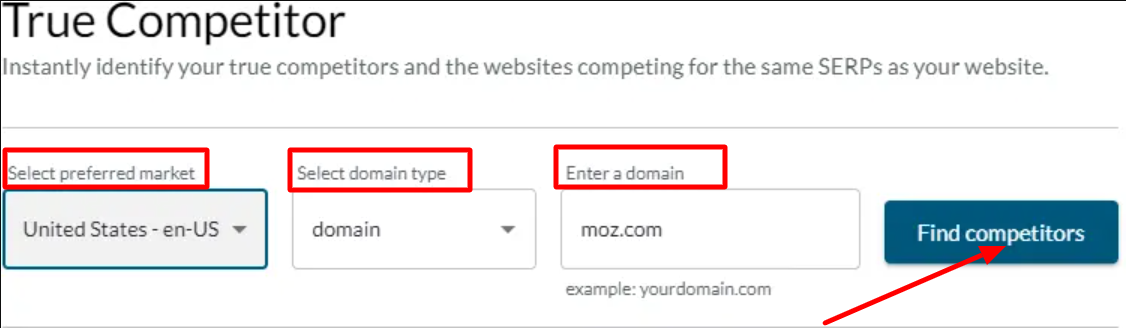
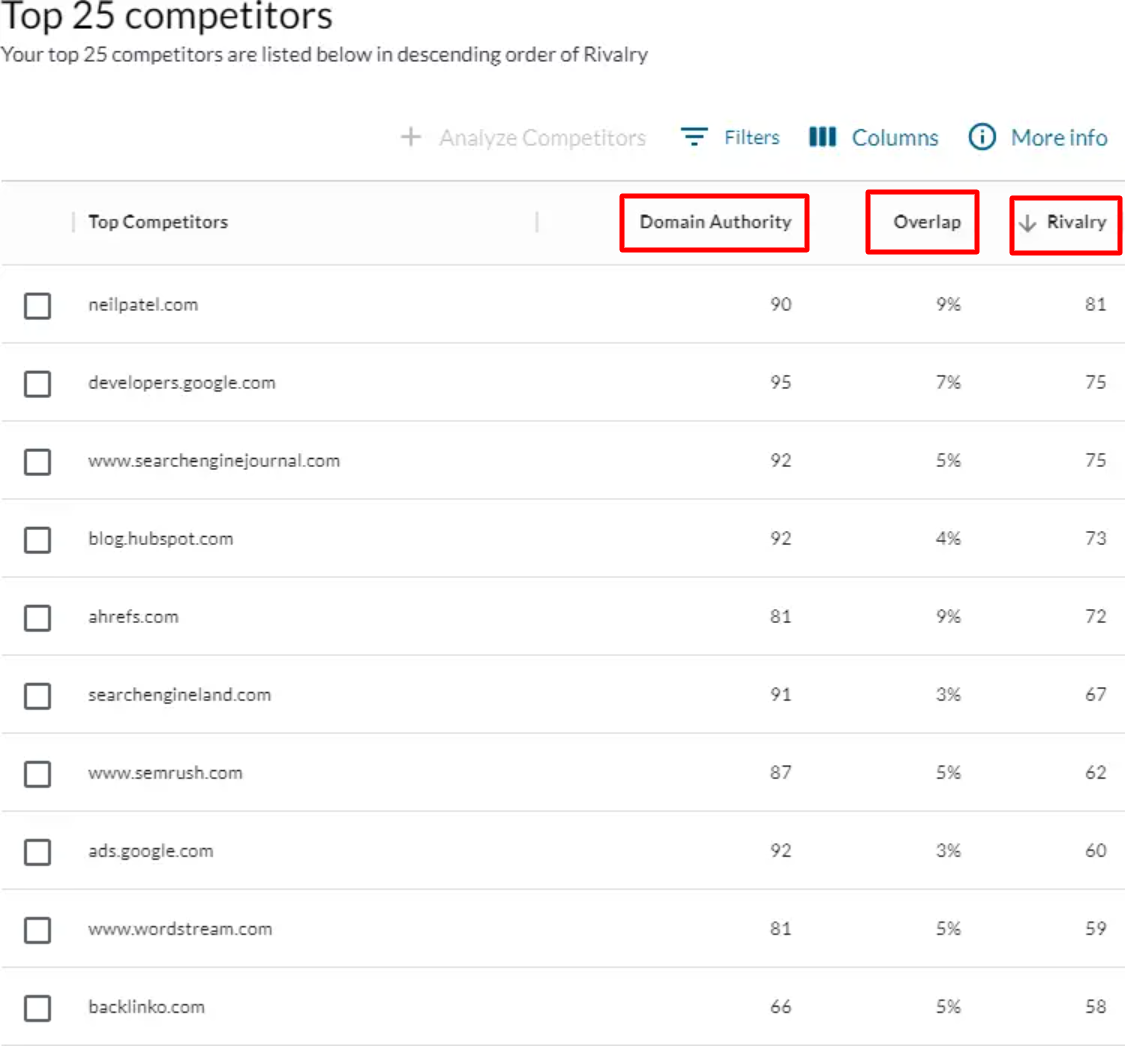


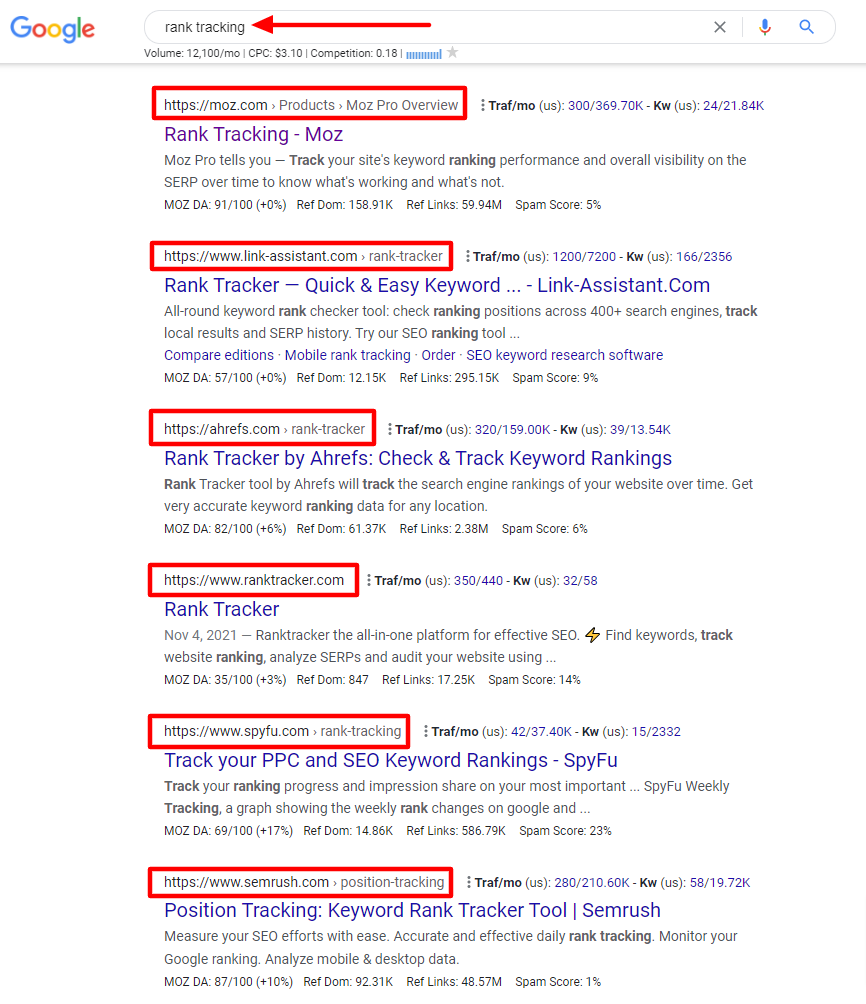
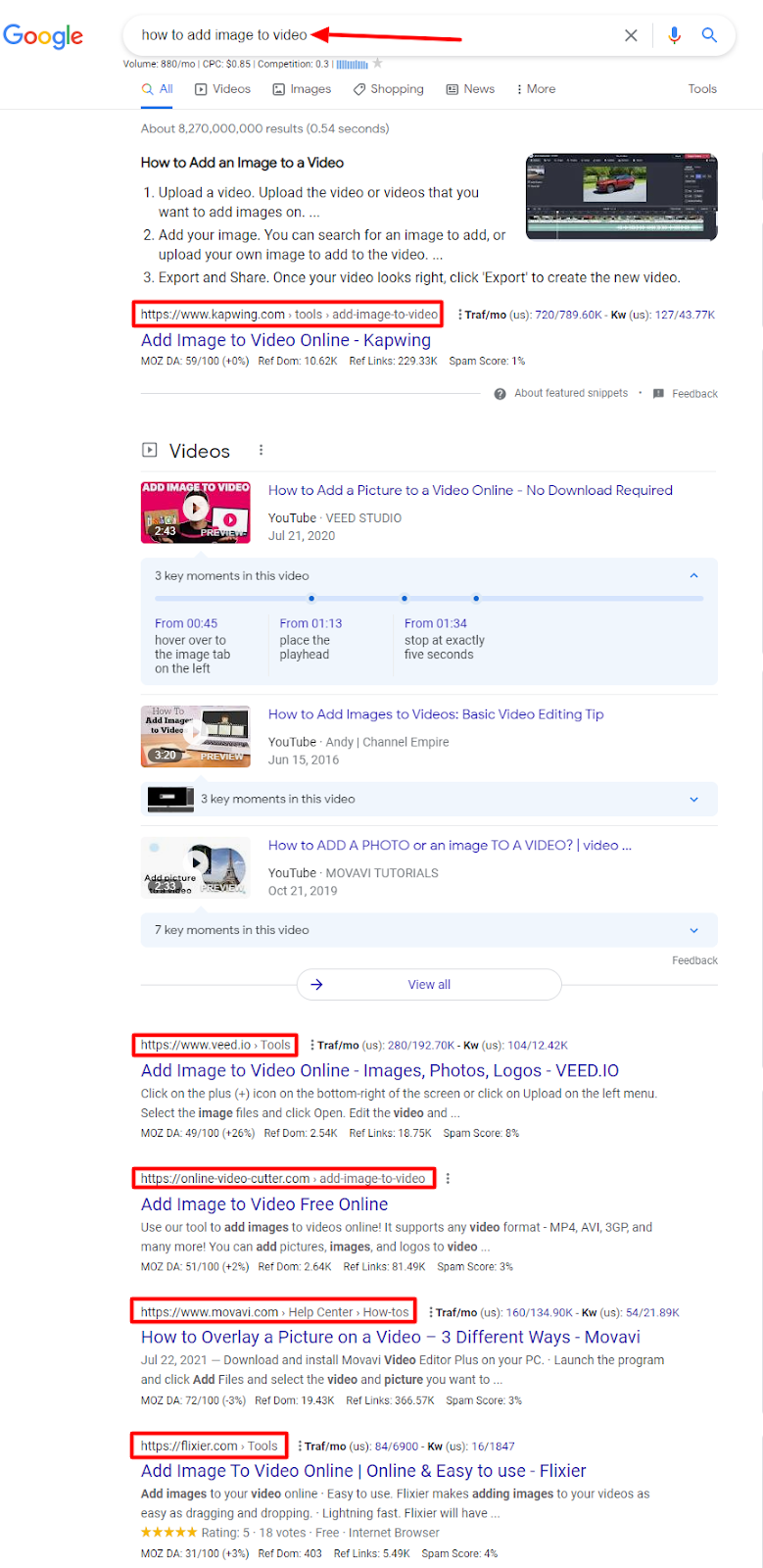


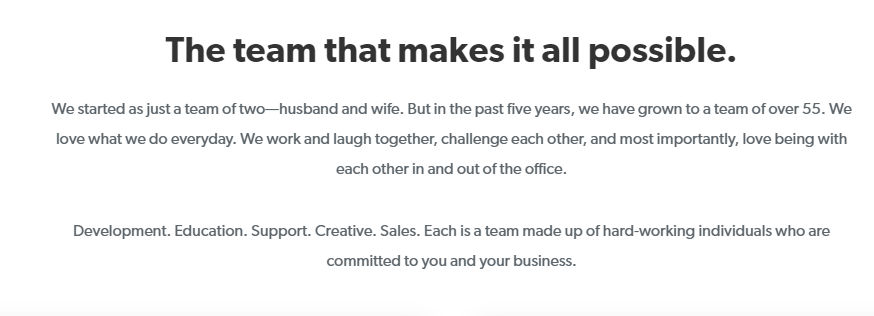
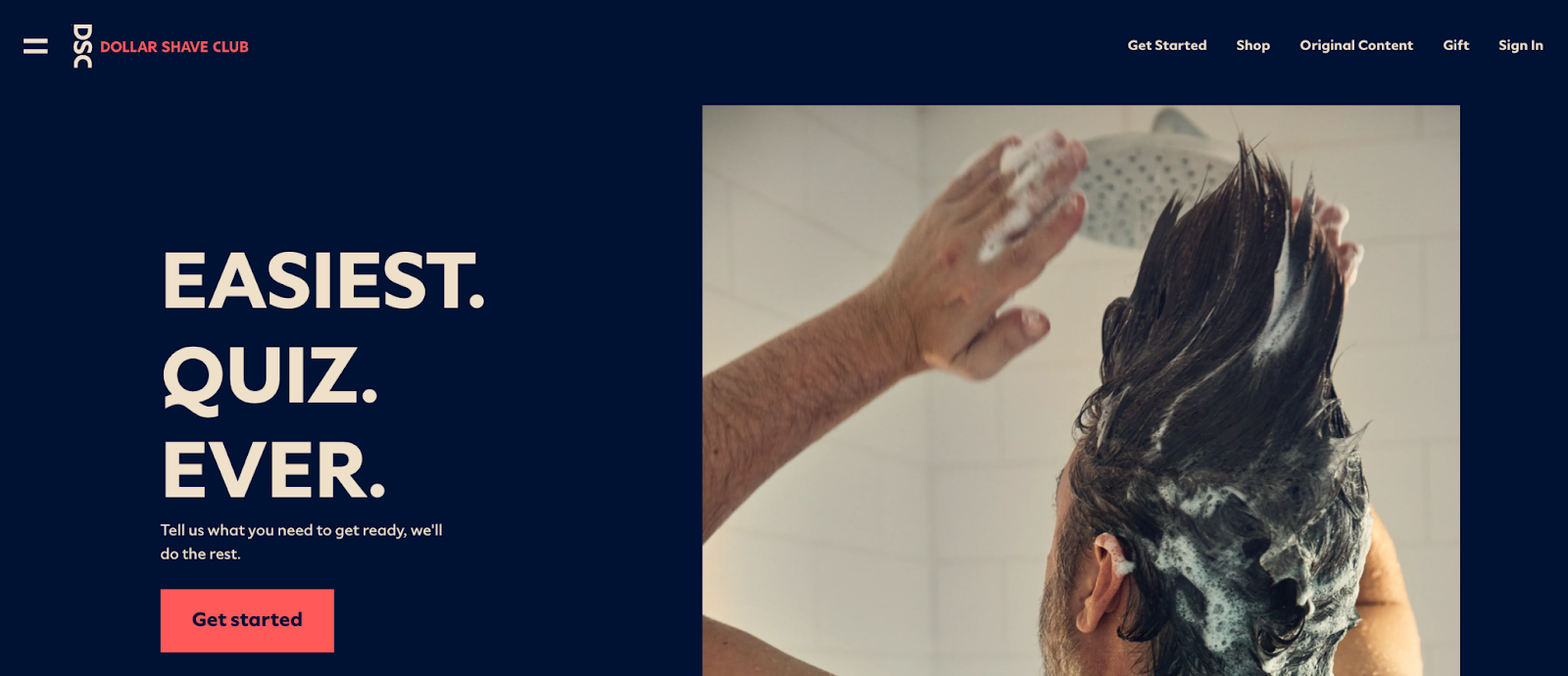

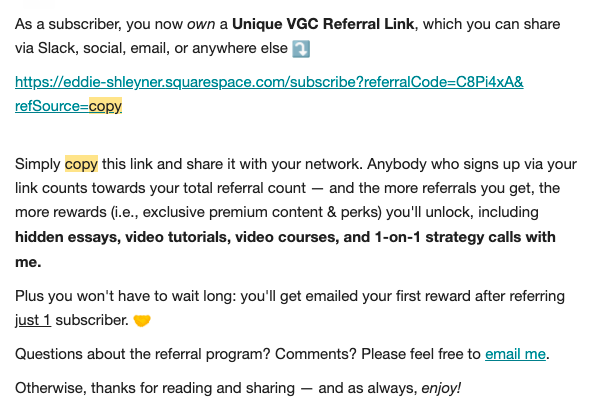
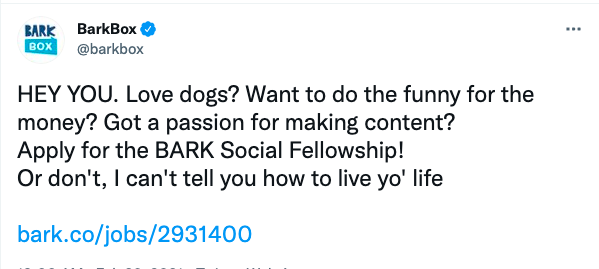


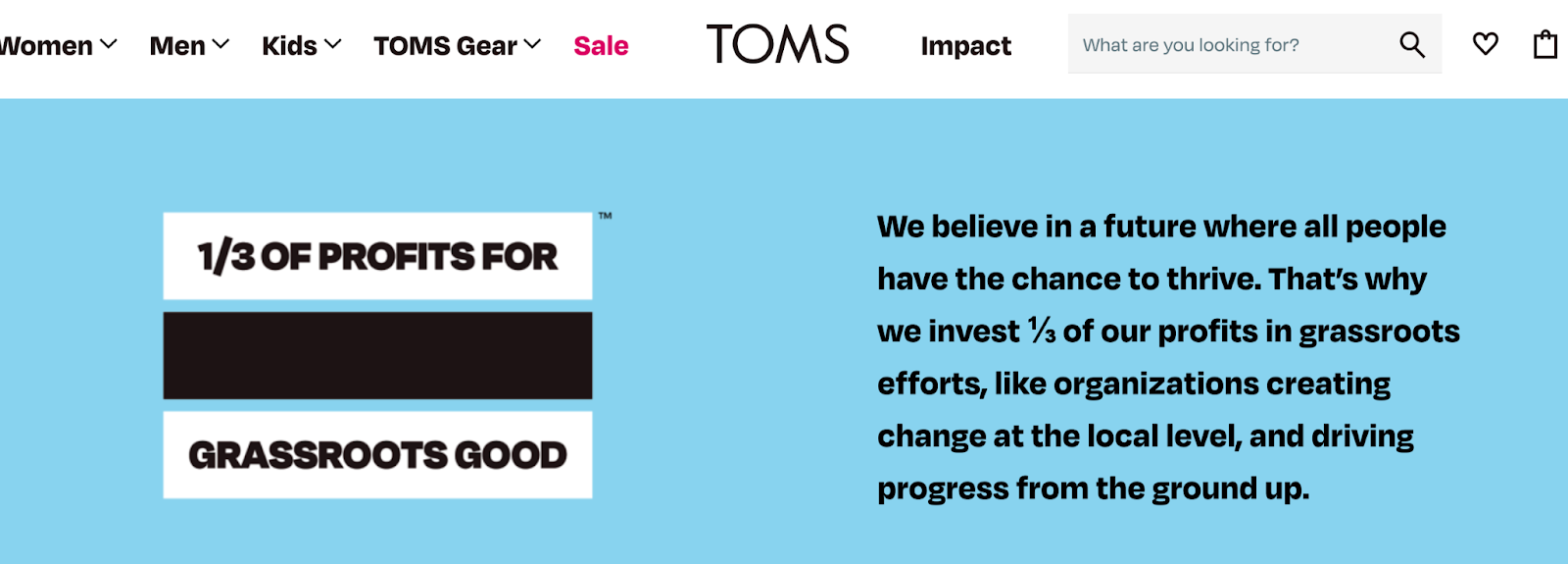


 Exemplo de Mulher Cursos