Learn how to transform your industry landing pages into powerful sales enablement tools for B2B success. Discover the key strategies to bridge the gap between search relevance and customer expectations in this Whiteboard Friday.
12 Local Search Developments You Need to Know About from Q3 2023

The previous quarter in local search has felt slightly more mellow than the first two of this year, but industry experts have definitely made some noteworthy discoveries, and Google has made one major move.
With the holiday shopping season up next, now is the time to examine any emerging opportunities or learn about new rules, before things get too busy for the local businesses you market. Let’s hop right in!
1. No second reinstatement chances from Google

Ben Fisher wins the quarter with his detailed breakdown of the biggest Google local news. Already launched in the EU and coming to us all globally at an unspecified date is a set of changes to the Google Business Profile reinstatement process.
The main improvement Ben highlights is somewhat more transparency in the process, offering some clues as to why your listing was suspended. The biggest fly in the ointment is that you have just one chance to make this application for reinstatement. Ben shares these two useful links:
Google may continue to tweak this process in the coming months. In the meantime, if a listing you’re managing gets suspended, you’ll be better equipped to handle reinstatement if you’ve bookmarked Ben’s article.
2. Try out “&near=[ZIP]” remote location emulation

Take 60 seconds to watch Chris Long’s useful video on emulating zip code location by editing the URL of your query. Chris offers this process:
1. Copy the ZIP code of the geography you want to emulate
2. Search for your target query (e.g.. “fence repair near me”)
3. At the end of the URL, append “&near=[ZIP]”
4. Click enter and analyze the local search results
While it’s important to remember that Google’s results can be hyperlocal to the searcher, meaning that any emulation tool or tactic may not exactly represent what a unique searcher sees as they move about town, try Chris’ tip next time you want a general idea of what rankings look like in a remote location. Fast and quite fun!
3. Review tests, spam, and warnings
We’ve got three different items of note in this category this quarter.
1. Inline reviews test

Mike Blumenthal has captured this interesting test in which reviews do not stem from individual reviewers but from third parties like Best Company and Home Advisor. Historically, Google has sometimes showcased third-party reviews in sections labeled “Reviews from the web” or similar lingo. But, this test mixes platform reviews right in with customer’s direct reviews. Keep your eye out for this test in your area.
2. No lasting consequences for Google review spam

To understand why Joy Hawkins calls reporting review spam to Google “as about as effective as trying to teach a goldfish to play piano,” watch her video on the frustration she experienced in repeatedly reporting purchased reviews. Joy documents how each report resulted in some reviews being removed from the errant company’s listings, but then they simply bought more, creating an endless cycle of tomfoolery. If Google doesn’t ban brands that violate guidelines by buying reviews, consumers will continue to be taken in by unearned high-star ratings, and the local search results will remain untrustworthy. On that note…
3. Spammers, en garde in France!

We take our hats off again to Mike Blumenthal for sharing this screenshot of a French reviewer being warned that their review isn’t being posted because it may violate Google’s policies. It remains to be seen whether this is EU-wide (if you know, please @ me), but it certainly doesn’t seem to be the case yet in the US, where we’ve gotten into a sad pattern of lagging behind Europe in anything regulatory-related. Wouldn’t it be fantastique if Google would roll this out globally, and publish such warnings not just to the reviewer, but on the profiles of brands that have been repeatedly caught violating review guidelines?
4. Interesting GBP Developments
We’ve got several wondrous things to ponder in the world of Google listings this past quarter, including:
1. Footnotes in overviews?

I don’t often feature myself in these quarterly roundups, but look at this weird thing I came across in the local packs! My Twitter (ugh, ‘X’) thread compiles a bunch of instances I saw of what appear to be numbered footnotes within overview descriptions within the local pack. Look at this example, where the numbers go as high as 9:

And here’s another curious one on GBP that claims to be linking to a menu:

The trouble is, none of these footnotes are actionable. They don’t link to anything, and they aren’t explained. There appears to be no point to them, so they almost feel like a bug. But… they do have a familiar tone. Don’t these sound rather like AI of the kind we’ve been previewing in experiments like SGE? I’m wondering now if what I spotted presages an AI/local mashup ahead. Keep watching!
2. You can’t list services as GBP products anymore

I think we all share Claire Carlile’s disappointment that you can apparently no longer add services as GBP products. Until recently, it appeared fine to do so, but that’s Google local search for you: a dynamic environment in which today’s best practice is tomorrow’s bad hair day (which is why reading columns like this one becomes necessary just to keep up with the changes). I wish Google would reverse course on this. For SABs, their services are what they sell; they are their products.
3. Getting the “Provides” local justification to show on your listing

Speaking of SABs, who wouldn’t want this awesome Provides local justification to appear on their local pack listings, catching the eyes of potential customers? I don’t know what wizardly work my friend Colan Nielsen has been up to lately in the deep recesses of GBP, but when a Local Search Forum member asked why she couldn’t get this justification to show up on her listing, his reply got my attention. Colan indicated that if you want that justification to appear, you need to contact Google support to ask them to completely remove the “on-site services” attribute from your profile and that this can help you get the Provides option, instead. That was news to me, and I’d love to hear more stories like this.
4. New Google policies bring some transparency to formerly-secret processes

This document makes public Google’s formerly secret policies on why and when they might suspend an account, and I highly recommend watching Near Media’s full commentary on what we’ve learned from this disclosure. I quote:
“Google rolled out a number of new policy statements regarding the rules guiding suspensions and content takedowns affecting Google Business Profiles (GBP). These guidelines, long the working rules that affected listings and listing content, now make explicit how user accounts, and abuses affect whether a business continues to have access to any given listing or whether that listing will be removed from Google. While this increased clarity is welcome, the devil is in the details.”
Local search depends on authenticity, and I warmly welcome any public declarations of this kind by Google.
4. Grab bag ‘o other local finds
1. What’s your blue zone?

Check out what Andy Simpson noticed when looking at the map for “nearby searches”: an unusual blue zone none of us seem to have seen before. It indicates both a walking and driving distance, and as Andy said, could be useful in helping you choose a new location for a business, given Google’s penchant for user-to-business proximity. How great to be running a business that customers can walk to.
2. What are you mentioned in?

While not specifically local, getting this “Mentioned in” treatment captured by Brodie Clark could be good for any local business, especially if the recent loss of FAQ-rich results impacted you. Google appears to be testing different versions of this result, and it strikes me as a reminder of how the Authoritativeness signal of E-E-A-T works in action. Who is mentioning your brand, and how can you get more mentions from top sources?
3. Is your Performance data spooky enough for Hallowe’en?

We’re finishing up with a notable case study from Joy Hawkins that was kicked off when an attendee of a LocalU event asked why his storage client’s GBP Performance section was showing him ranking for restaurant queries. Dismissing the notion that people safeguard leftover meatloaf in storage units, and getting no insight directly from Google on the mystery, Joy posited and confirmed a theory: the client was participating in the paid Performance Max Google Ads program, which gives you a little branded pin on Google Maps… often for queries that are totally unrelated to your business.
As Joy explains, this Performance Max data then transfers over to your GBP Performance stats, convoluting paid with organic info. Joy was able to confirm that a branch of this business not participating in the Performance Max program was not getting this weird data, giving good credence to her theory. She also offers a warning that you shouldn’t immediately blame SEO if you see performance drops being reported to you by Google – it could be coming from your paid ads.
And that’s it for Q3 in local search marketing. Now we’re headed for the wild and wonderful holiday shopping season, my friends. Please, come back in January to see how it all played out!
How to Collect & Use Your GA4 Data to Transform Your Content Strategy
Content without data is like a property without a foundation — it lacks stability. Without data, you can’t truly understand the impact of your content and what to do next.
Victor Ijidola put it best in his recent article on informational content, “You want your content to persuade your readers to do something,” but if traffic is low or sales are slow, chances are your content isn’t working hard enough at generating interest.
In the last few years, content marketing has become more data-driven than ever before. Content marketers and SEOs have tools like Moz Pro and Google Analytics to thank for that. These tools can help you identify which articles are working, how many conversions your content is generating, where your content gaps are, and much more.
Google Analytics 4 (GA4) replaced Universal Analytics, Google’s long-standing analytics reporting tool, in July 2023. Hopefully, you’ve already migrated to GA4 and taken ownership of your GA4 property, had a good look around, begun unpacking all of your data, and made yourself familiar with the reporting platform’s layout. As you settle in, you can begin to learn just how much GA4 can help you renovate your content marketing strategy.
Whether you’re creating content for a SaaS knowledge hub, planning articles for a service-based company’s blog, or publishing product guides for an e-commerce platform, the tactics I am about to share will help you evaluate your content marketing efforts so far (or within the last two months or 14 months, depending on your data retention period), figure out which pieces of existing content to improve, and identify gaps and opportunities in your content.
This article presumes that:
-
You have admin access to your website’s GA4 property.
-
You have admin access to your website’s Google Tag Manager (GTM) container or have a developer who can help you with tags.
If you don’t have admin access to your GA4 property, get this set up first! If you’re unable to gain access, you can send some of these recommendations to those who do, so they can share the reports we create with you.
Let’s begin!
How to evaluate your content performance using GA4
As a content marketer, there’s always a desire to create new content. After all, we’re often told that Google favors “fresh” content — wisdom that is widely debated. That’s why I recommend working on your content strategy by improving existing content first.
This doesn’t just draw new attention to older articles. Beginning by improving your existing content also makes it much easier to develop new content ideas.
The first step in improving your existing content is to figure out which articles you should work on and prioritize. Enter GA4.
I’ll explore each of the following metrics in more detail, including where to find them in GA4. But first, here’s a quick rundown of the most helpful metrics when it comes to understanding how well your content is performing and choosing which pages to focus on for optimization:
-
Page/screen views
-
Engagement rate
-
Average engagement time
-
Exits
-
Bounce rate
-
Scroll
Page/screen views
Let’s start with one of the most important and easy-to-find metrics — page/screen views. Views will provide a helpful indication of your content’s performance, i.e., how many times your article has been viewed in a specific period of time.
In GA4, you can find this by going to Reports > Engagements > Pages and screens. Once there, you’ll see a list of pages and the number of views they had during your selected time period. By default, this is set to the last 28 days, but you can update this to a duration that suits you.
Filter this data so you can concentrate on your blog or content hub only. In most cases, you can do this by:
-
Clicking “Add filter” at the top of the page
-
Choosing to filter by the “Page path and screen class” dimension
-
Selecting “contains” as your Match Type, then enter the subfolder that contains your relevant content — usually “/blog/” or “/news/”

Order the results by views, and you’ll see which articles have had the most — and the least — views during your selected time period. You might want to focus on a selection of the least visited articles first as these could have the biggest potential, so add those pages to your list.
Simple enough — but things can get complicated when choosing which period of time you want to evaluate. Older pieces of content will typically benefit from having a higher number of views just because they’ve existed longer. That is why other metrics can be more helpful in understanding what’s working well and what isn’t.
However, if posts about similar topics feature prominently in your least viewed articles, you may want to remove this type of content from your blog or hub altogether. It’s OK to delete content that attracts little attention or combine some of these pieces into a longer guide that provides more value for your readers. Just remember to implement redirects from your old URLs to the new ones for your guide.
Engagement rate and average engagement time
Google defines engagement rate as “the percentage of engaged sessions on your website or mobile app,” where an “engaged session” is a “session that lasts longer than 10 seconds, has a conversion event, or has at least 2 pageviews or screenviews.”
Put simply, engagement rate measures the percentage of visits that involve a significant interaction with your website.
The engagement rate isn’t included by default in GA4, so you’ll need to add this to your report. The pages and screens report we just used to see views is a good place to add this metric.
Here’s how:
-
At the top right, just below the date range, click the pencil icon to customize your report view
-
In the “Report Data” section, click “Add Metric”
-
Type “Engagement rate” then “Save”


Average engagement time should be added by default. This metric provides the average “amount of time someone spends with your webpage in focus or app screen in the foreground.”
Analyze engagement rate and average engagement time against your pages to identify those with lower-than-average results. In the Base Creative blog, our average engagement rate is 51%, so I’d pay close attention to articles that are much lower than that and those that have a short average engagement time (which should already be in your report).
The aim is to use this data to improve engagement. Some quick wins based on engagement metrics could include:
-
Increasing font size so it’s easier to consume content (particularly on smaller devices)
-
Breaking up longer paragraphs into smaller chunks to improve readability
-
Adding links to related content and/or downloads or (more) links to your calls to action
-
Incorporating a range of media formats, such as audio, video, images, or interactive assets like quizzes or infographics
Interactions across different devices
You can go one step further and compare how your content performs against these metrics across different devices. Compare desktop and mobile performance against each other in GA4 by using the “Add comparison” feature on any report screen you’re looking at:
-
Click “Add comparison” just above the graphs
-
In Dimension, choose “Device category”
-
Choose “exactly matches” in the Match Type
-
In Values, choose either Mobile or Desktop and click “Apply”
-
Click “Add comparison” again and add the other device, e.g. “Desktop” in Values

In Base Creative’s case, there isn’t a large difference between engagement rates across devices. Around 90% of visits to our blog take place on desktop, so I’d pay closer attention to these statistics when reviewing performance, but you might find some interesting results that could make you rethink the design and layout of your blogs if there are some drastic differences between devices.

Exits and bounce rate
An exit counts as a session that ends on a particular page or screen. It’s similar, but not the same as a bounce, which is a single-page session where no engagement occurred.
Both are useful metrics for identifying weaker pieces of content, but I find the exit rate more helpful when it comes to articles. A high number of exits suggests that your content isn’t encouraging any further action on your site. Ideally, we want our articles to lead our readers to visit another article or — even better — your money pages (usually a service, product, or contact page).
Currently, Google doesn’t offer an exit metric in the Reports section of GA4, so you’ll need to create an exploration in the Explore section. You can add the bounce rate here, too, to see how it compares. Here’s how:
-
Go to Explore and click on “Blank exploration” to create a new exploration
-
Click the “+” icon next to DIMENSION, choose “Page path and screen class” under “Page/screen”, click “Import,” then drag to ROWS
-
Click the “+” icon next to METRICS, choose “Exits” and “Views” under “Page/screen,” then “Bounce rate” under “Sessions”, click “Import,” then drag to VALUES
-
Filter to just show your articles by dragging “Page path and screen class” to FILTERS. Update Match Type to “contains,” then enter your blog’s subfolder (e.g.,/blog/) below and click “Apply”


Don’t forget to change your date range on the left to a helpful time period and reorder by the number of exits, which you can do by clicking on the “Exits” column.
What can you do with this information?
If you see high exit pages here, for example, if your number of exits on an article equals at least 50% of its views — then these are your priority to review. The aim here is to keep visitors on your site for longer (by visiting another page) or to encourage them to take action, so take this opportunity to add helpful, relevant links to related content or other appropriate pages.
This is also a good place to add links to your least viewed articles (that we identified previously) if you believe they still provide valuable information for your visitors, as they may be difficult to find on their own.
Site scroll
If you’ve enabled enhanced measurement in your GA4 property (which you can do by going to Admin > Data Streams > Web stream details, then clicking the toggle on Enhanced Measurement), then you’ll begin recording a “scroll” event. This will count every time a visitor has scrolled through 90% of your page.
 Data Streams > Web stream details in GA4, where you can toggle Enhanced measurement” height=”1600″ width=”666″>
To see scrolls, go to Reports > Engagements > Pages and screens, then under “Event count,” you can choose to just see “scroll.” Compare this number against the number of views to get a sense of how many users are making it to the end of your article without any additional setup.
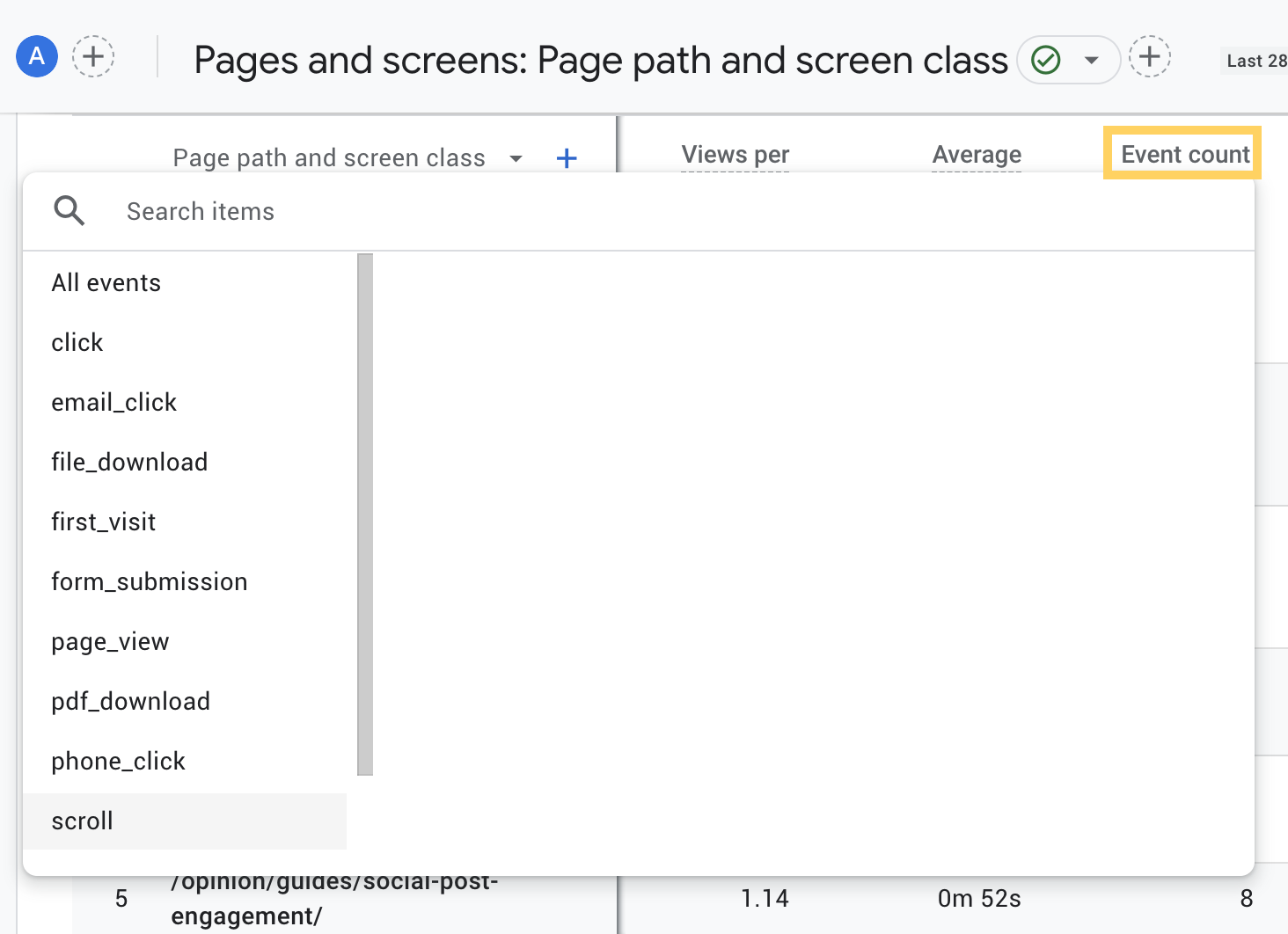
GA4’s offering provides a limited interpretation of scroll depth but combined with Google Tag Manager, you can learn more about your visitors’ scrolling behavior.
Using Google Tag Manager to enhance your data
Remember how I mentioned that content and data work so well together? Well, the same applies to GA4 and Google Tag Manager (GTM) when it comes to reporting on the impact of that content.
There are plenty of insights you can glean from GA4 alone, but you can take it further with GTM.
Chances are, you’ll already be using GTM to track meaningful engagements with your website and conversion events like form submissions, purchases, and video views. However, you can also use GTM to send some helpful data for analyzing content performance directly into your GA4 property.
Here are some tags I recommend setting up specifically for content analysis:
Improved site scroll
We’ve seen that GA4 can give us a basic indication of scroll depth. Angela Petteys’ Introduction to Google Tag Manager shares some helpful tips on how to set up scroll depth so you can create an event that triggers every time a visitor scrolls 25%, 50%, 75%, and 100% down the page, to give you more detailed scroll data in GA4.
Depending on your GTM setup, there will be various ways to see this data in GA4. You could create a scroll depth exploration like this:
-
Go to Explore and click on “Blank exploration” to create a new exploration
-
Click the “+” icon next to DIMENSION, choose “Page path and screen class” under “Page/screen”, “Event name” under “Event” and “Percent scrolled” under “General”, then click “Import”
-
Drag “Page path and screen class” to ROWS
-
Drag “Percent scrolled” to COLUMNS
-
Click the “+” icon next to METRICS, choose “Event count” under “Events”, click “Import,” then drag to VALUES
-
Filter to just show your accordion clicks by dragging “Event name” to FILTERS. Update Match Type to “exactly matches,” then enter “scroll”
-
Additionally, you can filter by page by dragging “Page path and screen class” into the FILTERS section
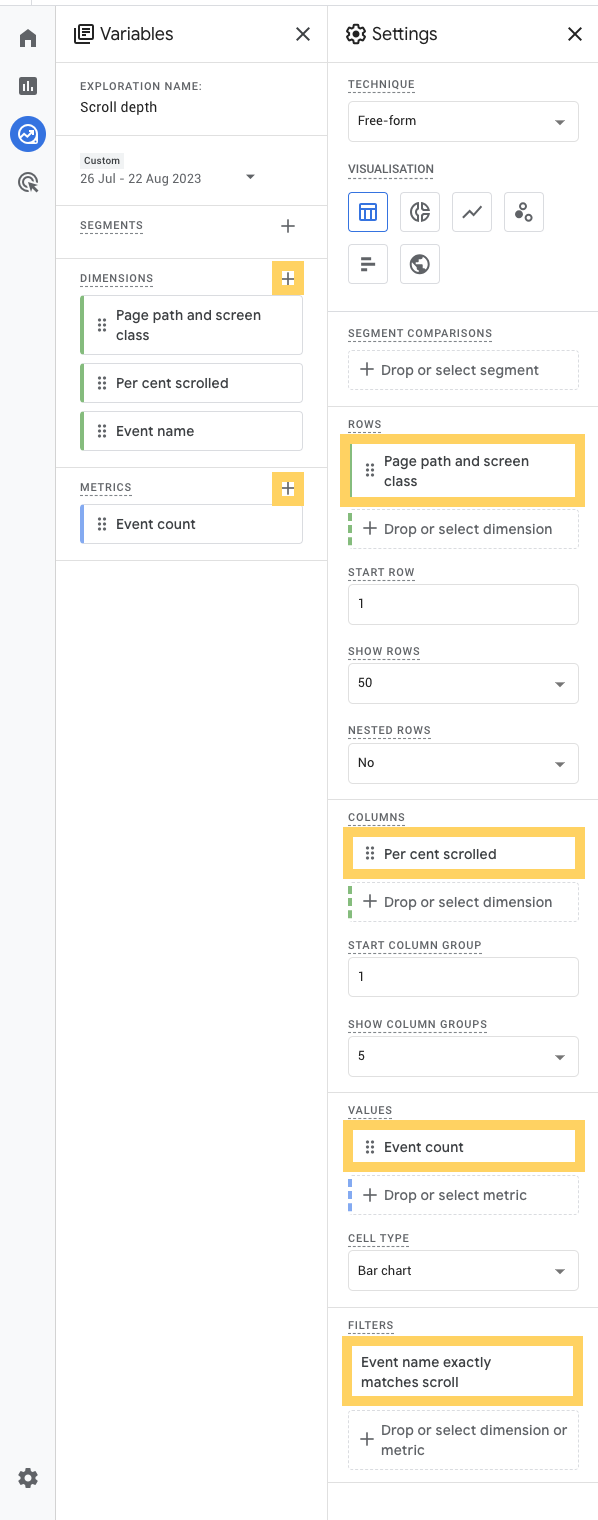
Use the data you see here to help optimize your content. At which point on the page do visitors tend to drop off? Are they seeing your calls to action?
If all your CTAs are at the end of each page and most visitors are dropping off around the 60% mark, then you might want to test moving these up to a more prominent position towards the top of the page.
Click events on FAQs
With informational websites, I’ve found it useful to track what visitors click on, particularly for areas like FAQs that typically use accordions.
Depending on their implementation, there are lots of ways to set up accordion tracking in Google Tag Manager. Often, this will be setup in the form of a GA4 event tag and a “Click – All Elements” trigger. These will look out for clicks on your accordion based on a specific set of rules, like when a “Click class” contains “Accordion_title”.
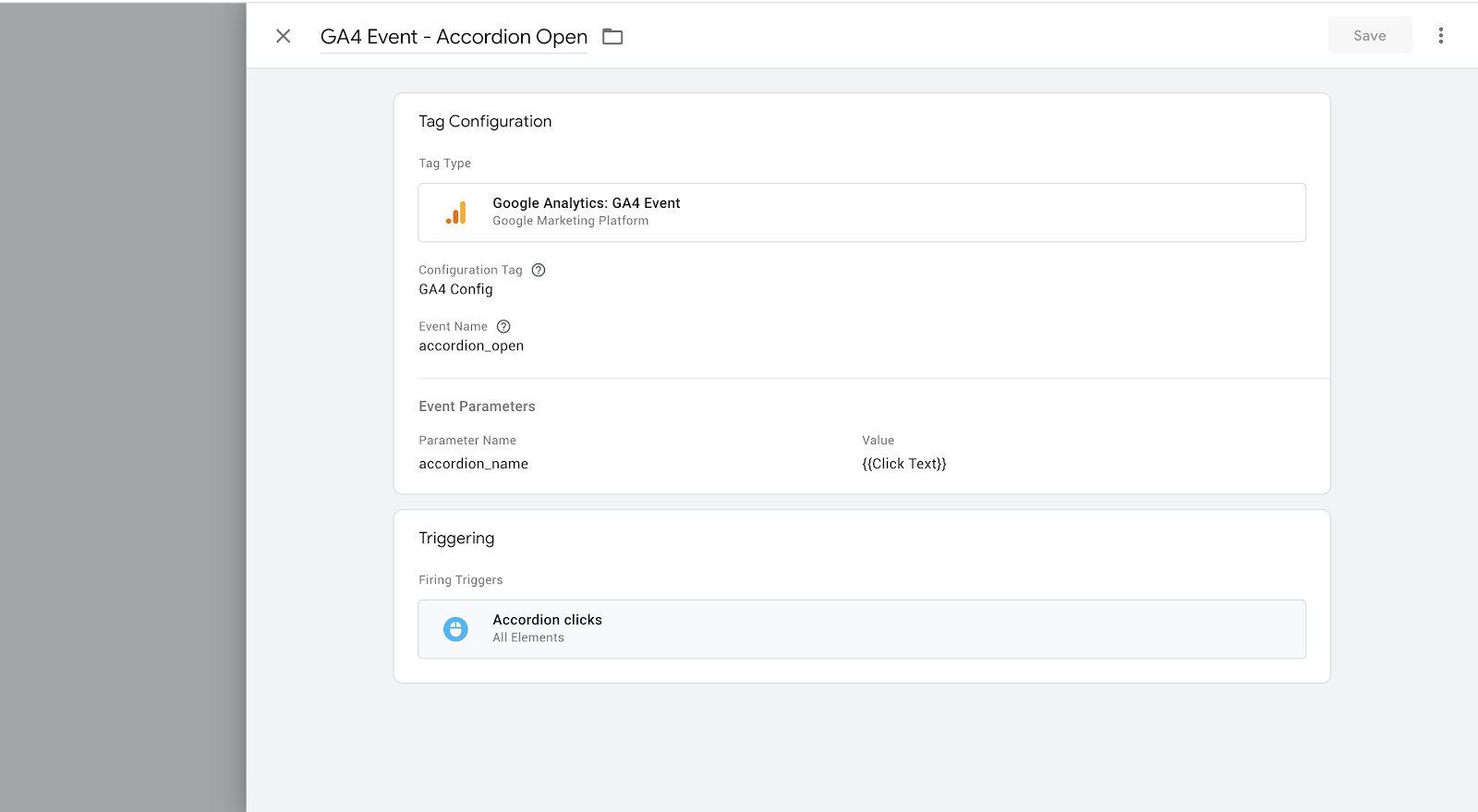
You’ll then want to scrape the text on your accordion, so you can see what visitors are clicking on in GA4. In your Google Tag Manager tag, create an Event Parameter with a helpful name (something like “accordion_name” or “faq_name”), then set the Value to “” to grab the accordion’s title.
You may need to do some testing to find out what you should use here or check with your web developer.
Once you’ve got this set up, you should start seeing this event — let’s call it “accordion_open” — being recorded in your GA4 property within a few days. But there are some extra steps to take to specifically review the FAQ titles in your GA4 property.
You need to create a custom definition. To do this:
-
Go to Admin > Property > Custom definitions
-
Click “Create custom definition”
-
In the Event parameter box, you should hopefully see the Event Parameter you set up in Google Tag Manager (e.g. “accordion_open” or “faq_click”)
-
Choose this, and name your dimension the same thing.

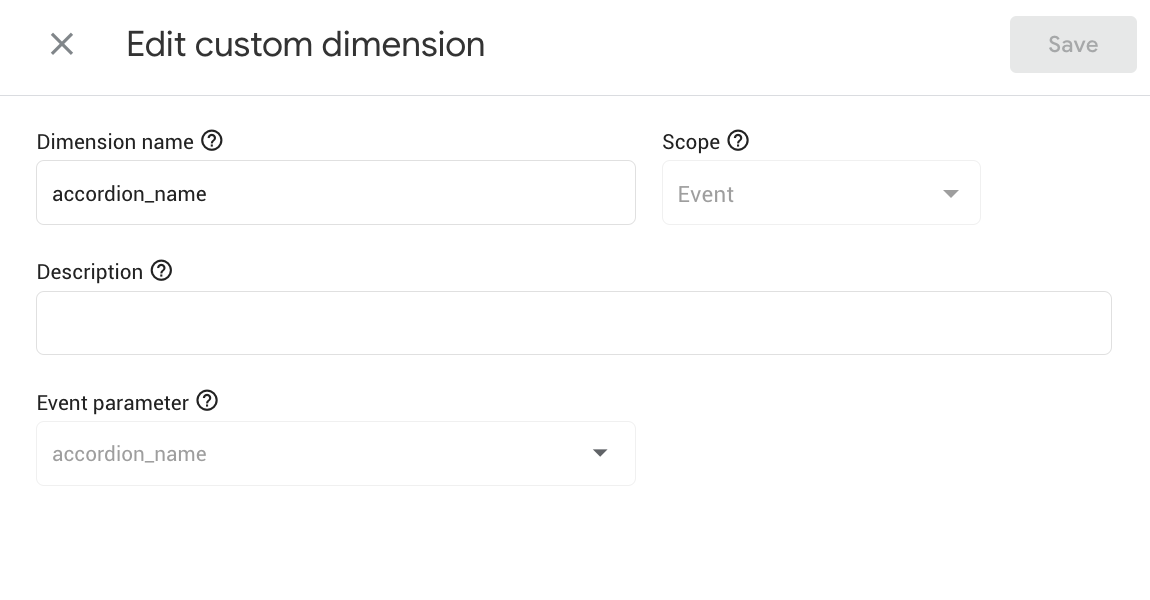
That’s the setup. Now to review the activity! This calls for another exploration, which you set up as follows:
-
Go to Explore and click on “Blank exploration” to create a new exploration
-
Click the “+” icon next to DIMENSION, choose your custom definition e.g. “accordion_name” under “Custom”, click “Import,” then drag to ROWS
-
Click the “+” icon next to METRICS, choose “Event count” under “Events”, click “Import,” then drag to VALUES
-
Filter to just show your accordion clicks by dragging “accordion_name” to FILTERS. Update Match Type to “does not exactly match,” then enter “(not set)”
-
Additionally, you can filter by page or section by also importing “Page path and screen class” as we did in the previous example and using this in the FILTERS section
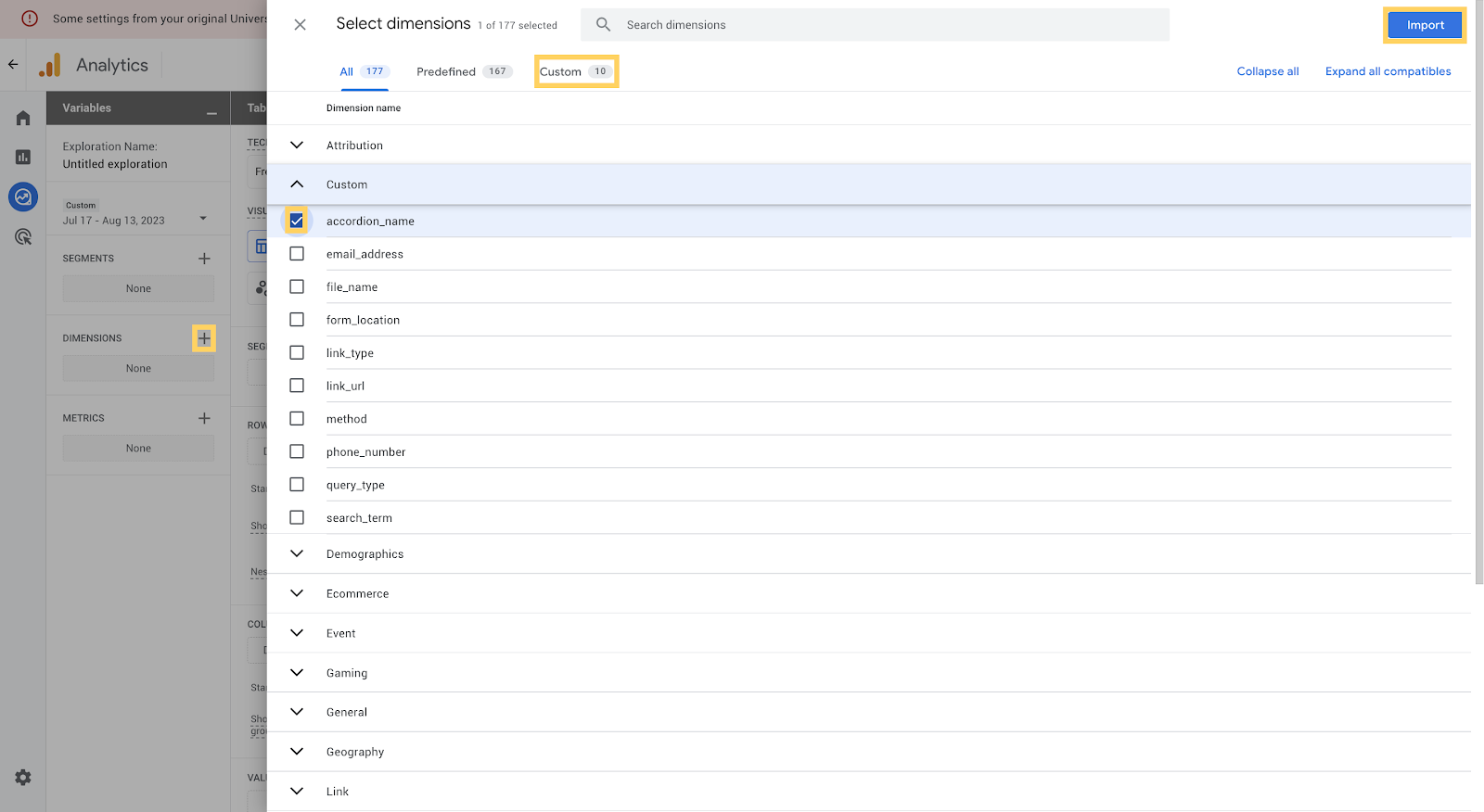
With this information, you can see which queries are being clicked on more than others.
Are there any themes in which types of questions are engaged with more? If so, these could provide the basis for more in-depth content.
Are there questions that aren’t clicked on often, but you think they should be? Consider moving them to pages with higher traffic for more exposure.
Using site search to identify content gaps
We’ve explored ways to identify and improve, move, combine, or delete existing articles based on GA4 insights. But what about new content ideas?
Hopefully, you’ll already be using tools like Moz Pro and insights from your sales teams to find content opportunities, but your GA4 data can also provide great content ideas. Specifically, GA4 can help you identify content ideas that address your customers’ pain points.
Your site’s search bar is a goldmine of content ideas based on what some of your most engaged site visitors are looking for. In GA4, there are a few ways of finding site search data.
But first, you’ll need to make sure you’re set up to track site searches. In most cases, you’ll need to enable enhanced measurement in GA4, which you can do by going to Admin > Data Streams > Web stream details and then clicking the Enhanced Measurement toggle.
You’ll then need to set up a “search_term” custom definition (which you can do via Configure > Custom definitions like we did with “accordion_name”). This reports on the actual search terms from the “view_search_results” event.
Then I recommend you create an exploration. Here’s how to set this up for site search:
-
Go to Explore and click on “Blank exploration” to create a new exploration
-
Click the “+” icon next to DIMENSION, choose “search_term” under “Custom”, click “Import,” then drag to ROWS
-
Click the “+” icon next to METRICS, choose “Event count” under “Events,” then click “Import,” then drag to VALUES
-
Filter to just show your search terms by dragging “search_term” to FILTERS. Update Match Type to “does not exactly match,” then enter “(not set)”
Now you’ll see a table with all your site search queries ordered by the number of times they were searched for. This information is valuable for many reasons, and you can analyze and review these results to inform your content strategy.
The next step doesn’t involve any GA4 tactics. It involves you, a list of popular search terms, and your web browser of choice. Visit your website and try out these search terms yourself. What content crops up in your results? Is it helpful?
You can use your site search analysis to:
-
Compile a list of topics for articles or thought leadership pieces on your site, especially for terms that have a high number of searches but there isn’t currently an article or page that covers it well
-
Create FAQs that answer the most popular searches, especially for terms that are formatted as questions
-
Update or move content around so it’s easier to find or make better use of customer terminology if a term is being searched a lot and there is content on your site that covers it
Prioritize your pages: combining site search with exits
Want to learn even more about your site searches? Let’s combine site searches with exits.
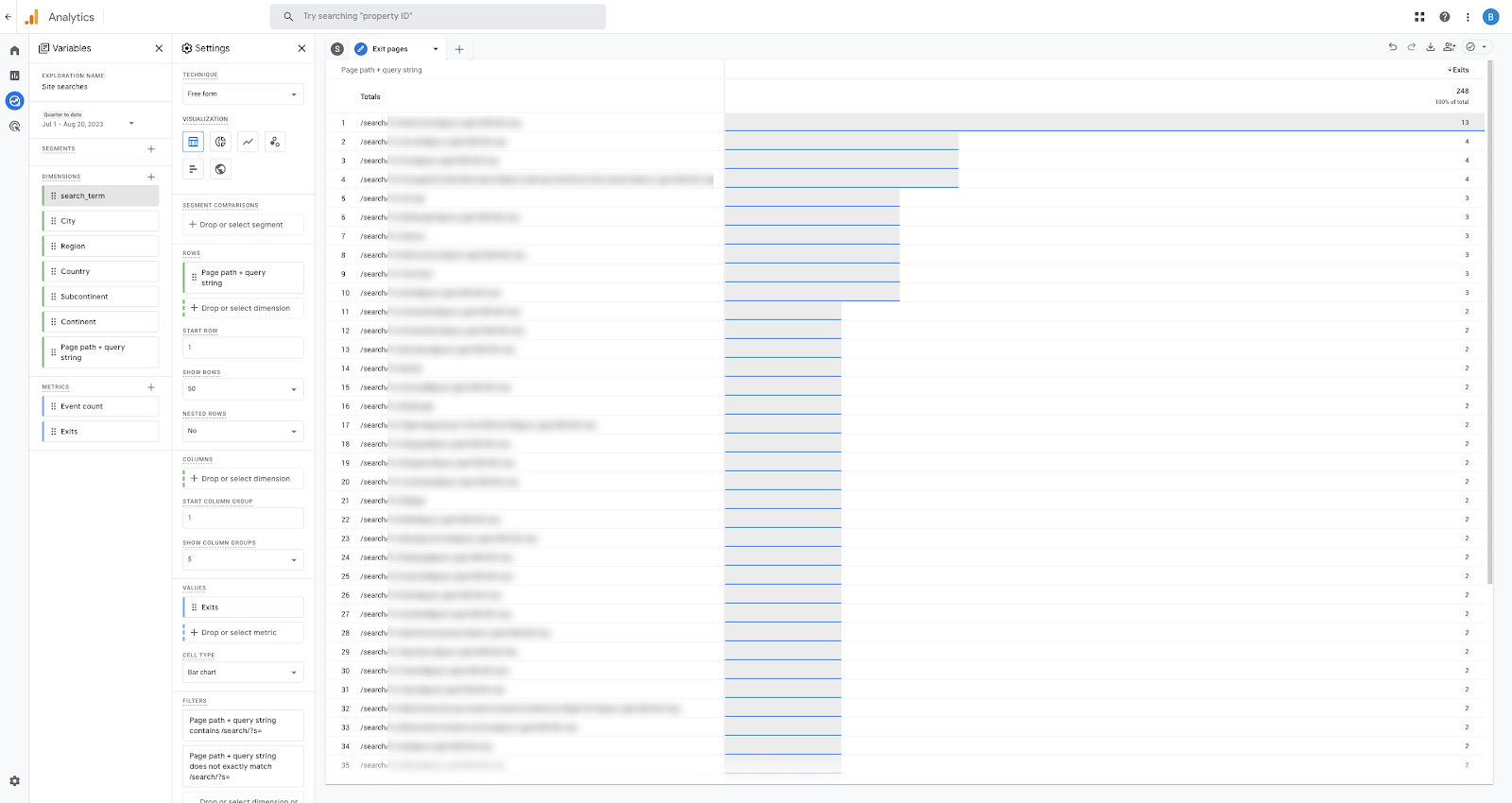
Either create a new exploration or create a new tab in your “Site search” exploration, where you’ll then do the following:
-
Click the “+” icon next to DIMENSION, choose “Page path + query string” under “Page/screen”, click “Import,” then drag to ROWS
-
Click the “+” icon next to METRICS, choose “Exits” and “Views” under “Page/screen”, click “Import,” then drag to VALUES
-
Filter to just show your search terms by dragging “Page path + query string” to FILTERS. Update Match Type to “contains,” then enter the relevant information here, which means you’ll just see your search results pages. In most cases, this will be something like “/search/” or “/?s=”
Once you order by exits, you’ll see which searches most often end in someone leaving your website, suggesting these are your highest priority content gaps. Add these to the top of your content to-do list.
Final tips
There are countless ways that GA4 can help you analyze, plan, and optimize your content strategy. The more you get to grips with your GA4 property, the more you’ll develop your own measurement criteria for evaluating your content’s performance, but these metrics will provide you with a great starting point.
Use your GA4 insights to create content experiments backed by data. If your data tells you that your CTAs are too far down the page, then move them and review them. If your data tells you that visitors keep searching for a particular topic, then make sure it’s prominent across your website.
Setting up new events and dimensions can take time. When testing your new events or custom dimensions, expect to wait at least 24 hours before seeing data in your GA4 property.
My final tip — be patient when collecting data and keep testing. By following the data and fine-tuning your strategy, you’ll see your content pay off in the long term.
How to Create a Brand SEO Strategy — Whiteboard Friday
Miracle shares valuable insights on establishing your brand’s online identity and dominating the SERPs in this informative Whiteboard Friday.

Click on the whiteboard image above to open a high resolution version in a new tab!
Video Transcription
Hi, everyone, my name is Miracle Inameti-Archibong. I’m the head of SEO at John Lewis Finance. Welcome to “Whiteboard Friday.” Today I am going to be speaking to you about how to create your brand SEO strategy.
Why do you need a brand SEO strategy?

Now, why are we talking about brand SEO strategy? I mean, it’s 2023. Traditionally, SEOs have always been after generic keywords, and that’s not a bad strategy. I mean, that’s where the search volume is, isn’t it? However, if we’re all competing in the same crowded space, then it gets really tricky to gain visibility. We’ve all seen the SERP evolutions. I mean, since 2000, there’s been 233 major algorithm updates and it feels like Google and all search engines are constantly chasing the goalpost. And rather than running after them, why not get your customers to come directly to you? Now, I’m not saying don’t go after the generic space. Please do, but we need to diversify our audience. In case there’s an algorithm update, in case something changes, we have something to fall back on. Now, except you’ve been living under a rock, you’ve heard of AI. And we’ve all seen how search engines are integrating AI into the SERPs.
And that means that visibility is going to get harder and harder, because with personalization, the data’s gonna get brought back, and it’s only the top brands that will most likely be included in that SERP. So we want to make sure that people are searching for us and they’re coming directly to our content. Another thing is the increase in competition. Have you ever done a search? I mean, I did a search for hope, like a poem about hope, and I got over four million results. And all of the page titles look very, very similar. And it became really, really difficult for me to distinguish between which one I wanted. And so at the end of the day, I just went for a brand, a newspaper brand that I knew. And that brand identification helped me to identify what I wanted to see. And that’s why we’re talking about brand SEO because we want to make sure that your brand stands out in the SERP and people can come to you.
How to start creating a brand SEO strategy
Now, how do we start with this strategy?

Become an entity
The first thing is to make sure that your brand is a recognized entity. Google your brand. Does it trigger a knowledge panel? How do you get your brand to trigger a knowledge panel? How do you get Google to understand that that name is a brand, this is the product we sell, and this is who we target? First things first is to make sure that you are using a consistent naming convention. Across all your brand assets, your social medias, your platforms, make sure. The amount of times I’ve seen websites migrate or change their name, and although instead of like changing the name of their social media platform, they just abandon that one or close it down and create a new platform or a new entity. What you need to do is to make sure that you’re being consistent across, you’re taking ownership of any old assets you want, and you’re pointing it in the right direction. Do you have a Wikipedia page?
I know they’re notoriously hard to get, but Google takes at least 70% of its content for the knowledge panel from there, so you want to make sure that you have one.
Establish relationships between entities
The next thing to do is to establish relationships between all of these identities. Now, when you search for, say, dresses, ‘cause I’ve got a lovely dress on, when you search for dresses, what makes Google recommend, and maybe I search for Zara dresses, what makes Google recommend Forever 21 or H&M? What makes Google understand that all of these brands have a similar profile? So what you want to do is establish those links. There is a tool called TextRazor where you can take some of your content, put it in, and Google shows you some of the links and the associations that it’s making with that content.
So what you need to do is think about where you’re building links, where you’re getting citations, and make sure that you are targeting similar brands with competition that you want.
Utilize schema markup
Another thing to do is give a markup. Now, Google can crawl the web, they can understand content, but what you want to make sure you’re making your content super clear. You want to make sure you’re tagging up your organization schemas, your product, whatever you’re doing that just makes it easier for search engines to understand what your content is about.
Engage with your local audience

Again, if your content is local, make sure that you’re engaging with your local audience. Now, this is not just about starting off your GMB profile and feeling like, “No, I’m done.” This is about creating an engagement strategy.
So responding to reviews, creating a review collection strategy, making sure that you’re engaging with your audience so much that they want to like post about you, they want to take pictures and share with search engines. Because at this point, search engines value more what your consumers are saying about you than what you’re saying about yourself. So you want to make sure that you’re using all of the features, the post features, the promotion features, you’re keeping everything up-to-date, you’re answering questions, and you’re really engaging with that audience.
Dominate your brand’s SERP

Again, are you dominating your brand’s SERP?
Now, I did a search. Traditionally, everyone just thinks that if your brand name is in that search, in the keyword when someone searches, you will rank position one. But that’s wrong, as more brands are ignoring their brands and chasing after generic keywords. So I did a search for how to book a flight on Expedia. And surprise, surprise, Expedia, even though it’s a big brand, was not in position one.
Now, the site that was in position one is called Techboomer. They had a full article step-by-step guide, screenshots from Expedia’s website on how to book a flight. They also had a video as well to accompany that, and that was what was in position one and two. Now, I went to Expedia’s website and I tried to look for this content. I couldn’t find it. And to make matters worse, Expedia is bidding on that keyword. So they are paying for their own brand traffic when they could have just been targeting it right by content, using content.
Create a plan to maintain a positive brand reputation

Again, we talked about reviews when you’re part of local search. You want to make sure that you’re doing the same, even though you’re not in the local space. Where are people engaging with your content? What forms are people having chats about your brand, your products, whether you’re doing well? You want to make sure that you’re on there, you’re getting all of that feedback, and you’re targeting them with content that makes it easier for them to understand your product.
You want to make sure that if you’re on Trustpilot or whatever review tool you’re using, that you’re actively seeking to collect reviews and you’re responding as quickly as possible.
Build a top-of-funnel content strategy

Again, you want to build a top-of-the-funnel content strategy. Now, a lot of SEOs shy away from this because it’s really hard to measure, but if you’re really intentional on the purpose of this and you work with the right channel, so this is not just an SEO strategy. You have to work with brand, social media, the product team to bring this into life. And the key to this is establishing your brand’s online identity.
Now, you want to give your brand, you want to position your brand so that it has a distinctive, unique identity. For instance, what makes someone an Apple? What makes someone an Android? And those two users, “Well, I can never use the other product.” And that’s what you’re trying to do. Establish who your brand is for and who you’re targeting with your top-of-the-funnel content strategy. There’s something called social identity theory, which states that if you can do this for your brand, people get like a boost of self-confidence when they associate with a brand because they feel like that brand understands them. And they became your marketers. They recommend your brand to other people. They advocate for your brand in the world. And that’s what you want to do with your brand SEO strategy.
Now, I’ll finish on this note. If we are all targeting the same keywords, we are competing in a very, very crowded space. Your brand’s online identity is your beacon. So make them come to you.

Thank you.
How To Get Buy-In by Setting Strategic Content Marketing Goals
Marketing teams are under more pressure than ever. 50% of small and mid-size businesses have in-house content marketing teams that are struggling to overcome challenges, according to UpCity’s Content Marketing Survey.
Some find it difficult to measure ROI, while others struggle to identify strategic collaborations. Even among those that are effectively measuring content marketing KPIs related to their goals, there is always room for improvement — especially when management wants to know how you will attain that next best result.
To secure budgeting, resources, and cooperation from internal partners, you need to get those stakeholders to ‘buy in’ to your content marketing strategy. You can do that by setting clear content marketing goals that guide you toward more optimal performance. According to Marketing Week, nearly 39% of SMB (Small and Midsize Business) marketers now focus more on performance because of pressure from senior leadership to achieve specific targets.
Whether you seek buy-in from the C-suite or are interested in presenting data to your stakeholders, here’s how to bridge the gap between your team and those with decision-making power.
What are content marketing goals?
Content marketing goals are strategic initiatives that marketing teams set and track in pursuit of their overarching content marketing objectives.
It’s no longer enough to produce quality content, click the publish button, and hope for the best. Content marketing is a strategic approach for creating and distributing content to achieve business goals. These goals look different for varying businesses. For some, the core objective may be to attract new customers and boost brand awareness, whereas another company may focus solely on lead nurturing and conversion. These goals will change over time and in response to varying target audiences.
Regardless of the primary objective, content marketing goals allow teams to gauge progress and communicate to those most interested in that progress. SMART goals provide direction, allowing you to prioritize content creation to allocate your budget effectively.
Think of content marketing goals as a roadmap to achieve success. For example, you may want to increase conversion rates by X% in six months. This clear goal helps you track KPIs to adapt accordingly.
But you shouldn’t run before you can walk. Instead of collecting as much data as possible, set a clear goal and start small. Measure the elements that will provide actionable insights so you can pivot quickly.
For example, if your primary goal is to increase brand awareness and rank higher in the SERPs, you may focus specifically on new website visitors or inbound links, and alter your strategy and approach as further information becomes available.
Top 3 content marketing goals
Content marketing goals can help you grow, engage, and retain your audience. However, you must determine your primary goal to optimize your next campaign and choose the most relevant KPIs. The following three content marketing goals can help you take your strategy to the next level and achieve real, measurable results.
Create content to fill a content gap
After conducting a content audit, you may notice that the performance of your content doesn’t align with your current goals. This audit will be highly specific for some, such as uncovering a keyword gap with competitors.
When you’re ready to review the data, leverage an analytics tool like Google Analytics to look at engagement, traffic, conversions, or other indicators. Based on that data, identify gaps where your content misses the mark concerning your goals, your audience’s needs, or your competition’s standards.
You may discover you lack content for a particular stage in the buyer journey, or you may not have enough content for a specific persona. From insufficient keyword-driven content to the absence of content for an industry trend, there are many reasons why a gap exists. Identify it and act fast to ensure the most significant impact.
Moz’s Keyword Gap tool is particularly useful for identifying content gaps relative to a website’s competitors. Simply plug in your site’s URL (either domain or subfolder) and those of your competitors, then voila! You will see which keywords your competitors are ranking for in comparison to your own rankings. Narrow down your results by using the “Your Rank” filter and inputting your desired rank minimum or maximum to only show keywords that are most attainable for you to go after.
To hone in on the most viable opportunities, you can use Volume and/or Difficulty Score metrics. By setting a Difficulty Score <20, for example, you’ll find keywords that any well-established website should be able to target and ultimately rank for, versus aiming to create content and rank for keywords with higher difficulty.

In the above example, I compared UpCity’s B2B marketing blog against two industry-leading marketing blogs, HubSpot and Digital Marketing Institute. The Keyword Gap tool reveals that UpCity has content ranking in position #8 for the keyword “ppc on google,” while the other blogs are ranking in position #3 and #5 for that keyword, respectively.
With this data, UpCity can optimize its existing content to rank higher for these competitive keywords, and see new content opportunities by looking at phrases for which they are ranking in the 51st position or higher (which, in terms of SERP placement, “higher” is not always a good thing.)
Create content for link-building initiatives
If you have not prioritized link-building strategies, you’re leaving significant growth opportunities on the table. While link building was all about quantity in the past, quality has the upper edge in 2023 and beyond. The quality and authority of the pages where you build links play a major role in ranking.
This goal is of the utmost importance if you are in a competitive industry and want to improve your SEO strategies. To ensure success, you must begin with helpful, quality content that people want to share. Part of this approach will be knowing where to find prospects, or websites, that might be interested in linking to your content.
Create content to rank in the SERPs
The forever-changing SERPs can make it tough to maximize the value of your keyword data. However, there are some fundamental considerations when the goal is to rank.
As you adjust your strategy to rank higher on Google, you’ll get more traffic and drive conversions. But to achieve that, you need to offer quality content. Google continues focusing more on user experience, accounting for bounce and click-through rates, and rewarding sites that publish comprehensive content with search intent, scannability, and speed to value in mind.
Content marketing KPIs
To help drive the above goals, you need insight into what’s working and what isn’t. One way to do so is by paying attention to key performance indicators (KPIs) that align with those goals. While the metrics depend on your objectives and audience, these four are critical for any team to optimize resources:
-
Sessions: If you want to know whether users are landing on specific pages and staying long enough to engage with the content, dive deeper into average pages per session. When using Google Analytics (GA4), you can track Events per Session or Engaged Sessions per User, which Google defines as a session lasting longer than 10 seconds, a session with a conversion event, or two or more screen or page views.
-
Keywords: When building a campaign based on target keywords, you must track the keywords’ ranking positions. Focus specifically on rank checking and visibility.
-
Revenue: You can discover how much revenue is generated directly from your content marketing efforts by determining which conversions come from content and which conversions come from ads. This data can help you compare your strategy to other marketing and sales tactics, and it’s vital for gaining buy-in from other teams.
-
Backlinks: For content, few KPIs are as crucial as backlinks. Think of every link as a vote. Once you start growing backlinks from authoritative sites, you’ll know your audience is engaged, and your reputation is strengthening, both in the eyes of your readers and search engines.

Mix and match your KPIs to content types
Not all content marketing KPIs make sense for every content type or situation, so knowing when and how to match them will provide more value. For example, the following content types often come with unique goals, which can help you determine the most appropriate KPIs to measure.
Educational resources
Commonly referred to as hub-and-spoke content, educational resources serve as a foundation of information on the given topics on which your site focuses. Having informational content around the products and services you offer plays an integral part in establishing authority and trust.
Educational resources may be centered around “What is?” and “How to” queries, and should heavily focus on targeted keywords for that topic. Not only does this help prove your knowledge and expertise to users, but it also significantly helps with your site’s SEO and ranking potential.

Tools like AlsoAsked and AnswerthePublic do a great job of visually displaying hub-and-spoke queries related to the topic or keyword you input. These tools work by scraping search engine results’ “People Also Ask” boxes to quickly show what questions users are asking, helping you to produce content that people are interested in learning about.
Keywords and backlinks will help you grow your audience and boost your ranking, whereas session data will help determine how your potential clients or customers interact with your educational content. Is one resource page attracting users for an average of five minutes compared to another resource that holds interest for 30 seconds? Determining why this happens can ensure you create more helpful, meaningful content that supports a healthier ROI.
Most vital KPIs:
-
Sessions
-
Keywords
-
Backlinks
Tools
Whether it’s a mortgage calculator or data scraper, a company name generator or a three-question quiz, users love finding helpful and engaging tools and sharing them with others. That’s why online tools are arguably the most linkable assets for content marketers.
If, for example, you are a professional video marketing service provider, you might create an interactive tool that allows users to estimate the cost of making a professional video. Enabling users to add and remove options for their desired video like “music,” “live action,” or “animated” would adjust the price accordingly. This tool would prove helpful for anyone exploring professional video services, making it a great link target for link building outreach, as well as sharing on social media platforms and online threads.
Most vital KPIs:
-
Sessions
-
Keywords
-
Revenue
-
Backlinks
Surveys/Data reports
Collecting proprietary data through surveys, carefully analyzing the results, and publishing a high-quality report is a proven content marketing strategy that works time and time again, like this survey on ‘What Diners Write About Most’. Producing survey reports and sharing results with top-tier journalists can help land your brand highly coveted media placements on strong domains.
Similarly, surveys are one of the best content types for link building outreach, as your data can often fit seamlessly into existing content on other sites that have written about the topic of your report. Website owners are typically much more willing to reference your data and link back to your content as opposed to other content types, which are more difficult to earn placements for.
Further, data reports can rank more easily in the SERPs compared to other content types. There is no shortage of users searching for “[topic] statistics” on a daily basis, so it’s wise to do keyword research to hone in on the specific keywords that are being searched for your targeted topic. By incorporating these keywords in your report, you’ll significantly increase your chances of ranking in the SERP.
Most vital KPIs:
-
Keywords
-
Backlinks
Quote roundups
Publishing quotes — especially unique, thought-leadership quotes — can help you gain backlinks. You can create an “expert roundup” content piece quoting leaders or influential parties in your industry, also using this opportunity to build collaborative relationships.
You can also combine quote roundups with other content types, like data reports or educational pieces, by adding expert quotes to support the information in those pieces. Adding expert quotes to an article can improve its authoritativeness (an integral part of E-E-A-T) and increase backlink opportunities.
Leveraging reporter-supported platforms like HARO and Qwoted can make putting together quote roundups a breeze. It is more common than not for expert contributors to expect a backlink in return for sharing their insights, and the site publishing the piece shouldn’t stray from asking the featured individuals to return the favor. Expert roundups can truly be a win-win.
Most vital KPI:
-
Backlinks
Measuring up: How to report against your content marketing goals
Once a piece of content is published, you need to track its performance to have actionable data to report. Without that information, your team will be left in the dark.
Results should align with ongoing content marketing goals to ensure progress and growth. Based on the common goals and content marketing KPIs discussed above, here is how you should approach each scenario.

Content gaps
When the goal is to fill content gaps, the optimal result is relatively black and white — you filled the gap, or you didn’t.
There are several ways of looking at content gaps, ranging from outdated information to fluctuating keywords and shifting customer interests. So, when gaps appear, it doesn’t mean you’ve done something wrong in the past. However, if you want to stay ahead of the game and remain competitive, you must identify and address any new gaps, as they will quickly become missed opportunities.
Keyword research will be imperative here to ensure your content ranks high. To get started, focus on a competitor keyword analysis or leverage a tool like Moz Pro, which includes the Keyword Gap tool described above.
Quick Tip: If you are experiencing a lull with your target keywords, it’s time to incorporate more long-tail keywords. These keywords, which are keyword phrases of three words or more, are less competitive and are often highly effective because they represent customers further along in the buying process.
Link-building results
While link quality is of the utmost importance, quantity still matters too. To put it simply: the more quality backlinks you get, the better.
To measure the success of any link-building campaign, you must consider the number of backlinks your site has and the quality of those links, or the number of referring domains acquired within a set period (often month over month).
However, patience is vital before you make significant shifts to your strategy. On average, it takes anywhere from three to 12 months from when you build links to when you see major changes in SERPs. You can also dive deeper into the organic growth of traffic.
Lean on the tools available, like Link Explorer, to make this process as accurate and efficient as possible.
Quick Tip: When the goal is to collect data from your campaigns to measure your link-building success more efficiently, set a benchmark. This benchmark will act as a reference point so that you can pivot and better contextualize your results.
Content that ranks
SEO campaigns are crucial for businesses across varying industries and niches, ranging from retail to technology. While organic search and visibility go hand in hand, ranking is one of the most significant advantages of investing in SEO. Showing up on the first page of Google has massive implications. According to First Page Sage, the average click-through rate for Google’s first three organic results is 68%. By the tenth position, that number falls to 2%.
The first step is determining if your content already appears in the SERPs. The SERP Analysis tool in Keyword Explorer can help you with this process as you tweak SERP features. Pay attention to whether your content is optimized after determining whether it is ranking. Again, this is when you start associating the connection between content marketing and SEO. Focus on keywords and user intent, but don’t overdo it.
From a content marketing perspective, remember that content should serve the user first and the search engine second. The best approach here is to create research-driven content that is high quality and reliable. That way, you’ll cover both bases.
Some of the most valuable metrics to consider include:
-
Organic traffic, which you can access in Google Analytics or Moz Pro
-
Keyword rankings, which will help you determine which keywords drive traffic to your website. Moz’s Rank Checker is ideal for this process.
Quick Tip: Always implement best practices to optimize for technical, off-page, and on-page SEO. Know what to prioritize and when based on your initial goal and ongoing KPIs.
Adjust content marketing KPIs to your business goals
Whether you want to sit down with your management team or present figures to stakeholders, you must know how to translate your content marketing goals into actionable KPIs.
As you select clearly defined metrics to track, you will better understand if your marketing spend is producing an attractive ROI. If not, you’ll now have enough information to make more informed decisions. Well-presented data will make decision-makers “buy in” to your initiatives, especially if you have already adjusted and refined your strategy to show improvements.
Whether you have an in-house or outsourced content marketing team, be sure to align and establish KPIs based on your unique objectives. Learning how to measure and report against your chosen KPIs effectively could make or break your next campaign.
Takeaways from an Irish Locksmith: Listing Spam Scandal
“I did what people normally would do — Googled ‘locksmiths near me.’”
These telltale words preface a scandalous account of listing spam I recently ran into on an Irish call-in radio show on RTÉ. I’m going to share a summary of it in today’s column, offer my best understanding of the root of the problem, and close with takeaways both for consumers and for local business owners who operate in Your-Money-Or-Your-Life (YMYL) industries, like security.
When local search reads like a mystery novel

Host, Katie Hannon, and her team did a good job of structuring this unfolding mystery on the Liveline with Joe Duffy show. Sir Arthur Conan Doyle would definitely have gotten hooked into this plot.
Caller #1
On a bank holiday, a woman came home to find herself locked out of her house. She called the first locksmith she found on the web. The locksmith told her the lock cylinder needed to be replaced, did the work, and 5-6 minutes later, presented her with a bill for €391 ($419.35 USD). She had been so frazzled by the ordeal, that it wasn’t until the next day that she began to wonder why the charge was so high, but when she re-contacted the company to ask for a breakdown of the cost, she was informed that while the fee might appear large, it reflected the expertise of their staff.
Later, a licensed locksmith would confirm for the customer that, on a bank holiday, the charge should have been about €200.
Caller #2
“I did what people normally would do – Googled ‘locksmiths near me.’ I needed it done as quickly as I could. I took the first one that popped up. I spoke with a young lady, and she said she’d have someone get in touch with me,” said the next caller of his experience of hiring a locksmith when his door handle stopped working, when questioned about the locksmith’s online presence, he answered, “It looks very professional with very good reviews. There was certainly nothing to warn you.”
After a series of non-fixes, the locksmith got the caller’s door open but said he’d leave it without any lock unless the customer was willing to pay for replacement of the mechanism. Not wanting to risk having a door that couldn’t be made secure, the customer found himself with a bill for €1,143 ($1,225.87 USD) and began to worry he’d been overcharged when friends remarked that he could have gotten a whole new door for that amount.
Later, a licensed locksmith would confirm that the charge for the work should have totaled less than €500.
Caller #3
When one woman needed a rusty door lock replaced, she did what most of us would do,
“I just Googled ‘Dublin locksmith.’ It had reviews and everything.”
The locksmith who arrived charged her €60 for the service call but told her he’d need to order a €400 ($429 USD) replacement lock. When some days had gone by with no follow-up, she re-located the Google Business Profile she’d clicked on and again spoke to a receptionist. The receptionist told her she’d need to email the man on the invoice she’d received, but when her email went unanswered, the customer set out to find the elusive locksmith.
Via the Internet, she located a street address, and that took her to the house of a completely different person…
The Case of the Retired Locksmith

Caller #4 was the gentleman whom the woman with the rusty door lock found at the Dublin residence, and he is a retired licensed locksmith who served the industry for 45 years. I won’t do screenshots in this piece, but my own research confirmed that he appears to be the victim of impersonation via a Google Business Profile, and other local business listings. The top-ranked listing I found for the search in question featured the retired locksmith’s name and a 4-star rating on the basis of some questionable reviews + a few complaints.
It turns out that not only does the retired licensed locksmith know about this scandal, but he has felt so upset by customers being overcharged by the alleged impersonator, that he has been going to their homes to explain that he is not the service person they contacted and to offer them advice on what steps they might take. He is proud of the reputation he worked hard to build over more than four decades and is understandably unhappy to find his good name being tarnished, saying,
“I wouldn’t have survived this long in business if I had given a bad service to people.”
He has reported the issue to the authorities but has yet to receive a response, and unfortunately, there isn’t much he can tell these homeowners to do. In most cases, they did receive the work they paid for, but the charges simply were not commensurate with industry standards.
Google… I don’t know how they operate their business
During the radio program, Caller #5 phoned in to say that she, too, is a licensed locksmith, and has had four local people reach out to her lately after apparently receiving outrageous charges for basic services from this same entity. She stated:
“Google, I feel, is partly responsible for providing disinformation, but I don’t know how they operate their business. I would really like to know what is going on beneath all this because I do feel that there is an establishment that may be running companies like this. They’ve seen a niche in the market, and they’ve grabbed onto it, and they are making an absolute fortune. They’re unlicensed, and they are ripping people off.”
And therein lies a very large key to this common problem. Neither consumers nor legitimate business owners in this case (and in many) have a clear idea of what Google’s omnipresent local search results consist of, how they are ranked, or how often they contain spam.
Vulnerabilities in Google’s local search platform make it quite possible for a scenario like this one to take place, of an individual apparently spoofing the identity of another company and creating a listing around it. It’s also possible to hijack the listing of another business and insert your own phone number so that you receive the calls that should be going to your competitor. It’s possible to pay for fake reviews that make a dubious business look trustworthy, and as my honored colleague Joy Hawkins recently reported, you can repeatedly spam Google’s review component without any lasting consequences.
Lack of meaningful competition in the local search space has not motivated Google to fix this problem of listing spam over the past several decades, despite volumes of reporting both by major media outlets and industry journalists. At the same time, Google has never succeeded at widely engaging with or offering adequate support to the millions of local business owners whose data they use to populate their local search results. No matter how many times they rebrand and reshape local search, Google just isn’t getting the basics right to create a trustworthy, manageable platform or consumer experience.
So, where does that leave local business owners and Google users?
The cause and effect of local online scams

“You have to be so careful about who you have come to your home to fix a lock or deal with your security.” — Katie Hannon, RTÉ host
Misinformation, disinformation, and web spam are a threat to public safety in YMYL scenarios. I remember writing an article nearly twenty years ago about having a medical emergency and realizing that Google’s local pack results were full of inaccurate listings for ERs and hospitals. And clearly, when it comes to home security, no one would want someone untrustworthy working on their locks.
Meanwhile, I was listening to another Irish call-in show recently in which guests had lost tens of thousands of euros to scammers allegedly claiming to be from the online finance app Revolut, and the subsequent nightmare they’ve gone through in realizing that even the real Revolut isn’t like a real-world local back with an office and phone number you can contact for emergency help if you’re robbed.
Imagine spending 12 hours with a chatbot because it’s the only source of customer service available to you after having $10,000 dollars taken from your account! One of these callers even wondered afterward if the person she was speaking to at the scam company was a real human being or AI with a Dublin accent. Scenarios like these seem to me to stem from and create the following cascade:
-
Civil societies function on members having a certain degree of respect for authority, whether the authorities are teachers, medical experts, licensed professionals, or government leaders.
-
Many members of society have mistaken tech companies and their products for authorities, implicitly trusting that if something is as big and powerful as Google, it must be vetted, regulated, accurate, and authoritative.
-
In non-daily circumstances like suddenly needing a lock changed, having a medical emergency, or thinking your finances might have been compromised, people are flustered. They reach out for the quickest possible help to get themselves out of trouble and are not in any state to use their best critical thinking. Very intelligent people who say they would normally know not to give out sensitive information to strangers find themselves doing so in emergencies.
-
Because scammers know people are vulnerable during a time of stress, they build business models around exploiting others during these episodes.
-
This is a global problem that no government, regulatory body, or tech company has effectively solved. It has been nearly 20 years since Google Maps first appeared, and in the US, there are still no meaningful consequences for a search engine that profits from publishing spam that fools, misleads, misdirects, and even harms people. Regulation does not keep pace with rapid technological development.
-
Invested tech companies are now actively worsening this problem by presenting AI as an authoritative source of information rather than as an amalgamation of whatever data it has been fed, good or bad, real or not real. If countless people have already been scammed by others who use platforms like Google Business Profile to misrepresent themselves via spam listings and reviews, there’s pretty much no end to what bad actors could do with the opportunities AI will offer to spoof legitimate entities to disastrous consequence.
The effects of scams on communities are deeply serious. Scams undermine how humans feel about the societies they live in. Living in a setting in which people have to be constantly suspicious of their neighbors is stressful, and long-term stress undermines physical health. Some callers I listened to expressed shame at having been fooled, and others were reticent about admitting to anyone that they were swindled for fear of looking out-of-step with the times and the tech. All of them suffered financially, which is especially difficult in Ireland right now given that its people are experiencing what they call a “cost of living crisis,” which appears to have its same root as the 40-year transfer-of-wealth scam American economists cite as the cause of our present state of poverty in the US.
Thieves have always existed. The internet has simply allowed them to scale up and cause harm to vast numbers of people. When societies are unprepared and unprotected from swindles, an unfortunate outcome is that people have to look out for themselves (a very anti-social state of affairs that improves life for no one), but this is where I believe we’re at in the absence of better regulation, and I’ve got a few tips to share.
Tips for increased safety amid Google Business Profile spam

Let’s start with tips for customers — folks like you and me who are using the internet to navigate our local landscape:
1. Understand that spam is widespread on Google
Know that it is very easy to create illegitimate Google Business Profile listings and that a recent large-scale study by Uberall found that Google is the platform with the highest percentage of suspicious local business reviews. Know that Google does not have adequate safeguards in place to identify and remove fraudulent information from their product. The local results you see when you search for nearby businesses may well contain both fake listings and fake reviews and do not deserve your unqualified trust.
2. In a quiet moment, create a list
To protect yourself from being manipulated in a time of stress, consider the types of sudden incidents that take people unawares at some point or another in many of our lives. These might include:
-
Medical incidents requiring emergency assistance
-
Auto accidents and malfunctions requiring roadside assistance, auto repairs, and sometimes legal assistance
-
Security needs, like locksmith assistance or home security malfunctions
-
Damages from weather events like storms or fires, requiring rescue or urgent remediation services
-
Household malfunctions like septic overflows or plumbing problems, garage door failures, major appliance repairs or replacements, and other needs that require urgent assistance
-
Financial emergencies, such as fearing your banking card has been lost or stolen
It may sound like I’m trying to turn back the hands of the clock to pre-internet times, but at this point, you will be better off writing a list of the names, phone numbers, and addresses of reputable resources and keeping a copy of it in your wallet, purse, vehicle, and home rather than trusting random local business listings for YMYL scenarios. You could definitely put the list on your mobile phone, but you might want a paper copy as well in case your phone gets hacked, lost, or runs out of juice.
When you are not in the middle of an emergency, you can thoroughly research and contact your options to vet them. You can ask your friends and family for recommendations. And if you are traveling even a little distance from home, you can make such a list to protect yourself from being scammed in an unfamiliar setting.
In short, Google may be fine for helping find a quick cup of coffee or a slice of pizza, but don’t trust the local packs or Google Maps if your money, health, bank account, or life is at stake. Don’t invest Google’s results with an authority or accuracy they don’t possess. As a seasoned local SEO, I don’t like having to say this, but it’s my honest take on the state of affairs.
3. Start relying more on people in your life and less on the internet for YMYL decisions
Speaking of ethical scandals, we all need to be bracing ourselves right now. Large publishers you once trusted for vetted, fact-checked information that is hand-researched and hand-written by experts and authorities, may be making decisions right now to replace some of their staff with AI. We are already seeing results in the form of shocking pieces being published like this one (now removed) from Microsoft, which advised tourists to Ottawa to enjoy visiting a local food bank on an empty stomach.
The combination of spam local business listings and reviews + the increase of what could be a real mess of AI-generated nonsense in both chat-based and organic results could mean you should be very careful of letting the internet be your guide when making decisions that involve your life, health, money, security, or major purchases. Publishers have profit goals in view in replacing human authors with AI-generated information, but you need recommendations from people who have your best interests in mind. And that, of course, lands you back in the circle of your friends and family.
You are likely better off asking your mother, your neighbor, or your friend from work where to find a trustworthy outfit to replace your broken windshield than you are asking ChatGPT, Bard, New Bing, local listings, or organic results. You are likely better off steering clear of the web and asking your existing doctor where to find a specialist, if the need arises. Word-of-mouth recommendations are a tried-and-true method that long pre-dates the internet of finding reliable help, and it works on the basis of trusting that real people in your life want the best for you. They may not always get it right, but lived experiences are a rich source of useful information we all can share.
4. Know that asking to see credentials is not bad manners
Know the licensing laws of your country and/or state and request that any service provider show you proof of their credentials before you contract with them. I’ve heard kind people say they worry it sounds rude to ask for this documentation, but remember that legitimate service providers have to go through all kinds of steps to earn their credentials, and they will not be in any way annoyed by sharing the results of their efforts to be compliant with regulations. These credentials set them apart from scammers they already know exist in their geographic markets. If a potential contractor makes a fuss about proving they are licensed, it’s a red flag to you that they don’t have the necessary proof.
In sum, the internet can be a great place for local consumers to browse their communities and connect with local businesses, but when it comes to specific high-risk categories and transactions, you will be safer if you do your research ahead of sudden events and make sure you are working with licensed professionals with legitimate business credentials and contact information.

Now let’s turn to the local business side of this story. What can you do if you know your Google Business Profile categories are polluted with spammers, putting your neighbors and potential customers at risk of being scammed?
1. Report what you can
This shouldn’t be part of your job description; it should be Google’s responsibility to keep their index as free as possible from spam listings and reviews that violate their own guidelines. Nevertheless, you can report spammers to Google, and sometimes they will act on those reports, and that may help you move up in the local rankings. However, do go into this knowing Google often won’t act and that spammers will often simply come back. It’s not ideal, but you do have the following options for reporting:
-
Use the Business Redressal Complaint Form to report Google listings you are convinced are spam and in violation of the guidelines, or review profiles you believe are the result of forbidden activities.
-
If three weeks pass and you have seen no movement on what you’ve reported, you also have the option to post your redressal case ID in the Google Business Profile Community help forum to ask a product expert to consider escalating your case.
2. Treat credential content as central rather than as an afterthought
On your website, social profiles, and in areas of your listings like Google Updates (formerly known as Google Posts), create content that explains what your credentials are, and why you have them. Too often, service providers’ sites simply have a license number in the header or footer, with no explanation of why it matters. Build core content that educates potential customers as to what legal requirements there are in your field for licensed or credentialed providers, and take the opportunity to warn your community against spammers and scammers by teaching people to ask to see credentials before they hire anyone.
3. Don’t abandon business cards and fridge magnets
Tech news might make you think that everything has to happen online these days, but the truth is, being generous with handing out business cards, magnets, car stickers, and other tangible marketing assets with your contact and credential information on them is a great way to ensure customers come back to you in a moment of stress, instead of going with another random provider they find online. The oil change business I go to always places a little transparent window cling on my car that is branded with their name, contact info, and the date I should come in for my next service. Any service provider can offer a physical reminder to the customer of whom they should trust when the time comes.
4. Build a simple referral program
This is very easy to do when your business is a cafe or grocery store that locals visit on a regular basis. Offering a free cup of coffee after a customer’s fifth visit or a coupon for ½ off dinner with a friend is simple. But when you are in a YMYL category, chances are good that the same customer isn’t going to need you on a regular basis. What you want is for them to share your good name with their friends and family in advance of the need arising, and a branded merchandise campaign could be one good option for accomplishing this.
For example, imagine you own an auto glass repair company. You might invest in branded stainless steel water bottles that people can take in their cars instead of plastic. Your branding can include your name, phone number, address, and credentials, as well as your logo. When completing a job for a customer, you could let them know you have a special offer of one of these bottles if they agree to give a second one to a local friend or family member. You’ll not only be reducing plastic consumption in your community, but you’ll also be getting your brand name into people’s cars so that they remember it right away if their car window gets damaged. A plumber might offer a toilet brush set. A locksmith might offer a cool keychain charm. The point is to get your trusted name into the hands of your neighbors when they need you, making them safer from scammers and earning you new business.
In sum, you have some options for reporting online spam to Google, but your strongest bet will be to build real-world relationships with the people in your community so that they learn to trust you and recommend you to their circle.
Local listing and review spam harms communities, and AI is likely to take scams to as-yet-undreamt-of levels. While the internet is an amazing tool for finding things, it cannot replace the offline social contract of trust that surrounds time-honored word-of-mouth recommendations amongst family and friends. When your money or life is on the line, or if your business provides services for people with urgent, unexpected needs, trust is a must.
The MozCon 2023 Video Bundle Is Here (Plus, Our 2022 Videos are FREE!)
This year’s MozCon was a journey into the future of our industry, set against the stunning backdrop of our brand new venue, Seattle Convention Center’s Summit building. Whether in-person or via livestream, more than 1,000 people gathered for two days of insights and tactical presentations from industry leaders and to connect with fellow attendees. Just a few of the practical lessons we learned include:
-
How to explore Seattle like a local and make the most of your time in the Emerald City
-
How to prepare for an SEO conference, and why conferences are more important than ever
-
How to convince your boss that sending you to an SEO conference is good for your business
And while the industry continues to evolve at a lightning-fast pace, our 22 speakers offered up next-level advice for leveraging emerging technologies and staying ahead of the competition. If you missed the conference live, we’re happy to share that the MozCon 2023 video bundle is now available for your viewing pleasure!
For $299, you’ll gain access to every presentation and speaker deck to watch as many times as you’d like. That’s 22 talks and over 11 hours of content! Schedule a viewing party with your team and get everyone on board with the best digital marketing advice, data, tools, and resources for the coming year.
If you’d like a taste of what this year’s video bundle’s got cooking, check out one of our top-rated talks from Ross Simmonds:
The Evolution of Content & the Future of Our Industry
Is it all over? Is the world as we knew it a wrap? With the rise of AI — is it realistic to assume that the world of SEO and content will stay the same? Or should we all start dusting off our resumes to try something new? In this presentation, Ross shares a blend of both the realities of how AI can be incorporated into our work (maybe to give us additional runway) and answers the question as to whether or not AI is actually coming for our jobs. Ross shares what we can do to ensure that we’re ahead of the curve when it comes to using these tools, embracing the technology, and finding edges amidst rapid change.
Watch the MozCon 2022 videos for free in our SEO Learning Center!
SERP Strategies
Andy Crestodina
Every key phrase is a competition. But the best competitor for that competition depends on what you see in the SERP. Getting your page to rank organically is only one of the many possible strategies. In this talk, Andy Crestodina explains big-picture strategies in the context of ever-more crowded search results pages.
Search What You See: Visual Search Tactics, Tools, and Optimizations
Crystal Carter
Visual search has been at the forefront of Google’s search and product innovations in the last year. Watch this talk for “search what you see” optimizations via Google Lens and more with Crystal Carter.
Unlocking the Hidden Potential of Product Listing Pages
Areej AbuAli
E-commerce website product listing pages contain hidden potential. This talk is all about unlocking the magic of your listing pages by making the most out of filters and internal linking. Instead of being fixated on those landing page head terms, turn your attention to the indexability of long-tail pages with high conversion. Whether you work in e-commerce or not, we’ll also cover how to embed yourself within tech teams and analyze impactful changes.
Get Your Local SEO Recipe Right with Content & Schema
Emily Brady
Local SEO can be so much more than off-site listings, so let’s talk about it! By using content and schema on local landing pages, businesses can create unique value that satisfies customers and search engines with Emily Brady.
SEO Gap Analysis: Leverage Your Competitor’s Performance
Lidia Infante
Ranking is as easy or as hard as doing better than your competitors. For that, you have to benchmark the sites on your search landscape, meet them where they are, and gain an edge. In this talk, Lidia Infante shares how she built SEO strategies off the back of a gap analysis, along with her templates and success stories.
The Future of Link Building: What Got Us Here, Won’t Get Us There
Paddy Moogan
11 years ago, Paddy Moogan stood on stage at MozCon and shared 35 ways to build links in 35 minutes. In 2022, he spoke about lessons he has learned during the last 10 years, some reflections on what he got right and wrong, along with what the future holds for link building.
Moving Targets: Keywords in Crisis
Debbie Chew
There are many types of link magnets, but there’s one that’ll never go out of style: data-backed research reports. When done well, you’re creating a piece of content that helps your E-E-A-T, drives backlinks, and is genuinely interesting content for your target audience. Debbie Chew covers the different steps needed not just to create a research report but to create one that can get links.
Breaking into New Areas with Topic Maps
Noah Learner
In this talk, Noah Learner goes beyond keyword research to explore how to build topic maps and internal linking maps (that align with Google’s understanding) to help you conquer new SERPS and win more budget from stakeholders along the way.
Building Remote Culture That Feels Like a Culture
Ruth Burr Reedy
Remote work is the new normal for many marketers — but leading a successful distributed team is about more than just making sure everyone’s got their home office set up. Ruth Burr Reedy talks about how to build a vibrant, cohesive, and productive company culture when your team isn’t all in the same place and how to give remote employees what they need to set them up for success.
Moneyball Is the Future of SEO
Will Critchlow
Advanced statistical analysis has changed the face of professional sports, and similar insights are changing how we do SEO. In this talk, Will Critchlow shares the approaches he’s seeing from the most forward-looking SEO teams, as well as the lessons learned from their analysis of what’s working and what’s not.
More Than Pageviews: Evaluating Content Success & Correcting Content Failure
Dana DiTomaso
Throw that tired pageview-and-bounce-rate-heavy report right out the (virtual) window — we can do better than that! Dana DiTomaso peels back the layers of measuring content success. You’ll learn which metrics will actually tell you if your content is doing what it’s supposed to be doing and how to link these metrics to your SEO strategies and tactics.
Trash In, Garbage Out: A Guide to Non-catastrophic Keyword Research
Tom Capper
Keyword research is one of the first and most basic tasks that SEOs learn. And yet, it’s strewn with pitfalls and errors, even for experienced practitioners. In this talk, Tom Capper talks you through the various ways the wrong data can lead you astray and how to leverage the right techniques for the right tasks.
SEO In the Enterprise: Tips and Tricks for Growing Organic Traffic at Scale
Jackie Chu
In this talk, Jackie Chu shows us how to identify, prioritize, and get buy-in on large-scale SEO campaigns to drive traffic and revenue.
The Future of Local Landing Pages
Amanda Jordan
Location landing pages are extremely important for local businesses but are often repetitive and uninteresting. This presentation focuses on strategies to make your location landing pages valuable and interesting to search engines and site visitors. Amanda Jordan discusses ways to incorporate first-party data, third-party data, and user-generated content to create local landing pages that don’t fall short.
How Marketing Data Intelligence Skyrocketed Our B2B Conversions
Tina Fleming
If you want to geek out on data, this will be the right session to check out. We’re not talking about Google Analytics or your plain old CRM data. We’re talking about de-anonymizing your website traffic, providing one-on-one personalized user experiences, shortening your lead forms without missing out on valuable information, and doing everything possible to get to that SQL. In this presentation, Tina Fleming demystifies the basics of marketing data intelligence, revealing actionable strategies for your day-to-day conversion marketing, and sharing real examples of how her agency has skyrocketed B2B conversions with the addition of marketing intelligence.
Achieve Accessibility Goals with Machine Learning
Miracle Inameti-Archibong
3.8 million US adults aged 21-64 have a visual impairment, but 98% of the world’s top 1 million websites don’t offer full accessibility (despite legislation to encourage this). This leads to 1 in 3 baskets being abandoned, leaving an estimated 13 trillion up for grabs. One of the top issues is image alt text. This text is essential for making images accessible — however, it isn’t always a priority when it comes to SEO strategy due to the challenges of implementing it on a wider scale. Miracle Inameti-Archibong walks you through easy, scalable alt text generation — an intuitive and easy-to-understand tutorial, with most of the heavy lifting already done for you.
How True Leaders Transform a Marketing Department into a Dream Team
Paxton Gray
There are hidden, structural factors holding stellar marketers (and their teams) back‚ and it’s not their fault. Discover what these factors are, how to root them out, and how to help your existing team members reach their potential in Paxton Gray’s MozCon presentation.
Myths, Misconceptions, & Mistakes (Lessons Learned from a Decade in Digital PR)
Hannah Smith
For more than 11 years, Hannah Smith has been tasked with coming up with content ideas that people will share, and journalists will write about. In this session, she shares some of the most important lessons she’s learned along the way.
E-Commerce SEO Horror Stories: How To Tackle the Most Common Issues At Scale and Avoid An SEO Nightmare
Aleyda Solis
A dynamic inventory, complex categorization and filtering options, lack of unique product descriptions, well-established global and local competitors… E-commerce sites are known to be amongst the most challenging types of sites when it comes to doing SEO and often result in some pretty frightening horror story scenarios. But it doesn’t have to be that terrifying. In this session, Aleyda Solis takes us through the most common issues and shows how to effectively address them at scale before they become real nightmares.
Why Real Expertise Is the Most Important Ranking Factor of Them All
Lily Ray
In this presentation, Lily uses real data to demonstrate how the rise of E-E-A-T has led to Google prioritizing expertise and authority above all else.
You Need Audience Personas — Not Buyer Personas
Amanda Natividad
Traditional buyer personas help your marketing team make decisions and run campaigns for your ideal customers. But even when done right, buyer personas don’t benefit half your marketing — the half that’s not customer-facing. Instead, consider a suite of audience personas that support a holistic business and marketing strategy. Your audience personas go beyond helping your performance marketing team — they’ll help your content marketing, PR, brand, and events teams drive better business results. Learn more in this session with Amanda Natividad.
Rabbit Holes: How Google Pushes Us Down The Funnel
Dr. Pete Meyers
As an SEO, you’ve probably fallen down the rabbit hole of “organic” results that lead to more Google SERPs. If you map that rabbit hole, you’ll see a systematic effort to push searchers down the funnel to commercial results. Why is Google doing this, what does it mean for SEO, and what can we learn about our own customers’ journeys? Dr. Pete Meyers talks through how Google pushes us down the funnel.
Beyond the Button: Tests That Actually Move the Needle
Karen Hopper
In a world that has a million different options for every creative element… where do you start? How do you know a particular element is where you’ll see an impact big enough to make a difference for your bottom line? This is the number one question CRO strategists get asked, and the answer every time is: it depends! Karen Hopper walks you through understanding your testing opportunities, generating test ideas, and measuring your results with scientific accuracy.
Understanding Key Performance Factors: Using Data to Make Smart Decisions for Organic Search
Joe Hall
What KPIs are actually key? In this talk, Joe shows how organizations can use their own data to ascertain what’s relevant for actionable insights in the hopes of helping you to develop smart SEO strategies.
Finding Your Way To SEO & Content Success: A Framework
Ross Simmonds
Let’s cut to the chase: there are a million ways to win online today. You can create amazing scalable landing pages. You can build a backlink empire. You can create a bunch of pillar assets and clusters. The options are endless. But how do you determine what’s the best investment for your brand to generate organic traffic? Ross Simmonds shares a framework that will help guide your thinking, along with some tactical techniques and case studies you can steal.
Things I Learned from Sales Teams that Every SEO Should Know
Petra Kis-Herczegh
Whether you’re trying to build a business case or get buy-in for your SEO project, some of the core challenges will come down to the same thing: How well can you sell it? As SEOs, we often forget that, even though we spend our day-to-day analyzing data and optimizing content and websites for bots, at the end of the day, we are working with human beings — and some of those people have decision-making power over what we can and can’t achieve in our roles. This is where learning a good set of sales skills becomes crucial. In this talk, Petra Kis-Heczegh explores some critical skills and methods sales teams use and how you can apply these to your SEO work.
How Localized Content Can Double Your Link Earning Potential
Amanda Milligan
When we talk about digital PR and link earning, we often focus on national coverage, which is fantastic. But local coverage (and the content that leads to it) is often neglected. In this presentation, Amanda Milligan explains how brands can add localized content to their strategies to earn more media pickups and high-quality links.
Advanced On-Page Optimization
Chris Long
Take your on-page optimizations to the next level using advanced tactics for one of the most common SEO tasks. This presentation goes beyond simply adding keywords. Chris shows you how to utilize tools such as IBM’s Natural Language Understanding to find semantic entities of competitor pages, how Google’s EAT guidelines apply to content, and what actionable steps you can take to improve content, perform on-page content experiments, and measure the impact of those tests.
Keyword Research for Thanks Instead of Ranks
Wil Reynolds
Seer Interactive has used keyword research methods to uncover ways to help clients understand their customers better. From diversity and inclusion to hopes and fears, customers are leaving clues in their long-tail searches. Wil Reynolds demonstrates why you should spend the time to find them.
Ready for more?
You’ll uncover even more SEO goodness in the MozCon 2023 video bundle. At the low price of $299, this is invaluable content you can access again and again throughout the year to inspire and ignite your SEO strategy:
-
22 full-length videos from some of the brightest minds in digital marketing
-
Instant downloads and streaming to your computer, tablet, or mobile device
-
Downloadable slide decks for each presentation
4 Stats About SGE – Whiteboard Friday
Discover key statistics on Google’s Search Generative Experience and their impact on SEO, ads, and user experience. Dive into the latest trends shaping the search landscape in this insightful Whiteboard Friday with Tom Capper.

Click on the whiteboard image above to open a high resolution version in a new tab!
Video Transcription
Happy Friday, Moz fans. I’m here today to share with you some quick stats, four quick stats about Google’s search generative experiences.
So in case you’ve not heard of those before or not seen these before, this is a new kind of search result, a new kind of SERP feature, I suppose that Google started testing earlier this year. Currently, this is not generally rolled out. You can only see this if you are opted in, in Google Labs. You are logged in, you’re using Chrome and you have a US IP address, although VPNs do work.
So this is maybe a bit of a hint about a direction that Google might be considering. Maybe not. I might publish some blog posts about whether I think they’ll stick to this plan but I still think it’s interesting to take a look at what they’re doing right now and yeah see what we can observe.
The structure of Google’s Search Generative Experience
So the basic structure of the SGE is, it’s stuck onto the top of a search engine results page above all of the other kinds of results and SERP features. And you’ve got a little warning. So generative AI is experimental. Then a block of of content, normally text, then some questions. So ask a follow-up and then some suggested questions.
So for example, I’ve searched for Mozcon. One of the suggested questions is where is Mozcon? And this would just link through to a follow-up search. And then there’s these three links on the right and these look kind of like portrait organic results but they’re actually supposed to be the articles that this AI generated text is based on.
Key SGE Statistics
So what are the stats that I want to share with you?
Links in the SGE

Well, these three links, I think it’s very interesting. You might reasonably assume that this would just be like the top three organic results or something like that but actually that’s not the case. So in only 13% of cases in the 100 SGE SERPS that I studied in only 13% of cases, were all three of these links actually present in the top 10 organic.
I should say a bit about the data that I’m using here. So this is the top few keywords from every MozCast vertical. So it’s a hundred SERPS in total tracked in the US on desktop. So relatively small scale study but enough to get an idea of what’s going on here. So yeah, 13% of of SGE SERPs had 100% overlap between these three links. Then also appearing in organic beneath which I think is surprisingly low. And in 41% of cases, there was none at all that none of these links actually appeared in the organic results, which I, yeah I find that very surprising. It shows that this is a different system. This is not built on top of organic.
Ads are beneath the SGE

The second stat I want to share with you is about ads. So you’ll notice I’ve not put any ads above the the SGE here and that’s not an accident. I didn’t see that even once, ads when they exist are beneath the SGE, so pushed right down and in only 30% of the SERPs I looked at were there any ads at all? Which I would say is quite low when you’re looking at sort of competitive head terms which MozCast keywords are, but also think about how far down they’ve been pushed. So this is not a particularly commercially great situation for Google if they were to go with this as it is.
Suggested questions

The third stat I want to share with you is about these questions. So you’ve got, like I say ask a follow-up and then some suggested questions here. Now these look a bit like people also ask questions. And indeed, often the questions that you see here will also appear in a people also ask box further down. I think that’s a bit odd. I think it’s very un Google-like to have duplicated functionality like this, got two SERP features that are essentially doing the same thing. Got both people also asked box somewhere further down. And then these questions often even with the same questions. So in 83% of SGE SERPs also had people also ask as a SERP feature, which like I say, I think that makes me think they kind of rushed this, you know if they had thought about this a little bit more maybe they would’ve changed the SERPs beneath to not include features that are overlapping. I’ve got some other stats on this that I’ll share later on.
But this also happens with maps. So if there are maps in this block, then there’s normally or often I should say also a local pack further down which is basically the same functionality appearing twice. It’s not really very elegant as these things go.
What is actually included in the SGE?

And that brings me to the last stat I want to share which is about what you actually have in the SGE. So in 70% of cases, this is just raw text, so just like a featured snippet, except obviously AI generated. The next most common is places so you know, location listings. And when that happens, it’s a bit odd because these three links tend to just be links to the the Google Maps results or Google local results that are also listed on the map. So again, it kind of comes over as a little bit clumsy. Then 7% of cases you can get products inside here. I did not see when they first demoed this at Google IO they had ads inside the AI generated block. I have never seen that in the wild. I’m not sure they actually have that functionality. It was probably just a mockup or something like this but maybe a statement of intent.
So yeah, that’s four quick stats about SGEs. The main thing that I would take away, to be honest from my experience collecting this data is that at the moment this is a bit of a half-baked feature. So they probably put it out in a rush to, you know to respond to pressure from competitors and from investors. I imagine this has a long way to go. Anyway, hope you enjoyed that. Hope you found these stats interesting. Thanks.
The ROI of Accessibility in SEO
This article contains some ableist phrases that are debunked and combatted throughout the piece. They have been included to highlight better alternatives.
Accessibility should be one of the top priorities for your website in 2024
Disabled people and those with accessibility needs make up a considerable percentage of our clients and customers — but, even if they didn’t, we should care about the end-user experience of those who interact with our products, services, and content.
As an SEO professional who has been advocating for accessibility for years, I’ve heard and seen it all when it comes to excuses for not implementing accessibility best practices to a website.
“How much is this going to cost me?”
“Just focus on SEO, nothing else will benefit my business.”
“Why would I do this work when it only affects a small number of people?”
“We don’t want blind people buying our products.”
I wish I were exaggerating, especially about the last one. Don’t be like them. Providing an inaccessible website is not only a missed opportunity for users — it’s also a missed opportunity for you, as a business owner. Think about all of those potential customers who are clicking through to your inaccessible website, and finding alternative solutions!
I’ve had countless conversations trying to convince business owners to let me include basic accessibility practices into my SEO workflow; honestly, I stopped asking and started just doing. Plenty of SEO activities also benefit accessibility.
When I need to discuss accessibility with a client, it always comes back to “what’s in it for me.” I’ll then start to roll off the benefits and explore whatever seems the most important to my client:
-
Larger customer base
-
More returning customers
-
Community-building
-
Legal compliance is met
-
Rank higher in Google
-
Your competitors aren’t doing this
-
Potential revenue increase up to 18.9%
The last three typically get their attention. Don’t worry; we’ll explore the 18.9% revenue increase a little later on. In this blog post, I will share the data you need to know to justify accessibility best practices for organic search. We’ll look at revenue increases and your competitors.
Identify revenue that comes from users with disabilities
So, to identify the revenue for a client, you’ll need to understand some stats. These stats will vary depending on the country the business operates in – you will also need the business’s data on organic revenue.
I will talk you through the entire process — using e-commerce as an example to break down total online spending and its intersection with accessibility.
Before we delve into the potential revenue, there are some core stats you’ll need to know and refer back to.
Stats around accessibility and internet usage in America
-
The USA has a population of 340 Million
-
According to the CDC, around 27% of the American population lives with some form of disability
-
90.9% of American citizens have access to the internet
-
63.8% of the American disabled population has access to the internet
-
83% of users with access needs limit their shopping to websites that they know are barrier-free
-
23% of the American disabled population state they never browse the internet at all
-
90% of websites do not meet the minimum single-A compliance with the WCAG set by W3C

Estimate revenue from customers with disabilities
With those figures in mind and a little math, we can estimate how much of our revenue (if our website is accessible) comes from customers with disabilities with the following formula.
27% of Americans live with a disability, 63.8% of the disabled community have frequent internet access, and 91% of all Americans have internet access.
27% * 63.8% / 91% = 18.9% of the total American population who use the internet have a disability.

18.9% is no number to turn your nose up at. For any sized business, 18.9% of additional revenue is life-changing money. This 18.9% is an incredibly important figure in understanding how many people you benefit by having an accessible website.
If we look at the total e-commerce revenue in 2023, we can see that $196.56 Billion ($1,04t *18.9%) was spent by people with disabilities online. This is just looking at online sales; we are not factoring in any other conversion at this point. What we are seeing is that people with disabilities are not a small portion of the population. A massive contribution to the online economy comes from users with disabilities.
You can replicate this formula for any business in the US and its revenue. Use those stats and the formula together to build a story while explaining the importance of accessibility to your client.
You can frame this data in multiple ways, but at its most simple — if you know your website is inaccessible, you can assume that you are making 18.9% less than you could be if it were accessible. Assumptions around whether a site is accessible or not are rarely wrong.
Own the market share for users with disabilities
For users with disabilities, it’s more than likely that they will struggle to find websites that they can fully navigate. Users with disabilities will have to view multiple sites to find one that caters to their needs so they can resolve their needs.
Studies have shown that over 90% of websites do not meet the minimum compliance with the WCAG guidelines.
WCAG has become the standard for online accessibility and is frequently referred to by the Americans with Disabilities Act (ADA) as the standard to meet for online accessibility. It’s also a legal requirement.
The WCAG levels of compliance are divided into three levels: A, AA, and AAA. Level A addresses the most basic accessibility issues, such as alt text and the page being navigable by keyboard. They list out the content and accessibility guidelines a website should follow, and many of them are not difficult to apply.
However, with 90% of all websites not meeting the minimum standards of accessibility, it’s a fair assumption that any given website is not entirely accessible. You can apply this to your own business but also to your competitors. If you have been overlooking accessibility, it’s likely your competitors will not be putting in the work to serve all of their potential customers either.
This creates a substantial opportunity for your business to corner the market. Working with SEOs, developers, and/or accessibility experts, you can open yourself up to potentially take the market share of users with disabilities for your specific service/niche.
It’s no small fee, but if you are already paying for SEO and development work, you may as well cover accessibility best practices, too. SEO can help you reach more users; accessibility can help you convert up to 18.9% of those users.
The cost of inaccessibility
When making your case for accessibility, you must factor in what could happen if you leave your website inaccessible. This could be covering the cost of defending a digital accessibility lawsuit — or even settling a demand letter — which is often more expensive than fixing accessibility issues in the first place.
In 2021, 265,000 website accessibility demand letters were sent out to businesses with an estimated $25,000 per case to resolve the demand letter and then proceed with fixing accessibility issues.
Accessibility lawsuits will cost you significantly more.
When it comes to accessibility, it’s better to be proactive. If you prioritize accessibility work early, you can reap the rewards and be recognized as an accessible brand to your customers.
How accessibility and SEO interlink
You may have heard that having an accessible website will help you rank better. Unfortunately, this isn’t wholly true. Google doesn’t really care if your website is completely accessible.
However, Google does care if you follow a strong heading structure. Google cares if you speak in layman’s terms. Google cares if you have alt text. Google cares if your site is navigable with JavaScript disabled. Google cares if the user experience is the same on Mobile compared to desktop. Google cares about Core Web Vitals.
All of these are activities that an SEO should address during their auditing and technical optimization strategies as part of a campaign. These activities can directly impact SEO as they provide additional context to your content and create a good page experience. The very same activities are incredibly important for solving access needs for users with disabilities.
Quick tips to make your website more accessible
Want to give yourself the best chance to achieve that 18.9% increase in revenue? Here are ten tips to get you started.
-
Ensure that every page has an adequately defined heading structure. Users relying on screenreaders often jump from header to header.
-
Create content that is well-displayed and easy to read. We should outline the problems our business solves and explain them in clear terms.
-
Links should be clearly distinguished from other text.
-
All links should be descriptive.
-
Test that you can interact with everything with a keyboard like you can with a mouse. Use the tab key to navigate the website.
-
All content images should have descriptive alt text or relevant expandable descriptions.
-
Ensure that images are not used when text content would have been more appropriate.
-
Breadcrumbs aren’t just for internal linking and structured data; they are an incredibly effective method of improving the experience for users with disabilities.
-
The page does not contain harmful flashing elements, i.e. interstitials.
-
You can zoom in and out effectively while still only scrolling in one direction.
Here is a full accessibility checklist that can seamlessly be added to a technical SEO audit.
Be the one to help your company address your user’s accessibility needs. Serve the public in this way, and enjoy the boost in reputation you will receive, and watch how your bottom line increases.
GenAI and the Future of Branding: The Crucial Role of the Knowledge Graph
The one thing that brand managers, company owners, SEOs, and marketers have in common is the desire to have a very strong brand because it’s a win-win for everyone. Nowadays, from an SEO perspective, having a strong brand allows you to do more than just dominate the SERP — it also means you can be part of chatbot answers.
Generative AI (GenAI) is the technology shaping chatbots, like Bard, Bingchat, ChatGPT, and search engines, like Bing and Google. GenAI is a conversational artificial intelligence (AI) that can create content at the click of a button (text, audio, and video). Both Bing and Google use GenAI in their search engines to improve their search engine answers, and both have a related chatbot (Bard and Bingchat). As a result of search engines using GenAI, brands need to start adapting their content to this technology, or else risk decreased online visibility and, ultimately, lower conversions.
As the saying goes, all that glitters is not gold. GenAI technology comes with a pitfall – hallucinations. Hallucinations are a phenomenon in which generative AI models provide responses that look authentic but are, in fact, fabricated. Hallucinations are a big problem that affects anybody using this technology.
One solution to this problem comes from another technology called a ‘Knowledge Graph.’ A Knowledge Graph is a type of database that stores information in graph format and is used to represent knowledge in a way that is easy for machines to understand and process.
Before delving further into this issue, it’s imperative to understand from a user perspective whether investing time and energy as a brand in adapting to GenAI makes sense.
Should my brand adapt to Generative AI?
To understand how GenAI can influence brands, the first step is to understand in which circumstances people use search engines and when they use chatbots.
As mentioned, both options use GenAI, but search engines still leave a bit of space for traditional results, while chatbots are entirely GenAI. Fabrice Canel brought information on how people use chatbots and search engines to marketers’ attention during Pubcon.
The image below demonstrates that when people know exactly what they want, they will use a search engine, whereas when people sort of know what they want, they will use chatbots. Now, let’s go a step further and apply this knowledge to search intent. We can assume that when a user has a navigational query, they would use search engines (Google/Bing), and when they have a commercial investigation query, they would typically ask a chatbot.

The information above comes with some significant consequences:
1. When users write a brand or product name into a search engine, you want your business to dominate the SERP. You want the complete package: GenAI experience (that pushes the user to the buying step of a funnel), your website ranking, a knowledge panel, a Twitter Card, maybe Wikipedia, top stories, videos, and everything else that can be on the SERP.
Aleyda Solis on Twitter showed what the GenAI experience looks like for the term “nike sneakers”:

2. When users ask chatbots questions, they typically want their brand to be listed in the answers. For example, if you are Nike and a user goes to Bard and writes “best sneakers”, you will want your brand/product to be there.

3. When you ask a chatbot a question, related answers are given at the end of the original answer. Those questions are important to note, as they often help push users down your sales funnel or provide clarification to questions regarding your product or brand. As a consequence, you want to be able to control the related questions that the chatbot proposes.
Now that we know why brands should make an effort to adapt, it’s time to look at the issues that this technology brings before diving into solutions and what brands should do to ensure success.
What are the pitfalls of Generative AI?
The academic paper Unifying Large Language Models and Knowledge Graphs: A Roadmap extensively explains the problems of GenAI. However, before starting, let’s clarify the difference between Generative AI, Large Language Models (LLMs), Bard (Google chatbot), and Language Models for Dialogue Applications (LaMDA).
LLMs are a type of GenAI model that predicts the “next word,” Bard is a specific LLM chatbot developed by Google AI, and LaMDA is an LLM that is specifically designed for dialogue applications.
To make it clear, Bard was based initially on LaMDA (now on PaLM), but that doesn’t mean that all Bard’s answers were coming just from LamDA. If you want to learn more about GenAI, you can take Google’s introductory course on Generative AI.
As explained in the previous paragraph, LLM predicts the next word. This is based on probability. Let’s look at the image below, which shows an example from the Google video What are Large Language Models (LLMs)?
Considering the sentence that was written, it predicts the highest chance of the next word. Another option could have been the garden was full of beautiful “butterflies.” However, the model estimated that “flowers” had the highest probability. So it selected “flowers.”

Let’s come back to the main point here, the pitfall.
The pitfalls can be summarized in three points according to the paper Unifying Large Language Models and Knowledge Graphs: A Roadmap:
-
“Despite their success in many applications, LLMs have been criticized for their lack of factual knowledge.” What this means is that the machine can’t recall facts. As a result, it will invent an answer. This is a hallucination.
-
“As black-box models, LLMs are also criticized for lacking interpretability. LLMs represent knowledge implicitly in their parameters. It is difficult to interpret or validate the knowledge obtained by LLMs.” This means that, as a human, we don’t know how the machine arrived at a conclusion/decision because it used probability.
-
“LLMs trained on general corpus might not be able to generalize well to specific domains or new knowledge due to the lack of domain-specific knowledge or new training data.” If a machine is trained in the luxury domain, for example, it will not be adapted to the medical domain.
The repercussions of these problems for brands is that chatbots could invent information about your brand that is not real. They could potentially say that a brand was rebranded, invent information about a product that a brand does not sell, and much more. As a result, it’s good practice to test chatbots with everything brand-related.
This is not just a problem for brands but also for Google and Bing, so they have to find a solution. The solution comes from the Knowledge Graph.
What is a Knowledge Graph?
One of the most famous Knowledge Graphs in SEO is the Google Knowledge Graph, and Google defines it: “Our database of billions of facts about people, places, and things. The Knowledge Graph allows us to answer factual questions such as ‘How tall is the Eiffel Tower?’ or ‘Where were the 2016 Summer Olympics held?’ Our goal with the Knowledge Graph is for our systems to discover and surface publicly known, factual information when it’s determined to be useful.”
The two key pieces of information to keep in mind in this definition are:
1. It’s a database
2. That stores factual information
This is precisely the opposite of GenAI. Consequently, the solution to solving any of the previously mentioned problems, and especially hallucinations, is to use the Knowledge Graph to verify the information coming from GenAI.
Obviously, this looks very easy in theory, but it’s not in practice. This is because the two technologies are very different. However, in the paper ‘LaMDA: Language Models for Dialog Applications,’ it looks like Google is already doing this. Naturally, if Google is doing this, we could also expect Bing to be doing the same.
The Knowledge Graph has gained even more value for brands because now the information is verified using the Knowledge Graph, meaning that you want your brand to be in the Knowledge Graph.
What a brand in the Knowledge Graph would look like
To be in the Knowledge Graph, a brand needs to be an entity. A machine is a machine; it can’t understand a brand as a human would. This is where the concept of entity comes in.
We could simplify the concept by saying an entity is a name that has a number assigned to it and which can be read by the machine. For instance, I like luxury watches; I could spend hours just looking at them.
So let’s take a famous luxury watch brand that most of you probably know — Rolex. Rolex’s machine-readable ID for the Google knowledge graph is /m/023_fz. That means that when we go to a search engine, and write the brand name “Rolex”, the machine transforms this into /m/023_fz.
Now that you understand what an entity is, let’s use a more technical definition given by Krisztian Balog in the book Entity-Oriented Search: “An entity is a uniquely identifiable object or thing, characterized by its name(s), type(s), attributes, and relationships to other entities.”
Let’s break down this definition using the Rolex example:
-
Unique identifier = This is the entity; ID: /m/023_fz
-
Name = Rolex
-
Type = This makes reference to the semantic classification, in this case ‘Thing, Organization, Corporation.’
-
Attributes = These are the characteristics of the entity, such as when the company was founded, its headquarters, and more. In the case of Rolex, the company was founded in 1905 and is headquartered in Geneva.
All this information (and much more) related to Rolex will be stored in the Knowledge Graph. However, the magic part of the Knowledge Graph is the connections between entities.
For example, the owner of Rolex, Hans Wilsdorf, is also an entity, and he was born in Kulmbach, which is also an entity. So, now we can see some connections in the Knowledge Graph. And these connections go on and on. However, for our example, we will take just three entities, i.e., Rolex, Hans Wilsdorf, Kulmbach.

From these connections, we can see how important it is for a brand to become an entity and to provide the machine with all relevant information, which will be expanded on in the section “How can a brand maximize its chances of being on a chatbot or being part of the GenAI experience?”
However, first let’s analyze LaMDA , the old Google Large Language Model used on BARD, to understand how GenAI and the Knowledge Graph work together.
LaMDA and the Knowledge Graph
I recently spoke to Professor Shirui Pan from Griffith University, who was the leading professor for the paper “Unifying Large Language Models and Knowledge Graphs: A Roadmap,” and confirmed that he also believes that Google is using the Knowledge Graph to verify information.
For instance, he pointed me to this sentence in the document LaMDA: Language Models for Dialog Applications:
“We demonstrate that fine-tuning with annotated data and enabling the model to consult external knowledge sources can lead to significant improvements towards the two key challenges of safety and factual grounding.”
I won’t go into detail about safety and grounding, but in short, safety implies that the model respects human values and grounding (which is the most important thing for brands), meaning that the model should consult external knowledge sources (an information retrieval system, a language translator, and a calculator).
Below is an example of how the process works. It’s possible to see from the image below that the Green box is the output from the information retrieval system tool. TS stands for toolset. Google created a toolset that expects a string (a sequence of characters) as inputs and outputs a number, a translation, or some kind of factual information. In the paper LaMDA: Language Models for Dialog Applications, there are some clarifying examples: the calculator takes “135+7721” and outputs a list containing [“7856”].
Similarly, the translator can take “Hello in French” and output [“Bonjour”]. Finally, the information retrieval system can take “How old is Rafael Nadal?” and output [“Rafael Nadal / Age / 35”]. The response “Rafael Nadal / Age / 35” is a typical response we can get from a Knowledge Graph. As a result, it’s possible to deduce that Google uses its Knowledge Graph to verify the information.

This brings me to the conclusion that I had already anticipated: being in the Knowledge Graph is becoming increasingly important for brands. Not only to have a rich SERP experience with a Knowledge Panel but also for new and emerging technologies. This gives Google and Bing yet another reason to present your brand instead of a competitor.
How can a brand maximize its chances of being part of a chatbot’s answers or being part of the GenAI experience?
In my opinion, one of the best approaches is to use the Kalicube process created by Jason Barnard, which is based on three steps: Understanding, Credibility, and Deliverability. I recently co-authored a white paper with Jason on content creation for GenAI; below is a summary of the three steps.
1. Understand your solution. This makes reference to becoming an entity and explaining to the machine who you are and what you do. As a brand, you need to make sure that Google or Bing have an understanding of your brand, including its identity, offerings, and target audience.
In practice, this means having a machine-readable ID and feeding the machine with the right information about your brand and ecosystem. Remember the Rolex example where we concluded that the Rolex readable ID is /m/023_fz. This step is fundamental.
2. In the Kalicube process, credibility is another word for the more complex concept of E-E-A-T. This means that if you create content, you need to demonstrate Experience, Expertise, Authoritativeness, and Trustworthiness in the subject of the content piece.
A simple way of being perceived as more credible by a machine is by including data or information that can be verified on your website. For instance, if a brand has existed for 50 years, it could write on its website “We’ve been in business for 50 years.” This information is precious but needs to be verified by Google or Bing. Here is where external sources come in handy. In the Kalicube process, this is called corroborating the sources. For example, if you have a Wikipedia page with the date of founding of the company, this information can be verified. This can be applied to all contexts.
If we take an e-commerce business with client reviews on its website, and the client reviews are excellent, but there is nothing confirming this externally, then it’s a bit suspicious. But, if the internal reviews are the same as the ones on Trustpilot, for example, the brand gains credibility!
So, the key to credibility is to provide information on your website first, and that information to be corroborated externally.
The interesting part is that all this generates a cycle because by working on convincing search engines of your credibility both onsite and offsite, you will also convince your audience from the top to the bottom of your acquisition funnel.
3. The content you create needs to be deliverable. Deliverability aims to provide an excellent customer experience for each touchpoint of the buyer decision journey. This is primarily about producing targeted content in the correct format and secondly about the technical side of the website.
An excellent starting point is using the Pedowitz Group’s Customer Journey model and to produce content for each step. Let’s look at an example of a funnel on BingChat that, as a brand, you want to control.
A user could write: “Can I dive with luxury watches?” As we can see from the image below, a recommended follow-up question suggested by the chatbot is “Which are some good diving watches?”

If a user clicks on that question, they get a list of luxury diving watches. As you can imagine, if you sell diving watches, you want to be included on the list.
In a few clicks, the chatbot has brought a user from a general question to a potential list of watches that they could buy.

As a brand, you need to produce content for all the touchpoints of the buyer decision journey and figure out the most effective way to produce this content, whether it’s in the form of FAQs, how-tos, white papers, blogs, or anything else.
GenAI is a powerful technology that comes with its strengths and weaknesses. One of the main challenges brands face is hallucinations when it comes to using this technology. As demonstrated by the paper LaMDA: Language Models for Dialog Applications, a possible solution to this problem is using Knowledge Graphs to verify GenAI outputs. Being in the Google Knowledge Graph for a brand is much more than having the opportunity to have a much richer SERP. It also provides an opportunity to maximize their chances of being on Google’s new GenAI experience and chatbots — ensuring that the answers regarding their brand are accurate.
This is why, from a brand perspective, being an entity and being understood by Google and Bing is a must and no more a should!
 Exemplo de Mulher Cursos
